Existing-TV extenders
Your screen still suits you, but its built-in apps are missing or have lost support. An HDMI-connected device is worth considering before replacing the whole TV.


Keep your TV if its picture still suits you and it has a working HDMI input: a streaming device may give you access to the broadcaster apps its built-in platform can no longer run. Replace the TV when the screen or its connections also fall short. Whichever route you choose, check the exact device’s app support and test the connection at the TV before treating playback problems as a reason to replace hardware.
Your screen still suits you, but its built-in apps are missing or have lost support. An HDMI-connected device is worth considering before replacing the whole TV.
BBC iPlayer, ITVX, Channel 4 and 5 matter on the main screen. Check each service against the exact device model and software version, rather than relying on a platform name alone.
If video buffers or drops in quality at the TV, investigate the local Wi-Fi connection and the device’s Ethernet options alongside any screen or player purchase.
Start with the screen and the apps you use, then check playback at the TV location. A network problem calls for a different response from an unsupported app or an inadequate display.
Choose when: Your exact TV model still runs every broadcaster app you need.
Bear in mind: App support can change for an older TV even while its screen continues to work.
Choose when: The screen remains satisfactory but its built-in app platform does not.
Bear in mind: The add-on needs a suitable HDMI input and power connection, and brings another interface to use.
Choose when: You also need a different screen, connections or picture features—not just newer apps.
Bear in mind: A new connected TV still needs model-specific app checks and cannot resolve an unstable home connection by itself.
| Concern | What to check | Who this matters to |
|---|---|---|
| Extend a usable TV | Check for a working HDMI input and the chosen device’s power requirements. | If my screen is still satisfactory, I want current apps without replacing it; around 31% of consumers would put extending their existing TV first. |
| Broadcaster apps | Check every priority app against the exact model and required software or firmware version. | I need the household’s broadcaster services on one main screen, not just a device labelled smart; for around 31% of consumers, confirming those apps would be the primary concern. |
| Connection stability | Test playback at the TV location and check whether the device offers a suitable Wi-Fi or Ethernet connection. | When streams buffer or lose quality, I want to understand the connection before changing video hardware; around 25% of consumers would prioritise reliable playback. |
| Screen capability | Check the TV’s resolution and HDR capability alongside the format offered by the content and device. | If the current display itself falls short, adding a player will not give me the picture features I want; upgrading the screen would come first for around 13% of consumers. |
Channel 4 and 5 list older device families that no longer support their apps, even though the screens or set-top boxes may still function.
Check each important app against your exact TV model and software version before deciding that its built-in platform is enough.
ITVX, Channel 4 and 5 set their own platform conditions. An app appearing on one device does not establish support for the others you watch.
List the household’s priority services, including BBC iPlayer where relevant, and check each one for the device you intend to use.
Apple and Google specify that 4K or HDR viewing needs a compatible TV and content; the connection also has to sustain the stream.
Check the display, available content, connection and required cables together before choosing 4K features.
For Apple TV 4K (3rd generation), Apple specifies an HDMI cable that is sold separately.
Netflix says a slow or unstable connection can lower streaming quality. A new display alone will not address that cause.
Test playback at the main-TV location, then assess Wi-Fi placement or a model-compatible wired option if the local connection is unreliable.
A TV and streaming-player platform to check when UK broadcaster apps are central to the choice.
A platform spanning HDMI streaming sticks and Fire TV televisions.
An Apple TV box route where the hardware format or an Ethernet-equipped variant suits the setup.
A Google TV route to investigate for an HDMI-connected player or a television with the platform built in.
A broadcaster-focused route to examine through a Freely-enabled TV or plug-in streaming device.
These choices cover two different decisions: adding a Roku stick to a TV you want to keep, or choosing a TCL Google TV when you also want to replace the screen. Check the apps you need on the exact device before buying either route.
 No image available
Consider this HDMI-connected stick if your existing TV screen suits you but you want a separate streaming platform.
The product description lists 4K Ultra HD, Dolby Vision, HDR10+, HDR and a voice remote. Check the TV, content and connection for the format you want, and confirm each priority broadcaster app on this model and its installed firmware.
 No image available
Consider this connected TV if you need to replace the screen as well as choose a streaming platform.
Its listed features include a 65-inch 4K UHD display, Direct LED, HDR10+ and Dolby Vision. Check that the size suits your space and that each priority app runs on this exact TV and its current software; available picture quality also depends on the content and connection.
 No image available
Consider this model when replacing the screen and a 55-inch connected TV suits the space.
The listing describes a 4K UHD Direct LED display with HDR10+ and Dolby Vision. Confirm the required broadcaster apps for this exact model and software version, as well as the content and connection needed for the picture format you intend to watch.
 No image available
Consider this connected TV if the current screen needs replacing and a 43-inch model fits your intended location.
Its listed specifications include a 4K UHD Direct LED display, HDR10+ and Dolby Vision. Check priority app support for this exact TV and software version; the service, title and connection also affect which picture format you can watch.
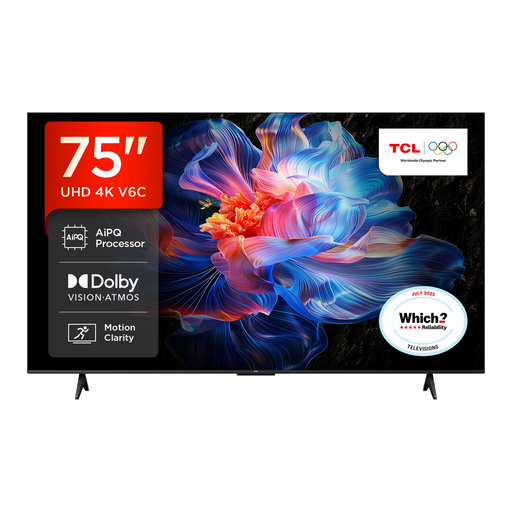 No image available
Consider this model if you are replacing the TV and have space for a 75-inch screen.
The listing specifies a 4K UHD Direct LED display with HDR10+ and Dolby Vision. Confirm each required broadcaster app on this exact model and software version, and check that your content and connection suit the desired picture format.
Yes, an HDMI streaming device is a route to consider if the TV has a working HDMI input and its screen still suits you. Check its power and internet requirements, then confirm every app you need on the exact device and software version.
Broadcaster support can depend on the model and its software. ITVX specifies platform and firmware conditions, while Channel 4 and 5 identify older device families that no longer run their apps; check the services you use against the device you plan to buy.
Yes—test playback at the main-TV location before assuming the screen is the cause. Netflix says slow or unstable connections can reduce video quality; if the local connection is unreliable, check router placement and whether your exact streaming device offers a suitable wired option.
No, a 4K player cannot turn an HD display into a 4K display. Apple and Google specify that 4K viewing requires a compatible TV and content, with connection requirements also affecting playback.
Yes, depending on the model and connection you choose. Apple specifies a separately sold HDMI cable for Apple TV 4K (3rd generation); Google describes a separately sold Ethernet power adapter for Chromecast with Google TV, while Google TV Streamer has direct Ethernet. Check the exact variant and box contents.