Households keeping an HDMI-equipped TV
If the screen still suits you, an external streaming player can supply a newer app interface. Check your required services on the exact device rather than relying on the television’s built-in software.


If your older television has a working HDMI input and its picture still meets your needs, an external streaming player lets you add apps without replacing the screen. Compare a compatible UK TV platform or set-top box if a live-TV guide, catch-up or recording matters more; consider a replacement television if the HDMI input is unusable or you also want a different display. Whichever route you choose, check the exact model against your required apps, home network and account requirements.
The condition of your existing television and the way you watch live and on-demand programmes should guide the equipment choice.
If the screen still suits you, an external streaming player can supply a newer app interface. Check your required services on the exact device rather than relying on the television’s built-in software.
If you want broadcaster services alongside a TV guide, compare compatible Freely, Freeview Play and Freesat equipment. The right choice depends on the model and whether your home uses broadband, an aerial or satellite reception.
An app problem does not necessarily mean the screen needs replacing. Channel 4 says selected older devices lost app support in April and May 2026 because they could not run required updates; a current external device is worth checking before changing the television.
Start with the services and viewing features you use, then check whether your existing screen and home network can support the route you prefer.
| Priority | What to check | Your needs |
|---|---|---|
| Viewing route | For a player, check its HDMI connection and app platform. For a TV guide or recording, check the features of the exact set-top box or TV. An existing console or HDMI-connected computer may also be an option if its required services work. | I’d keep the current screen if it still works for us. If we also want a new display, a replacement TV addresses a different need from adding a player. |
| Required apps | Check BBC iPlayer, ITVX, Channel 4, 5 and any subscription services you use against the exact UK device model. Check live-TV features separately from on-demand access: ITV Support says some ITVX live events are not available on every device. | Our regular programmes matter more than a general claim that a device runs streaming apps. I’d also check regional services or recording if we use them. |
| Screen and ports | Confirm a working HDMI input and check the television’s resolution and HDR capability. Roku says its 4K players work with HDMI televisions, but 4K and HDR output need compatible displays; check whether the chosen device needs a separate HDMI cable. | I want to use the screen we have, without assuming a 4K player can make an HD television display 4K. |
| Home network | Check Wi-Fi at the television, or an Ethernet connection if the chosen device offers one. Check any service-specific broadband guidance and whether advanced Wi-Fi features require a compatible router. | Streaming needs to work where the TV sits, not just where the router sits. A wired option matters if a network cable is practical in that room. |
| Software support | Check current app support and any published update commitment for the exact model. Channel 4 has ended support for selected older devices that could not run necessary app updates. | Before replacing a working screen, I’d check whether a current player solves the app problem. I wouldn’t assume that an older smart-TV platform will keep every app. |
| Setup and access | Check sign-in requirements for each broadcaster app. ITVX and Channel 4 require registration for viewing; check TV Licensing’s rules if anyone will watch live TV or use BBC iPlayer. | We need to be able to sign in to the services we use. The viewing rules depend on what we watch, not on whether we use a stick, box or smart TV. |
App support can change even while the screen still works. Channel 4 says selected older YouView, Freeview and Humax devices lost support in April and May 2026 because they could not run required updates.
Check each essential app on the exact TV model. If you already own a satisfactory HDMI-equipped TV, check whether a current external player meets those app needs before replacing it.
A player cannot display 4K or HDR on a television that lacks those capabilities. Advanced Wi-Fi features also depend on compatible network equipment.
Check the screen’s HDMI input, resolution and HDR support, your router, and whether the chosen player requires a separately obtained HDMI cable.
Freesat says on-demand players vary by box or TV model. ITV Support also notes that some ITVX live events are unavailable on certain devices.
List the programmes, live channels, apps and recording features you rely on, then confirm each one for the exact box or television.
ITVX and Channel 4 require registration for viewing. TV Licensing says a UK TV Licence is required for watching live TV on any service or using BBC iPlayer, regardless of the device.
Prepare the relevant app accounts and network details before installation, and check TV Licensing’s rules against the programmes your household watches.
These platform references help with route selection; app and feature support still need checking on the individual device.
An external-player option for keeping an HDMI-equipped television.
A streaming-device route for adding apps to an existing television.
A Google TV streaming route, including a Streamer model with Ethernet.
An Apple TV 4K route for households considering a tvOS player.
A TV-platform and set-top-box route for households considering satellite reception alongside catch-up viewing.
These options cover two different choices: adding a Roku streaming stick to an HDMI-equipped television, or replacing the television with a Sony Google TV. Decide whether the existing screen still meets your needs before comparing their features.
 No image available
An add-on route if you want to keep a television with a working HDMI input. Its 4K output needs a compatible TV to be displayed in 4K. Check each required UK app on this model before choosing it.
 No image available
Another external-player option for keeping an HDMI-equipped screen. Its stated 4K capability does not change the television’s own resolution. Check the exact model for your required UK apps and remote-control features.
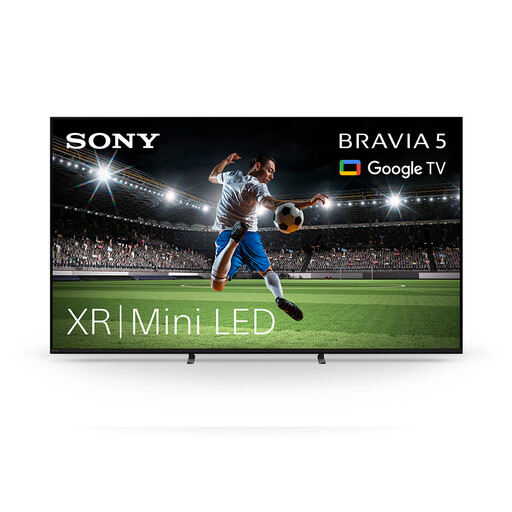 No image available
A replacement-TV option if you also want a 55-inch display rather than an add-on for the existing screen. The product name specifies Mini LED, 4K HDR and Google TV. Confirm your required UK apps on this exact television model.
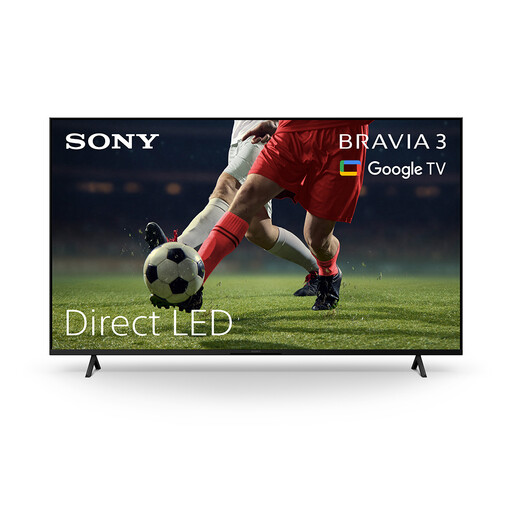 No image available
A 43-inch replacement-TV option when changing the screen is part of the decision. The product name specifies Direct LED, 4K HDR and Google TV. Check that this exact model supports the UK services you watch.
No. If it has a working HDMI input, a compatible external player can supply the apps and internet connection while the television supplies the screen. Check your required UK services on the player’s exact model.
No. Roku says its 4K players can work with HDMI televisions, but displaying 4K or HDR requires a television that supports the respective format. A player may still provide apps you want on an HD screen.
Compare compatible Freely, Freeview Play and Freesat equipment if an integrated live-TV guide and catch-up are priorities. Freeview lists BBC iPlayer and ITVX among Freeview Play’s on-demand services, while Freesat lists those services alongside Channel 4 and My5; Freesat cautions that players vary by box or TV model. Check the particular equipment and its reception requirements.
For some services, yes. ITV Support and Channel 4 say registration is required for viewing on their respective services, and Freely instructs viewers to sign in to individual player apps for on-demand programmes. Check the sign-in steps for the apps your household uses.
No. TV Licensing says a licence is required if anyone on the premises watches live TV on any service or uses BBC iPlayer, whatever device they use. It says watching only on-demand programmes on other services, such as Netflix or ITVX, does not by itself require a licence.