Who is this setup for?

Households keeping an older TV

If the television still works but lacks the apps you use, check for a working HDMI input and confirm that your required services support the player you are considering. Roku Support and ITVX Help set out these separate TV and service checks.

Households troubleshooting buffering

If playback pauses or drops quality on the main TV, compare other apps and devices before choosing new equipment. ITVX Help recommends these checks to help distinguish a connection problem from one affecting a particular device or app.

Households sharing one screen

Where several people use the main TV, remote-led access to their usual broadcaster and online-video services may matter more than an unused picture format. Check service-specific features on the intended device; ITVX Help lists different availability for some live-TV and profile functions.

What should you check first?

Add an HDMI streaming player

Choose this when: The TV has a working HDMI input, but its built-in platform does not meet your app needs; confirm the chosen player supports each required service.

Bear in mind: Roku Support says its players work with HDMI televisions, but the TV and HDMI path must also support the picture format you want to use.

Investigate the TV connection

Start here when: Playback problems affect more than one app or device; ITVX Help recommends cross-checking apps and devices before deciding what to change.

Bear in mind: Better Wi-Fi coverage or a feasible Ethernet connection cannot add an unsupported app to a TV or player.

Concern What to check Who this matters to
TV and service compatibility Check for a usable HDMI input and look up each required app on the chosen platform’s current support list. If our TV works but lacks the services we watch, I need a player that connects to it and runs those apps. Around 36% of consumers put this compatibility need first.
Reliable playback Test another app and device, then check connection quality near the TV. For Ethernet, check the device’s port or adapter requirements. When programmes keep buffering, I want to identify whether the trouble follows the connection or one device before changing equipment. Roughly 29% of consumers prioritise playback reliability.
Shared access Check the exact device and service support for the live viewing, profiles or other functions your household uses. We share the remote, so everyone needs straightforward access to the services and features they actually use. Around 21% of consumers place shared access first.
Picture and network features For 4K, check the TV and HDMI path, including HDCP 2.2 where required. For a newer Wi-Fi standard, check the router. If we already have equipment and content that support an enhanced format, I want the player’s features to work with that setup. Approximately 14% of consumers make these capabilities their primary concern.

Buying pitfalls

  • Replacing a player because the TV buffers

    Buffering alone does not identify the player as the cause. ITVX Help advises checking other apps and devices to help separate connection issues from device-specific problems.

    Try another app and device on the same network, check connection quality at the usual TV position and update the affected device before choosing a remedy.

  • Assuming an HDMI connection guarantees 4K or HDR

    A 4K-capable player cannot give a lower-resolution TV a 4K picture. Google Streaming Help and Roku specify HDCP 2.2 requirements for their stated 4K playback routes.

    Check the TV’s relevant HDMI port and any receiver or soundbar in the signal path against the format you intend to watch.

  • Checking an app name but not the feature you use

    General platform support does not establish that every live-viewing or profile function works on every device generation. ITVX Help lists these functions separately.

    Check the service’s current support information for your intended device and feature, including any firmware requirements.

  • Assuming a streaming device changes TV Licence requirements

    Under UK TV Licensing guidance, the requirement depends on what you watch, not whether you use an aerial, TV app or streaming player.

    Check your household’s viewing: watching live TV on any service or watching or downloading BBC iPlayer requires TV Licence coverage. Watching only on-demand programmes on other services does not.

Streaming-platform brands to consider

Roku

A player route for an HDMI-equipped TV that needs an external streaming interface.

  • Roku Support says its streaming players work with televisions that have an HDMI connection; ITVX Help lists Roku players among its supported platforms.
  • Roku says 4K viewing requires compatible TV and HDMI-path hardware, including an HDCP 2.2-compatible port. Check service and firmware requirements for the device you choose.

Google TV

An external interface for an HDMI display, with direct Ethernet available on Google TV Streamer.

  • Google TV Help says Google TV Streamer connects to an HDMI display, while Google Streaming Help describes its direct Ethernet connection.
  • Google states that 4K content requires HDCP 2.2 and that setup of its streaming devices requires a mobile device. Check exact app support, as ITVX notes exceptions for some Android TV models.

Amazon Fire TV

A streaming-stick route for households checking broadcaster-app access on an HDMI TV.

  • ITVX Help lists Amazon Fire among its supported TV and streaming platforms.
  • Do not assume a Fire TV Stick has built-in Ethernet: Amazon describes an adapter route for wired use. Features such as Dolby Atmos also depend on supported services and compatible equipment.

Joybuy product choices

These choices cover two parts of a shared-TV setup: Roku streaming sticks for adding an external interface to an HDMI television, and a TP-Link range extender to consider when you have identified a Wi-Fi coverage need near the TV.

Roku Streaming Stick 4K Dolby Vision

Roku Streaming Stick 4K Dolby Vision

Consider this external player when the main TV has a working HDMI input but needs access to a different streaming platform. Check your required apps on the current Roku support lists; 4K viewing also depends on a compatible TV and HDMI path, including HDCP 2.2 for Roku’s stated 4K route.

View on Joybuy

Roku Streaming Stick 4KPlus

Roku Streaming Stick 4KPlus

Another external-player option for an HDMI-equipped TV that needs a current streaming interface. If remote features matter to your household, check what comes with this 4KPlus variant; confirm exact service support and the TV and HDMI-path requirements before relying on 4K playback.

View on Joybuy
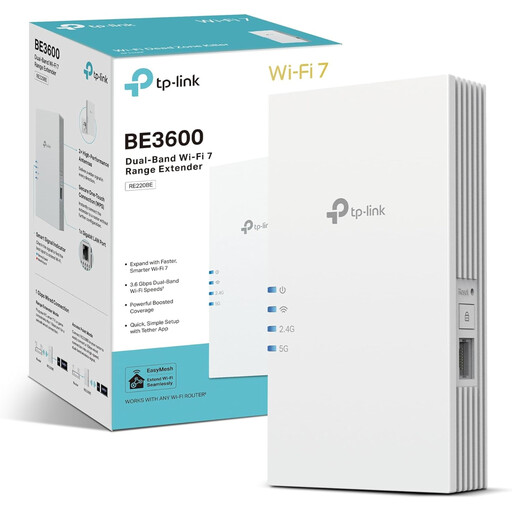
TP-Link RE220BE BE3600 Wi-Fi 7 range extender

TP-Link RE220BE BE3600 Wi-Fi 7 Range Extender

Consider this network-equipment route if checks point to weak Wi-Fi coverage near the main TV, rather than an app or player fault. Confirm that you can place an extender within range of your router and that its connection options suit the TV location; a range extender does not add streaming apps.

View on Joybuy

Common questions

Can I stream on an older TV without replacing it?

Yes, if it has a working HDMI input and the player supports the services you need. Roku Support and Google TV Help describe HDMI connection routes, but an HDMI input alone does not guarantee every app, feature or picture format.

Should I replace my streaming player when the TV buffers?

Check the connection and other devices before deciding. ITVX Help advises trying another app and device; also test connection quality near the TV, since a problem affecting several apps may need a different remedy from one confined to a single player.

Will a 4K player make a non-4K TV display 4K?

No. The player may still provide app access through HDMI, but it cannot change the TV’s resolution. Google Streaming Help and Roku also specify compatible HDMI-path hardware, including HDCP 2.2 for their stated 4K playback routes.

Do streaming apps require a UK TV Licence?

UK TV Licensing guidance says you need TV Licence coverage to watch live TV on any service or to watch or download BBC iPlayer, regardless of device. If you only watch on-demand programmes on other services and do neither of those things, you do not need one for that viewing.

Can a streaming device use Ethernet instead of Wi-Fi?

Some can, but the connection method depends on the device. Google Streaming Help describes a direct Ethernet port on Google TV Streamer, while Amazon describes a compatible adapter route for Fire TV Stick; check the exact model and whether a cable can reach the TV position.