Hall resident with interrupted study
If your connection drops while you study, check whether your room has an approved wired connection or which managed network you are expected to use before buying equipment.


Check your accommodation’s connection rules first, then work out whether the problem affects one device, one room or the wider service. A permitted Ethernet outlet can connect a study device directly; a Wi-Fi adapter may help with a compatible computer’s wireless connection, while an extender or travel router is an option only when the specific setup is allowed. Mobile broadband uses a separate connection, but depends on indoor coverage, a compatible SIM and a suitable data plan.
If your connection drops while you study, check whether your room has an approved wired connection or which managed network you are expected to use before buying equipment.
If your other devices connect but your study computer does not, check its settings and wireless capability before adding another access point. Any adapter also needs to match the computer’s connection and operating system.
If the connection is weak in one room, check whether the router owner allows an extender and whether the signal reaches a suitable position between the router and your room.
Jisc reported in September 2025 that three in five surveyed higher-education students across 24 UK universities and six colleges had Wi-Fi connection issues on or off campus. That finding describes reported problems; it does not show that personal equipment will fix an individual connection.
| Concern | What to check when buying | Who this matters to |
|---|---|---|
| Permission and network compatibility | Ask the accommodation provider and network operator about the exact device mode and connection method. Rules differ: Cambridge bars routers, bridges and extenders on its UniOfCam-Personal-IoT wireless service, while Newcastle University publishes instructions for a wired home-router setup. | If I live in managed halls, I want to know that the exact setup is allowed before spending on it; around 31% of consumers prioritise permission for their equipment and connection method. |
| A connection at the study desk | Confirm that the room’s Ethernet outlet is active and permitted, and check any registration requirements, cable and computer connector. A port rating does not establish internet speed. | I need a direct wired connection for study at a desk with an approved outlet; around 25% of consumers put a usable wired connection first. |
| One computer’s Wi-Fi | Compare the affected computer with another device, then check the adapter’s operating-system support and USB connection. An adapter will not resolve a sign-in problem or a wider service fault. | When other devices connect but my study computer does not, I want to address that device rather than add another access point; around 19% of consumers prioritise a single-device fix. |
| Coverage in one room | Check whether an existing signal reaches the intended extender position, whether the network owner permits the device and, for mesh features, whether the router is compatible. | I want to improve a weak bedroom signal without changing the whole connection, and would use an extender only with permission; around 13% of consumers prioritise coverage in one room. |
| A separate connection and ongoing plan | Check the mobile operator’s indoor coverage, SIM compatibility, data allowance and plan terms. A device’s rated speed does not establish the service available in your room. | If the accommodation connection is not an option, I may need a separate mobile service and want to understand its plan limits; around 12% of consumers prioritise an independent connection. |
Accommodation and network rules vary. Cambridge excludes routers and extenders from its UniOfCam-Personal-IoT wireless service, while Newcastle University describes a permitted wired-router arrangement for its relevant halls instructions. Newcastle also warns that incorrect router cabling can disrupt other users.
Check the current instructions for your building and ask whether the exact device and uplink method are permitted before connecting anything.
An adapter’s or extender’s stated wireless capability does not measure the accommodation’s internet service or reception at your desk.
Identify whether the fault is with one device, local room coverage, sign-in or the wider service before comparing equipment specifications.
Some outlets have specific usable ports or require activation or registration. Warwick identifies a usable port on its combined access-point outlet, while Lincoln College says its accommodation’s wired ports are disabled by default.
Check the instructions for your room, including which socket to use and whether you need to register a device, before choosing an adapter or cable.
Predicted mobile coverage can differ from the signal inside a particular room, and a hotspot’s rated maximum does not guarantee local performance.
Check the intended operator’s indoor coverage, the signal where you plan to study, SIM compatibility and the plan’s allowance and term.
TP-Link’s UK-listed examples include wired and Wi-Fi adapters, an extender and a mobile hotspot. Choose by the connection problem and the rules for your accommodation, not by brand alone.
The Anker 533 USB-C Hub A8338 includes an Ethernet port, which may be relevant if your compatible laptop has USB-C and your accommodation permits a wired connection.
The Beryl AX GL-MT3000 is an example of a travel router with Ethernet and repeater connection methods, for consideration only when the proposed setup is allowed.
The EX6120 illustrates a standalone range extender for a permitted household network with a local coverage problem.
These Joybuy options cover a room-coverage extender, a computer-side Wi-Fi adapter, mobile broadband and a wired Ethernet adapter. Check that the specific device and connection method are permitted by your accommodation and network operator before use.
 No image available
For a local coverage gap, consider this only if extender use is permitted and the existing router signal reaches a suitable position. The mesh arrangement requires a compatible EasyMesh router.
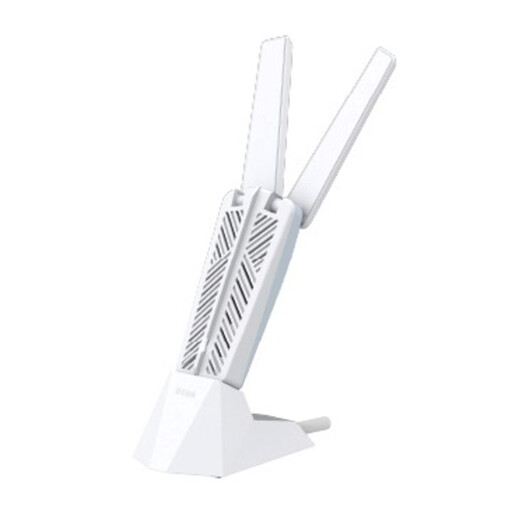 No image available
For a computer-specific wireless issue, check that your computer runs Windows 10 or Windows 11 and has a USB 3.0 Type-A port before choosing this adapter.
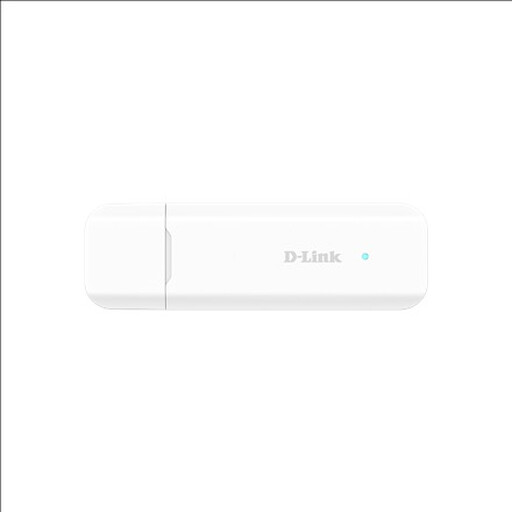 No image available
For a separate mobile connection, check SIM compatibility and coverage where you study. Confirm that the accommodation and network rules allow your intended setup.
 No image available
For a separate mobile connection, check that a compatible Nano SIM and usable mobile coverage are available where you plan to study.
 No image available
For a wired study setup, use this only with a permitted, active Ethernet outlet and a separate Ethernet cable. Check that the USB-A connection suits your computer.
Compare the affected device with another permitted device and try a different location, then follow your accommodation’s connection instructions. Cambridge Information Services advises checking items such as credentials, the installed profile and device settings for its wireless service. If several devices or locations have the same problem, report it to the network operator rather than assuming an adapter or extender will help.
Only if your accommodation provider and network operator allow that router and connection method in your building. Newcastle University publishes instructions for a wired home-router setup in relevant halls, while the University of Wolverhampton tells its residents not to buy a home router for its network. Check the current rules for your own residence before connecting equipment.
Do not assume it will. Cambridge Information Services explicitly bars extenders, bridges and routers from its UniOfCam-Personal-IoT wireless service. On a separately managed shared-house network, get the network owner’s permission and check compatibility; TP-Link says the RE315’s mesh arrangement requires a compatible router.
Use the designated active outlet and follow the network operator’s device registration or sign-in instructions. Warwick identifies a usable port on its combined access-point outlet, while Lincoln College says its accommodation’s wired ports are disabled by default. Ask your building’s support team if the port or registration process does not work.
A hotspot needs mobile service as well as the device, so check the plan’s data allowance and term before choosing. EE’s data-SIM terms dated 29 August 2024 describe either a 24-month or 30-day commitment depending on the plan; those terms do not establish the terms of other providers.