Who needs which connection?
In a UK student survey reported by Jisc in September 2025, three in five respondents had experienced Wi-Fi connection issues on or off campus. The right response depends on whether the problem lies with your device, the managed network or access at a particular location.
Students moving between study locations
If you study at home, in halls, on campus and sometimes at work, mobile data may provide a fallback when local Wi-Fi is unreliable. Check the network at the places you actually use and choose an allowance that fits your usage; Ofcom cautions that predicted coverage can differ from experience.
Halls residents using a managed network
Connect personal devices within your provider's rules rather than assuming you can add equipment that shares or extends the network. The University of Edinburgh prohibits extending its residential network with hubs, switches or wireless access devices; check the conditions for your own accommodation.
Students whose computer needs a connection adapter
A compatible USB Wi-Fi adapter may help a computer that needs a wireless interface. Where an authorised Ethernet outlet is available, a device without an Ethernet port may instead need a suitable adapter and cable. Check the device port and operating-system requirements before choosing either.
What should you check before buying?
Identify the failing connection first, then check the permissions, coverage or device compatibility that determine whether an item can help. The concerns below distinguish the primary need behind each purchase, although an individual student may need to check more than one.
| Concern |
What to check |
Who this matters to |
| Mobile backup |
Check the chosen network at each study location and compare your data usage with the allowance and tariff restrictions. Confirm that a hotspot, if needed, accepts the intended SIM. |
If Wi-Fi fails as I move between study locations, I need mobile access that works where I use it. Around 36% of consumers put that backup connection first. |
| Managed-network rules |
Read your institution's and accommodation provider's current conditions. Check device registration and whether the intended equipment only connects your device or also shares or extends the network. |
In halls, I need to connect my own computer without using equipment my provider prohibits. For around 29% of consumers, permitted access is the primary concern. |
| Authorised Ethernet access |
Confirm that an active wired outlet is available for your use, then check your device port, adapter connector and cable needs. |
If my room has an authorised wired outlet, I want my device to connect to it when Wi-Fi is unsuitable. That wired option comes first for around 21% of consumers. |
| Power for the backup device |
Match the power bank's connector and output to your phone or hotspot, and consider the capacity and cable you need to carry. |
On a long day away from a socket, I need my existing phone or hotspot to stay powered. Around 14% of consumers prioritise keeping that backup device running. |
Power banks for a mobile backup
These power banks are for keeping a compatible phone or mobile hotspot charged during study away from a socket. They support a mobile-backup plan; they do not replace the need to check coverage and data access.
 No image available
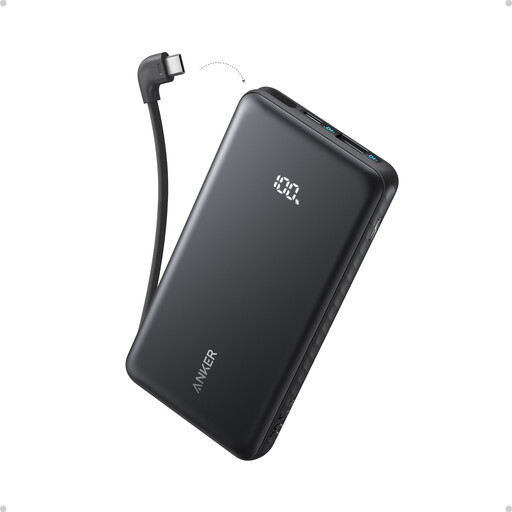
Anker Zolo 10,000mAh 22.5W Power Bank with Built-in USB-C Cable
Consider this for charging a compatible phone or hotspot when you are away from a socket. The listed capacity is 10,000mAh, the stated output is 22.5W, and the cable is built in.
Check your device's charging requirements; the stated capacity does not tell you how many full recharges your particular device will receive.
Joybuy
 No image available
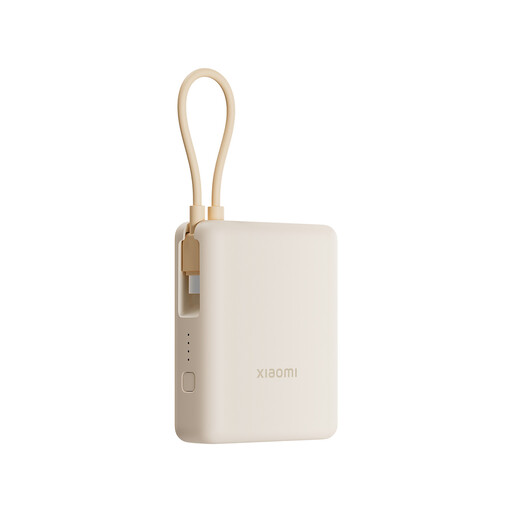
Xiaomi 33W 10,000mAh Power Bank with Integrated Cable, Tan
Consider this for charging a compatible phone or hotspot away from a socket. The title specifies a 10,000mAh capacity, 33W and an integrated cable.
Confirm the charging connection and output your device requires. The capacity alone does not establish its usable recharge count for your device.
Joybuy
Common questions
Can I use my own router or Wi-Fi repeater in student halls?
Only if your accommodation provider and institution permit the intended setup. The University of Edinburgh prohibits extending its residential network with hubs, switches or wireless access devices, while the University of Southampton restricts sharing access to its halls network; read the rules that apply to your residence before buying.
Will a USB Wi-Fi adapter fix poor campus Wi-Fi?
A USB Wi-Fi adapter may help a computer that needs a compatible wireless interface, but it will not repair a managed-network outage, an authentication problem or poor building coverage. Check the adapter's port and operating-system support, and report a wider network fault to the institution.
How much mobile data should I allow for study backup?
Base the allowance on your own usage, especially how often you use video calls or stream lectures without Wi-Fi. Review past usage where possible, check the chosen network at your study locations, and read any fair-use, speed and travel-use conditions before choosing a plan.
Can I use Ethernet instead of Wi-Fi in halls?
You can use Ethernet only where your accommodation provides an active connection that you are authorised to use. Check whether your room has an outlet, whether device registration is required and whether your computer needs an Ethernet adapter and cable.
What should I check before using a power bank with a hotspot?
Check that its connector and output suit the hotspot's charging requirements, and do not assume its stated capacity equals a particular number of recharges. Electrical Safety First advises inspecting power banks for damage, keeping them away from heat and liquids, and avoiding unattended or overnight charging.


