Browser-first recipe organisers
If your index consists mainly of links, Google Sheets and documents, check whether you can make the files you need available offline when internet access is unreliable.


For a recipe index built mainly in a browser or spreadsheet, choose the operating system around the other work the laptop must handle. A Chromebook can suit Google Workspace-led indexing if your course supports ChromeOS; choose Windows when required software needs it, or macOS when your university confirms its applications will run there. Then compare the exact configuration's storage, size and connections against your photos, files and study setup.
If your index consists mainly of links, Google Sheets and documents, check whether you can make the files you need available offline when internet access is unreliable.
If the laptop must also serve your degree, check course applications and specialist peripherals before settling on an operating system. Loughborough University, for example, does not support Chromebooks for its students.
If you plan to keep original photos, scans and downloaded recipes on the laptop, compare the SSD capacity of the exact variant you intend to buy, not just its screen size or product-family name.
For a recipe index that may double as a course laptop, establish which software you must run before deciding how much local storage and desk space you need.
Consider it: When the index and your other required work run in browser-based tools or Google Workspace.
Trade-off: ChromeOS is not a substitute for required desktop applications; Loughborough University says it does not support Chromebooks.
Consider it: When your course requires Windows applications alongside browser and spreadsheet work.
Trade-off: An Arm-based Windows model needs an additional check for essential applications and peripheral installers, as Microsoft Support advises.
Consider it: When your university confirms that its required applications work on macOS.
Trade-off: That confirmation matters: Loughborough University identifies NX engineering software as an example that will not work on an Apple device.
| Concern | What to check | Who this matters to |
|---|---|---|
| Software compatibility | Check your course's operating-system and application requirements; for Windows on Arm, check essential peripherals too. | I need one laptop for my recipe index and coursework, so a required application must work on it. Around 42% of consumers put software compatibility first. |
| Photos and file storage | Compare the selected variant's SSD capacity with the files you intend to keep locally, and set up offline access for cloud files you need. | If I keep recipe photos and scans alongside course files, I need enough room for the collection. Roughly 33% of consumers prioritise local files and storage. |
| Room space and portability | Consider screen size for viewing a spreadsheet beside a recipe, then check the laptop's weight and connections for your study setup. | My desk is small, but I also take the laptop to study elsewhere; I need a size I can live with in both places. About 25% of consumers make everyday size and portability their primary concern. |
A Chromebook may cover browser-based indexing without covering specialist coursework. Loughborough University says it does not support Chromebooks and cannot guarantee their functionality for its students.
Ask your course or university IT service which applications and operating systems it requires before choosing ChromeOS.
If a required application cannot run on the Chromebook, you may need access to another compatible computer for that task.
Microsoft Support says x64 emulation broadens application compatibility on Arm-based Windows PCs, but some manufacturer peripheral installers may not support Arm.
Check the publisher's compatibility information for each essential course application, printer, scanner or specialist accessory.
Capacity can change within a product family. Acer's cited Chromebook Plus 514 configuration has a 512GB SSD, while the Acer variant shown in the Joybuy choices below is identified with a 256GB SSD.
Check the exact model and SSD capacity before choosing space for recipe photos, scans and coursework.
If your local collection outgrows the chosen SSD, you may need external storage or a different file-storage arrangement.
Microsoft Support states that free Windows 10 security updates and support ended on 14 October 2025, which matters for a laptop used for accounts and coursework.
If considering an older Windows laptop, check its installed operating system and Windows 11 compatibility before purchase.
Acer's Chromebook Plus line is relevant to students considering a ChromeOS and Google Workspace workflow.
MacBook Air is a macOS option for recipe indexing alongside documents and photo organisation when required course applications support macOS.
The 13-inch Surface Laptop is a smaller-format Windows option to consider for a student-room desk.
These Windows and ChromeOS configurations offer different screen sizes and stated storage capacities for recipe indexing and study. Check your course software before choosing between operating systems, and assess each laptop as the exact variant shown.
 No image available
Consider this configuration if you want space for local recipe photos and a 15.6-inch screen for index work. Its name specifies an Intel Core 5 120U processor, 24GB RAM and a 1TB SSD. Check required course applications and whether the larger screen suits your desk and carrying needs.
 No image available
The 14-inch format is worth considering if desk space and carrying the laptop both matter. This variant names a Snapdragon X processor, 16GB RAM and a 512GB SSD. It is an Arm-based Windows choice, so check essential course applications and peripherals for that platform before buying.
 No image available
This Windows 11 Home configuration is a choice to assess for recipe indexing alongside Windows-based coursework. Its name specifies a 15.3-inch WUXGA display, AMD Ryzen 5 7535HS processor, 24GB DDR5 RAM and a 512GB PCIe SSD. Check your course applications and the connections needed for external storage or accessories.
 No image available
Consider this ChromeOS variant when your recipe index and required course work can be done in supported browser-based tools. Its name specifies a 14-inch 1920 × 1200 WUXGA display, Intel Core i3-1315U processor, 8GB RAM and a 256GB SSD. Confirm university support and make necessary cloud files available offline before relying on them without internet access.
 No image available
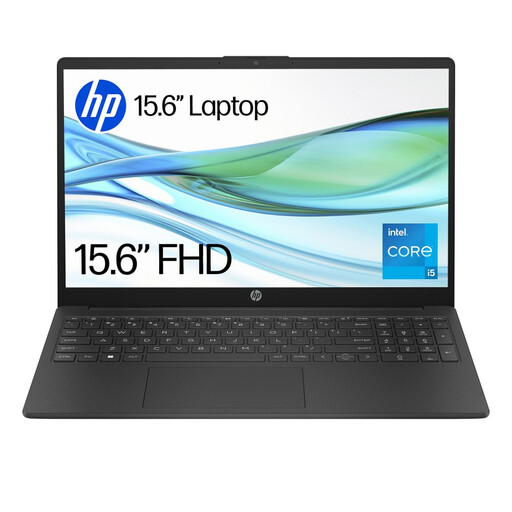
This Windows 11 Home model is a choice to assess if your recipe index sits alongside general Windows study work. Its name specifies an Intel Core i5-1334U processor, 8GB RAM and a 256GB SSD. Check whether that local capacity fits your photos and scans, and confirm the connections and applications your course requires.
Yes, if your indexing work uses browser-based tools or Google Docs and Sheets and your other required software works on ChromeOS. Make files available offline if you need them without internet access; Loughborough University says it does not support Chromebooks for its students, so check your own course's requirements.
Follow your course's published requirements rather than treating a recipe index as the most demanding task. For its engineering, computer-science and design students, Loughborough University lists a Windows 11-supported Intel Core i3 or AMD Ryzen 3 processor with at least four cores, 8GB RAM and a 256GB SSD as minimum guidance; those figures are not a universal requirement for recipe indexing.
Check its Windows 11 compatibility and current support before relying on it for long-term study. Microsoft Support states that free Windows 10 security updates and support ended on 14 October 2025.
Check each required application and peripheral rather than assuming compatibility from the Windows name alone. Microsoft Support says x64 emulation broadens application compatibility on Arm-based Windows 11 PCs, but some peripheral installers may lack Arm support.
Check your local council's electrical recycling routes and erase personal data before handing over the laptop. Lewes and Eastbourne Councils advise their residents not to put electrical items in household waste or recycling bins and identify recycling centres and other collection options; arrangements elsewhere may differ.