What should you check before choosing?
Confirm course compatibility first, then compare the configuration and form factor against the work you will do and the places you will carry it.
General-purpose laptop
Consider it when: Your work is mainly writing, research and online learning, with no specialist local software requirement.
Keep in mind: A general specification does not establish compatibility with every course application or assessment.
2-in-1 laptop
Consider it when: Handwriting or screen annotation matters to your study, and the device also meets your laptop requirements.
Keep in mind: Convertible use does not establish that required desktop software or assessment tools will work.
Laptop for specialist software
Consider it when: Your department specifies applications, graphics requirements or connected hardware that determine the configuration.
Keep in mind: Check the named tools before choosing a processor architecture or graphics configuration; the requirements are course-specific.
| Priority |
What to check |
Your needs |
| Course compatibility |
Confirm each named application’s operating system and processor requirements. Ask about assessment platforms and any connected equipment; the University of Nottingham flags possible engineering-software and interface limits on ARM-based devices. |
I need my primary laptop to run the software and complete the assessments my department requires. |
| Memory and storage |
Compare course requirements with the exact RAM and SSD configuration. University College London lists 8GB RAM and a 256GB SSD in its Windows-laptop minimum; the University of Bristol advises ideally 16GB RAM and no less than 8GB. |
My coursework may involve several applications and files at once, so I want a configuration that fits that workload rather than relying on a general minimum. |
| Campus use |
Check carrying weight, active-use battery information and charger arrangements for the exact model. The University of Warwick recommends a laptop for use across campus, residences and home. |
I will carry the computer between study spaces and need it to fit a typical day away from my desk. |
| Note-taking format |
If considering a 2-in-1, check its input options as well as required desktop applications. Loughborough University notes that tablets have a more limited software range. |
Handwriting or annotation would help me, but I still need one device that can handle my course work. |
| Connections and remote access |
Match ports and adapters to any required displays or course equipment. If relying on a university remote service, confirm that it runs the named application and supports the relevant workflow. |
I may need to connect equipment or work away from a lab, so I want to know what the laptop itself must handle. |
Brand references
These brands offer different laptop lines; assess the exact model and configuration against your course rather than choosing by brand alone.
Apple
A Mac laptop is an option when your course supports macOS and its required applications and assessments run on your chosen model.
- Apple describes MacBook Air as portable.
- Check for Windows-only course software before choosing a Mac; the University of Bath identifies such software in Mechanical Engineering.
Dell
Dell has Windows laptop lines to compare against your department’s workload and device requirements.
- Dell describes its XPS 13 as easy to carry; that description applies to the named line, not every Dell laptop.
- Check the exact model’s memory, storage, processor architecture and connections before deciding whether it suits your course.
Lenovo
Lenovo lists student-oriented devices in a range of processor, memory and storage configurations.
- The range gives you configurations to compare with a department’s stated requirements.
- Confirm that the particular device is a suitable primary laptop and runs your required software and assessments.
Joybuy laptop options
These options include laptops for general coursework, a 2-in-1 for convertible use and a configuration to consider for specialist graphics work. Match any choice to your department’s software and equipment requirements.
 No image available
ASUS ProArt P16 H7606WW-SE006W, 16-inch 4K OLED Touchscreen
Consider this configuration if your course calls for local graphics hardware, after checking its named software and interface requirements. The listed configuration has an AMD Ryzen AI 9 HX 370, NVIDIA GeForce RTX 5080 16GB, 64GB RAM, a 2TB SSD and Windows 11 Home. Check its carrying weight and active-use battery runtime for campus days.
View on Joybuy
 No image available
Lenovo IdeaPad Slim 3 83K7009MUK, 15.3-inch WUXGA
For general coursework, compare this Windows configuration with your department’s application list. It has an AMD Ryzen 5 7535HS, 24GB DDR5 RAM, a 512GB PCIe SSD, Windows 11 Home and Wi-Fi 6. Check its ports and active-use battery runtime if you need connections or long stretches away from a socket.
View on Joybuy
 No image available
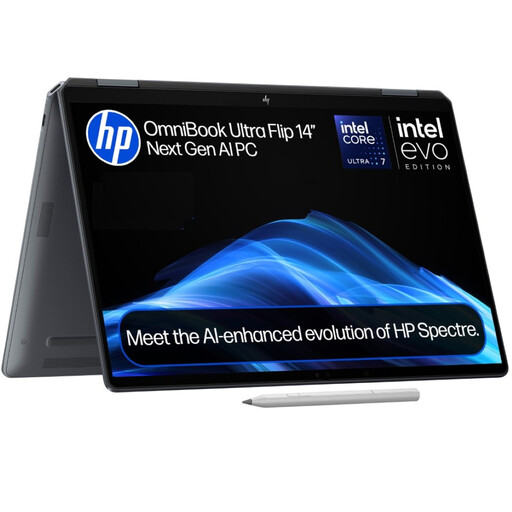
HP OmniBook Ultra Flip 14-fh0006na 2-in-1
The 2-in-1 format is worth considering if convertible use matters to your study, provided it runs your required applications and assessments. This configuration lists 16GB RAM, a 1TB SSD and Windows 11 Home. Confirm the graphics configuration before choosing it for graphics-intensive work, as the product information conflicts on that detail.
View on Joybuy
 No image available
ASUS Vivobook 15 X1504VA, 15.6-inch
For coursework involving several open applications and local files, compare this configuration with your course requirements. Its listed specifications include an Intel Core 5 120U, 24GB RAM and a 1TB SSD. Check required software compatibility and active-use battery runtime for your campus routine.
View on Joybuy
 No image available
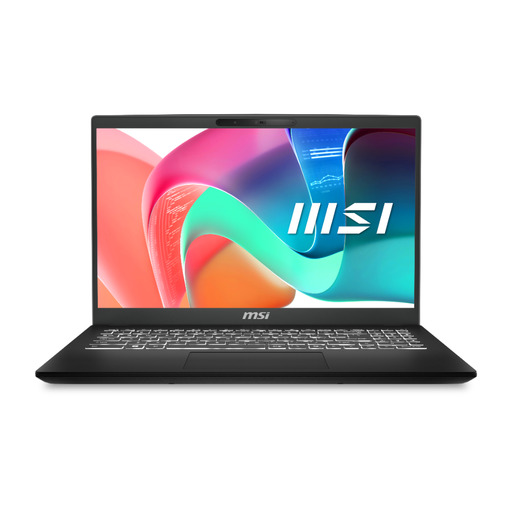
MSI Modern C2RMG-282UK, 15-inch FHD
For general coursework, assess this model against your required applications and connections. It lists an Intel Core 5 processor, 16GB DDR IV RAM and a 512GB SSD. Check active-use battery runtime if you expect to work away from a socket.
View on Joybuy
Common questions
Is 8GB RAM and a 256GB SSD enough for university?
It may meet a general starting specification, but check your department’s requirements before relying on it. University College London lists 8GB RAM and a 256GB SSD in its Windows-laptop minimum, while the University of Bristol advises ideally 16GB RAM and no less than 8GB.
Should I choose Windows or a Mac for university?
Choose the operating system that runs your required course applications and assessments. For example, the University of Bath recommends a Windows laptop for its Mechanical Engineering department because key software is Windows-only; that condition should not be applied to every degree.
Can a Chromebook or tablet be my main university computer?
Only if your department confirms that it supports your required applications and assessments. The University of Cambridge warns that tablets, smartphones and Chromebooks may not suit all assessments, and Loughborough University notes the more limited software range on tablets.
Could remote access let me use a simpler laptop?
It could be an option if your university provides the named software remotely and your workflow does not require unsupported locally connected equipment. Confirm access, connection needs, file handling and peripheral support with your department before reducing the laptop’s local specifications.
What should I check for online assessments?
Confirm the required device, operating system, browser and any camera, microphone or connection requirements with your university. The University of Cambridge warns that tablets, smartphones and Chromebooks may not suit all assessments, so check the platform on the device you intend to use.


