What to check before choosing
Start with your department’s required applications and assessment tools, then decide which device you can comfortably use across your usual study locations. A refurbished Windows laptop is another route to assess once its configuration and condition are clear.
| Concern |
What to check |
Who this matters to |
| Course software compatibility |
Confirm the required operating system, processor compatibility and whether applications or assessments must run locally. Use your module’s requirements rather than a general laptop specification. |
If my course uses specialist software, I need to know that I can complete assessed work on my own device. Around 33% of consumers put course compatibility first. |
| Everyday use across locations |
Consider carrying weight, screen and keyboard size, a webcam and the connections your study setup needs. For a used laptop, check battery condition. |
Moving between lectures and accommodation, I need one laptop I can carry and use for documents and online classes; around 27% of consumers prioritise that daily flexibility. |
| Refurbished condition and support |
Check the exact model and configuration, functional condition, charger, battery evidence, warranty provider and returns process. |
When considering a refurbished laptop, I want to understand its condition and the support available if something goes wrong. Around 20% of consumers make those safeguards their primary concern. |
| Notes and browser-based work |
Check every required learning platform, document task and assessment tool before relying on a Chromebook or tablet as your only device. |
If my work is mainly reading, notes and online resources, I may prefer a lighter device once my course confirms it will do everything required; around 20% of consumers put this use case first. |
Relevant brands to consider
These product lines illustrate different laptop routes, not a judgement about every device or seller carrying the brand.
Apple
A MacBook can serve as a full laptop for general study when your department confirms macOS support.
- A laptop route for documents and online resources where course software supports macOS.
- The University of Bath identifies Windows-only engineering software; check the specific applications and assessment tools before choosing a Mac.
Dell
Latitude business laptops are relevant when comparing refurbished Windows devices for coursework.
- Dell says systems sold through its UK Outlet carry the same limited hardware warranty as if bought new.
- That Dell Outlet statement does not establish the testing, accessories or warranty of a third-party refurbished Latitude; check the individual listing.
Lenovo
ThinkPad business laptops are another refurbished Windows route when the exact model meets your course requirements.
- Lenovo says devices in its certified refurbishment programme are inspected, restored and tested by Lenovo technicians.
- That programme description does not automatically apply to an unrelated marketplace listing; confirm the seller, device condition and warranty.
Windows laptops on Joybuy
These Windows laptops offer different configurations for document work, online classes and potentially more demanding coursework. Check your course applications and assessments against the exact processor, Windows mode and configuration before choosing; none of the specifications alone confirms course compatibility.
 No image available
ASUS Vivobook 14 X1407QA-LY003W Copilot+ PC, Quiet Blue
Consider this for a portable Windows study setup only after checking that your required applications and assessments work with its Snapdragon X processor.
The listed configuration has 16GB RAM and a 512GB SSD. Confirm that the device and its software suit your course before relying on it as your primary laptop.
Joybuy
 No image available
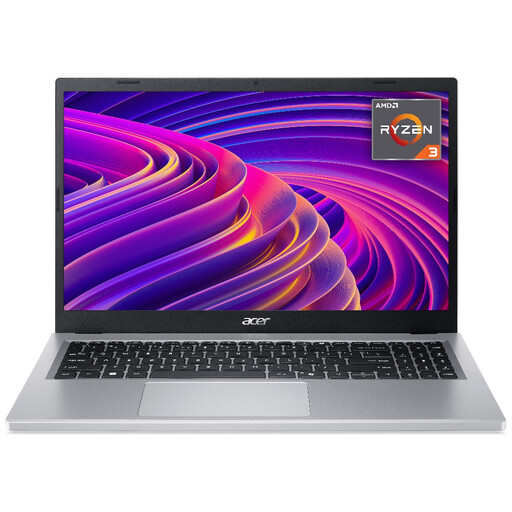
Acer Aspire Go 15 AG15-21P, Silver
Consider this for routine Windows coursework if its configuration meets your department’s requirements. Confirm the supplied model identifier, as the accompanying product description uses differing model names.
The title lists an AMD Ryzen 3 7320U processor, 8GB RAM, a 256GB SSD and a 15.6-inch Full HD display.
Joybuy
 No image available
Lenovo LOQ Essential 15ARP11
This is a configuration to assess if your course specifies requirements beyond general document work. Check the exact applications first, and consider whether carrying it regularly suits your routine.
The title lists an AMD Ryzen 7 170 processor, 16GB RAM, a 1TB SSD, GeForce RTX 5050 graphics and a 15.6-inch 144Hz Full HD display. Those components do not by themselves establish compatibility with a particular course.
Joybuy
 No image available
Acer Aspire Lite AL15-36P-C29Z, Silver
Consider this for study with modest local storage needs, provided your course software can be installed and used on the supplied Windows configuration. Confirm whether the installed system is in S Mode before ordering.
The title lists an Intel N150 processor, 8GB DDR4 RAM, a 128GB SSD and a 15.6-inch Full HD display. Its storage is below the University of York’s 256GB-or-larger taught-student example.
Joybuy
 No image available
Lenovo IdeaPad 1 15-inch, Cloud Grey
Consider this for routine documents and web-based coursework only after confirming that Windows 11 Home in S Mode permits the applications your course requires.
The title lists an AMD Ryzen 3 7320U processor, 8GB RAM, a 128GB SSD and a Full HD display. The storage is below the University of York’s 256GB-or-larger taught-student example, so check your own file and software needs.
Joybuy
Study-device questions
Do I need a Windows laptop for university?
Not for every course: a Mac may suit general study when your department supports its required software. The University of Bath identifies Windows-only applications in engineering, so check your module’s operating-system and processor requirements before buying.
Can a Chromebook or tablet be my only study device?
Only when your course confirms that all required applications, document tasks and assessments work on it. Tablets can serve for notes and online resources, but the University of Law recommends a laptop, PC or Mac as a primary device for its courses, and the University of Edinburgh advises students against relying on Chromebooks in its guidance.
What laptop specifications are a starting point for general study?
The University of York lists an Intel i3 or AMD Ryzen 3 processor, 8GB RAM and a 256GB-or-larger SSD as a taught-student example. It is not a requirement for every course: follow your department’s guidance if particular software needs a different configuration.
How can I assess a refurbished laptop’s battery?
Ask for battery-condition evidence for the exact laptop, rather than relying on its refurbishment grade. Microsoft describes a battery report that can be generated in Windows; for a Mac, check the reported battery condition and ask the seller what its warranty covers.


