What should you check first?
Check course and assessment requirements before deciding whether to replace a laptop or improve the desk around one you already own. Jisc’s survey of 15,398 higher-education students at 30 UK providers ran from October 2024 to April 2025; its figures below describe different access problems and investment priorities, not preferences for particular laptop types.
| Priority |
What to check |
Your needs |
| Primary device |
Check that the device can run required applications and assessment tools. For general study, compare course guidance with UCL’s example Windows minimum of 8GB RAM and a 256GB SSD; it is not a minimum for every programme. |
I need dependable access to a device for sustained coursework, not just a phone or basic tablet. In Jisc’s 2024/25 survey, 37% of respondents reported lacking access to a suitable device at some point; separately, 12% identified more computers and devices as a future institutional investment priority. |
| Course compatibility |
Confirm the operating system, exact applications and digital-exam rules. Ask whether specialist software runs on the processor architecture you are considering and whether campus machines or remote access are available. |
Before choosing a Mac, Windows laptop or two-in-one, I want to know that my course tools will work. In the same Jisc survey, 24% identified specialist course software as a future institutional investment priority—not as a personal laptop requirement. |
| Connection and calls |
Check home Wi-Fi where you will study, campus access arrangements, and the camera, microphone or headset needed for online sessions. A new laptop alone will not resolve a connection problem. |
Online tutorials need a connection I can use from home as well as on campus. Jisc reported that 60% of respondents in its 2024/25 survey had experienced Wi-Fi connectivity issues on or off campus. |
| Campus travel |
Compare the laptop’s stated weight and size with what you can carry. Check its charger and battery information against the length of your campus day rather than assuming a quoted maximum reflects coursework use. |
I will carry my work between home, classes and group sessions, so a larger screen has to earn its place in my bag. |
| Home desk |
If the laptop already meets course requirements, check its display outputs, ports and charging method before adding a monitor or dock. Consider a headset for calls in shared space. |
At home, more screen room or a clearer way to join calls could matter more to me than replacing a capable laptop. |
Relevant brand references
Compare particular models and configurations with your course requirements; a brand name alone does not establish software compatibility or campus-day battery life.
Apple
MacBook Air is a macOS option to consider when your course confirms that its required applications and assessments work on the chosen model.
- Apple’s UK MacBook Air specifications list a 13.6-inch display option, 16GB unified memory and two Thunderbolt 4/USB-C ports for the configuration described.
- Apple quotes up to 15 hours of wireless web use under its own conditions, not a guaranteed study-day duration. Check storage and whether your peripherals need adapters.
Microsoft
Surface Laptop offers a conventional Windows laptop with touch input; check the exact model’s processor architecture against course applications.
- Microsoft lists a 13-inch Surface Laptop weighing 1,225g, with two USB-C ports and a USB-A port.
- Microsoft’s quoted battery maximum is a manufacturer figure, not a measure of your coursework runtime. Windows on a particular processor still needs an application-by-application check.
Lenovo
Lenovo’s laptop lines cover different configurations, so compare a specific model with your course guidance rather than treating the range as one study setup.
- Lenovo UK lists a ThinkPad X1 Carbon Gen 13 Aura Edition configuration with a 14-inch display, 16GB memory and a 512GB SSD.
- Those ThinkPad specifications do not describe every Lenovo laptop or establish that the configuration is needed for general coursework.
Joybuy laptop options
These laptops are options for a primary device used between home and campus, including one two-in-one model. Check each exact configuration against your course before deciding whether you need a new laptop or accessories for one you already own.
 No image available
ASUS Vivobook 14 X1407QA-LY003W Copilot+ PC, Quiet Blue
A 14-inch laptop to consider when one device must travel between home and campus.
The listed configuration has a Snapdragon X processor, 16GB RAM and a 512GB SSD. Check that required course applications and assessment tools work with its ARM-based processor, and confirm battery runtime for your timetable.
View on Joybuy
 No image available
Lenovo IdeaPad Slim 3 83K7009MUK, 15.3-inch WUXGA
Consider this Windows laptop if you want a larger built-in display for work at home and can accommodate it when travelling to campus.
Its title specifies an AMD Ryzen 5 7535HS processor, 24GB DDR5 RAM, a 512GB PCIe SSD and Windows 11 Home. Confirm battery runtime and the ports needed for your desk equipment.
View on Joybuy
 No image available
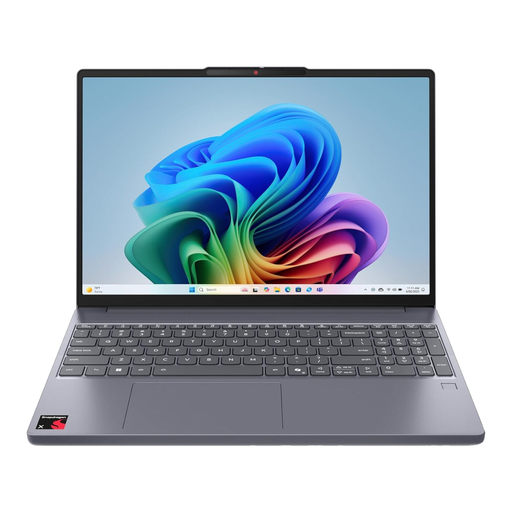
Lenovo IdeaPad Slim 3 15Q8X10, 83N30029UK
The 15.3-inch display gives this home-and-campus option more built-in screen space than a smaller laptop, with more to carry as a result.
The title lists a Qualcomm Snapdragon processor, 16GB RAM and a 256GB SSD. Confirm that course software and assessment tools work on this model’s ARM-based Windows configuration; do not rely on a quoted battery maximum as your study-day runtime.
View on Joybuy
 No image available
HP OmniBook X Flip 16-as0004na, 16-inch two-in-one
Consider the touch-enabled form factor if it serves a real study need as well as your required laptop work.
The title specifies an Intel Core Ultra 5 226V processor, 16GB RAM, a 512GB SSD and Windows 11 Home. Check its carrying weight and expected battery runtime before choosing a 16-inch device for regular campus travel.
View on Joybuy
 No image available
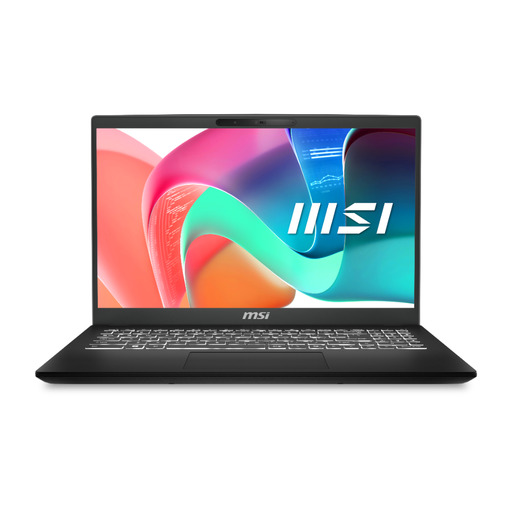
MSI Modern C2RMG-282UK, FHD laptop
For a laptop that will also sit at a home desk, check whether its connections suit your display and other peripherals.
The title lists an Intel Core 5 processor, 16GB DDR IV RAM and a 512GB SSD. Confirm the exact screen size because the product information differs between 15 and 15.6 inches; also check the camera and battery runtime if calls and unplugged campus work matter to you.
View on Joybuy
Questions before you buy
Can a tablet, Chromebook or phone be my only study device?
Only if your institution and course confirm that the exact device meets their software and assessment requirements. UCL says a tablet or smartphone alone is insufficient for its study requirements, while Cambridge warns that tablets, smartphones and Chromebooks may not suit all assessments; UWE Bristol advises against Chromebooks and tablets as primary study devices.
What should I ask my course before buying a laptop?
Ask which applications must run on your own device, which operating systems and processor architectures they support, and whether digital exams impose device rules. Confirm memory, storage, graphics and connection requirements, plus whether you can use specialist software on campus machines or through a university service.
Is 8GB RAM and a 256GB SSD enough for coursework?
They are a starting point for general study, not a guarantee for every course: UCL lists them in its example minimum requirements for a Windows laptop, and the University of Hertfordshire also advises at least those amounts. The University of Bristol says 16GB RAM is preferable for many students; follow your programme’s requirements where specialist work needs more.
Should I add a monitor, dock or headset at home?
Consider accessories after confirming that your laptop already runs the software and assessments you need. A monitor addresses desk screen space, while a headset may help with calls in shared space; check display output, ports and charging compatibility before choosing a dock. Accessories do not make incompatible course software run.
Could Disabled Students’ Allowance help with equipment?
It may help with disability-related equipment, depending on individual needs and the relevant national scheme. GOV.UK says England’s allowance can cover a computer needed because of disability and warns against buying equipment before assessment because it will not be reimbursed. Student Awards Agency Scotland says its allowance can cover electrical equipment, software and training; speak to your university disability adviser and the appropriate funding body before buying.


