What should you check?
Settle course-software compatibility first. Then decide how much everyday capability, portability and purchase support matter to you.
Windows laptops
Choose when: Your course specifies Windows applications, as the University of Bath does for parts of mechanical engineering.
Bear in mind: For specialist work, check the exact processor, memory and graphics requirements rather than assuming any Windows laptop will qualify.
Mac laptops
Choose when: Your course confirms that its required applications run on macOS and the particular model meets its hardware guidance.
Bear in mind: The University of Bath identifies Windows-only applications on its mechanical-engineering route; do not assume a Mac can run them.
Chromebooks
Choose when: Essential coursework and assessments are browser-based and your course confirms ChromeOS compatibility.
Bear in mind: Heriot-Watt University cautions that Chromebooks may not run software needed for a programme.
| Concern |
Buying checks |
Who this matters to |
| Course software |
Check the current application list and minimum hardware requirements with your course. For specialist work, confirm operating-system and processor compatibility. |
If my course requires CAD or another specialist application, I need to know it will run on my chosen laptop before I buy it. About 31% of consumers put course-software compatibility first. |
| Everyday coursework |
Compare memory and storage with your course guidance and the files you expect to keep locally; do not treat another institution’s minimum as a universal target. |
For essays, research and presentations, I want enough room for routine work without choosing a configuration for tasks my course does not require. Everyday coursework is the main concern for about 31% of consumers. |
| Daily portability |
Compare weight, screen size, ports and the basis of any battery-life claim against your travel and study routine. |
When I carry a laptop between classes and study spaces, its size and time away from a charger affect what I can use comfortably. About 23% of consumers prioritise daily portability. |
| Upfront cost and support |
For a refurbished model, check its exact specification, condition, battery information, charger, warranty and return terms. |
If I need to limit upfront spending, I still need a workable main computer with clear information about its condition and support. Keeping that cost down is the primary concern for about 15% of consumers. |
Brands to consider
These product lines offer different routes to compare; the brand alone does not establish whether a particular configuration meets your course requirements.
Apple
MacBook Air and MacBook Pro are macOS laptop lines to consider when your course confirms compatibility.
- Compare a specific MacBook’s size and configuration with your study and carrying needs.
- The University of Bath does not recommend MacBooks for its Windows-dependent mechanical-engineering software route.
Dell
Dell offers a UK student-laptop range that includes Windows configurations.
- Use the range to compare configurations against the software your course specifies.
- Check the exact model’s processor, memory, storage, graphics and warranty; the range label does not establish suitability.
Lenovo
Lenovo’s UK student range spans different laptop sizes and configurations.
- Compare models by the capability and portability your course and routine require.
- Confirm the selected configuration and operating system rather than relying on the brand name.
Acer
Acer offers Chromebook and Chromebook Plus lines for consideration where ChromeOS fits the work.
- A Chromebook is worth considering for confirmed browser-led coursework.
- Heriot-Watt University cautions that Chromebooks may not run software required by a programme.
Windows laptops on Joybuy
These Windows laptop configurations offer different screen sizes and memory or storage options for coursework. Check your course’s requirements against the exact model before choosing, particularly if it uses specialist applications.
 Image unavailable
ASUS Vivobook 15 X1504VA, Core 5 120U, 24 GB, 1 TB SSD
A Windows option to compare for writing, research and work involving several open applications. This Cool Silver configuration has a 15.6-inch display, an Intel Core 5 120U processor, 24 GB RAM and a 1 TB SSD. Check its fit with specialist course software and its battery performance for your study routine.
Joybuy
 Image unavailable
HP OmniBook X Flip 16-as0004na, 16 GB, 512 GB SSD
Consider this convertible if a touchscreen format fits the way you study. The Windows 11 Home configuration lists a 16-inch touchscreen, Intel Core Ultra 5 226V processor, 16 GB RAM and a 512 GB SSD. Check its weight and battery performance if you plan to carry it daily, as well as any course-specific software requirements.
Joybuy
 Image unavailable
ASUS Vivobook 14 X1407QA-LY003W, Snapdragon X, 16 GB
This 14-inch option is worth comparing when a smaller screen suits your daily carrying routine. The Quiet Blue configuration lists a Snapdragon X processor, 16 GB RAM and a 512 GB SSD. Because it uses an ARM-based processor, confirm that essential course applications work on Windows on ARM before buying.
Joybuy
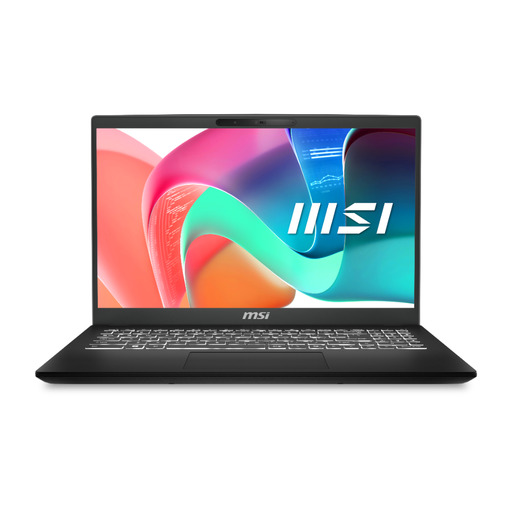 Image unavailable
MSI Modern C2RMG-282UK, 9S7-15H431-282, 16 GB
Compare this model for general coursework that involves keeping files locally. Its listed configuration includes a 15-inch FHD display, Intel Core 5 processor, 16 GB DDR IV RAM and a 512 GB SSD. Confirm the exact processor model against your course requirements and check battery performance if you study away from a charger.
Joybuy
 Image unavailable
Acer Aspire Lite AL15-36P-C29Z, N150, 8 GB RAM
Compare this Silver model for writing, web research and other routine coursework, subject to your course’s requirements. Its title lists a 15.6-inch Full HD display, Intel N150 processor and 8 GB DDR4 RAM. Confirm the SSD capacity before ordering because the product information gives conflicting figures, and check the Windows edition and mode if you need to install course applications.
Joybuy
Questions about student laptops
Do I need a powerful laptop for an essay-based course?
Not necessarily. Which? describes writing, presentations, spreadsheets, email and web browsing as common course tasks; check your own course guidance before paying for capability intended for more demanding work.
Should I choose Windows for an engineering course?
Choose Windows if your course requires Windows-only applications. The University of Bath identifies that requirement for parts of mechanical engineering, but requirements differ between courses, so check the current software list and minimum specification for yours.
Can a Chromebook be my only course computer?
Only if your course confirms that its essential applications and assessments work on ChromeOS or in the browser. Heriot-Watt University cautions that Chromebooks may not run software needed for some programmes.
What should I check on a refurbished laptop?
Check the exact model and specification against your course requirements, then review its condition, battery information, included charger, operating-system support, warranty and return terms. Keep the seller’s description so you can refer back to what was offered.
How much memory and storage should I look for?
Use your course’s requirements rather than one figure for every student. University College London gives 8 GB RAM and a 256 GB SSD as part of a Windows minimum example, while guidance from other universities points to 16 GB RAM and around 500 GB or 512 GB of storage for greater headroom or more demanding work.


