Who needs to check what?
The applications and equipment used on your course determine which laptop choices remain open to you.
Students on general taught courses
If your work centres on documents, research, learning platforms and video sessions, look for a laptop you can use across campus and home. Check the operating system, storage, camera and connections against your department’s guidance rather than assuming a general student specification covers every module. The University of York advises checking with your department where a course may have specialist requirements.
Engineering and hardware-connected course students
Get the names of required applications and hardware interfaces before settling on an operating system or processor. The University of Bath identifies Windows-only software in mechanical engineering; the University of Nottingham warns that some ARM-based Windows devices may not support required electrical and electronic engineering software or interfaces. Those are course-specific cautions, not rules for every degree.
Students studying online or across locations
Check that you have a suitable device, working audio and video, and access to the connections your online work needs. In Jisc’s 2024/25 survey of more than 15,000 higher-education students, 37% said they had lacked a suitable device at some point during their studies, while three in five reported Wi-Fi connection difficulties on or off campus. These figures describe access problems, not laptop buying preferences.
What matters when choosing?
Start with course compatibility, then assess carrying, everyday coursework and online access. A suitable existing laptop may make a replacement unnecessary; specialist software may change the specification you need.
| Priority | What to check | Your needs |
|---|
| Course compatibility |
Ask for the required applications, operating system and processor architecture. Check graphics requirements and hardware interfaces for the exact course; the University of Bath identifies Windows-only mechanical-engineering software, and the University of Nottingham cautions about ARM compatibility in electrical and electronic engineering. |
I need to run the applications used for my coursework and assessments, not just everyday browser tasks. If my course connects to specialist hardware, that connection must work with the laptop too. |
| Campus use |
Compare weight, display size, memory and SSD capacity with how you will carry and use the laptop. The University of Warwick recommends a laptop for use on campus, in residences and at home; its device recommendations do not set a minimum for every institution. |
Carrying my laptop between study locations matters alongside having enough capacity for my documents, browser work and video sessions. |
| Online access |
Check the camera, microphone, required ports and access to a suitable internet connection. If a course uses a remote desktop or external display, confirm its connection and accessory requirements. |
I need a suitable device and a connection for online coursework. In Jisc’s 2024/25 survey of more than 15,000 higher-education students, 37% reported lacking a suitable device at some point during study, and 60% reported Wi-Fi connection difficulties on or off campus; these are access experiences, not purchase priorities. |
| Existing laptop |
Compare its operating system, processor, memory, storage and connections with your department’s requirements. Ask what course software or campus facilities you can use before deciding to replace it. |
My current laptop may already cover my coursework. Heriot-Watt University advises students not to feel obliged to buy new equipment when a suitable device is available. |
Brand references
Brand ranges can help narrow a search, but a brand name does not establish compatibility with your course or describe every model in its range.
Apple
MacBook Air is a macOS route to consider when a department confirms its applications and peripherals work on a Mac. Apple’s UK specifications describe the listed MacBook Air configurations; check the exact configuration rather than applying those figures to every model.
- Apple lists MacBook Air configurations with 16GB unified memory, 512GB SSD and two Thunderbolt 4 USB-C ports.
- Mac compatibility needs particular care for specialist courses: the University of Bath identifies Windows-only engineering software, and Loughborough University names NX as an engineering application that does not work on Apple devices.
Lenovo
Lenovo’s UK education range includes ThinkPad, IdeaPad and Yoga laptop families. The families cover different configurations, so select by the exact device rather than the range name.
- Lenovo lists several laptop families alongside education-facing support and warranty options.
- Check the chosen model’s operating system, processor, memory, storage and ports against departmental requirements.
Dell
Dell’s UK student catalogue includes Windows laptop configurations. Its XPS 14 listing, for example, specifies Windows 11 options and a starting weight of 1.36kg for the listed model.
- The catalogue provides Windows configurations to compare with a course’s stated requirements.
- Display, weight and other listed figures depend on the configuration; confirm the exact model and whether its capabilities are needed for your work.
Joybuy laptop options
These Windows and Mac laptop options are starting points for campus coursework. Check each exact configuration against your department’s software, operating-system and equipment requirements before choosing.
 No image available
ASUS Vivobook 15 X1504VA, Core 5 120U, 24GB, 1TB SSD
Consider this 15.6-inch laptop for coursework if its exact operating system and connections meet your course requirements. The title specifies an Intel Core 5 120U, 24GB memory and 1TB SSD; check its unplugged runtime if you expect to study away from a socket.
View on Joybuy
 No image available
Lenovo IdeaPad 1, Ryzen 3 7320U, 8GB, 128GB SSD
This 15-inch laptop is an option for coursework that fits its specifications and Windows 11 Home in S Mode. Its title specifies an AMD Ryzen 3 7320U, 8GB memory and 128GB SSD; confirm that required applications can be installed and used with this Windows configuration.
View on Joybuy
 No image available
Lenovo IdeaPad Slim 3 83K7009MUK, Ryzen 5 7535HS, 24GB, 512GB SSD
For a course that supports this Windows configuration, compare its 15.3-inch WUXGA display with the space you need for work and the size you want to carry. The title specifies Windows 11 Home, an AMD Ryzen 5 7535HS, 24GB DDR5 memory and a 512GB PCIe SSD; confirm the ports and battery duration for your study setup.
View on Joybuy
 No image available
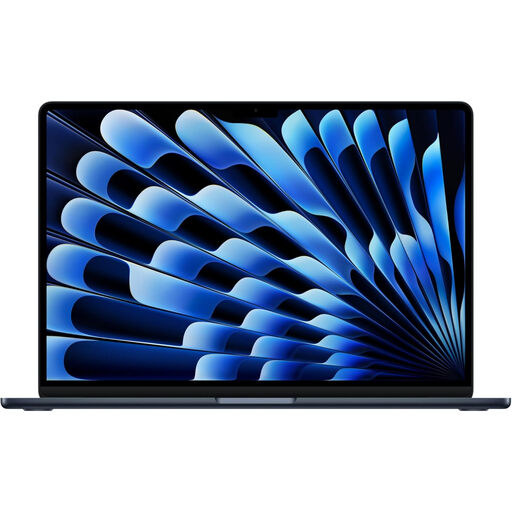
Apple 13-inch MacBook Air (2026), M5, 24GB, 1TB SSD
Consider this MacBook Air only if your department confirms that its required applications, assessments and peripherals work with the M5 Mac. The title specifies a 10-core CPU, 10-core GPU, 24GB memory and 1TB SSD; check the exact weight and connections if campus carrying or external equipment matters.
View on Joybuy
 No image available
HP OmniBook X Flip 16-as0004na, Core Ultra 5 226V, 16GB, 512GB SSD
If your course supports this Windows laptop, decide whether its 16-inch touchscreen convertible design fits both your work and your journeys across campus. The title specifies Windows 11 Home, an Intel Core Ultra 5 226V, 16GB memory and a 512GB SSD; check its weight, ports and battery duration for your routine.
View on Joybuy
Common questions
What should I ask my department before buying a laptop?
Ask which applications and assessment tools you must run, their supported operating systems and processor types, and any minimum memory, storage, graphics, port or hardware-interface requirements. Also check whether you will use software locally or through university facilities. The University of York advises students to check with their department where specialist course requirements may apply.
Can I use a MacBook for my course?
A MacBook is an option when your department confirms that its required software and peripherals work on macOS and the exact Mac you choose. Do not assume engineering software is compatible: the University of Bath identifies Windows-only mechanical-engineering applications, and Loughborough University says NX does not work on Apple devices.
Is a Chromebook or tablet enough for coursework?
Use one as your main device only if your department confirms that all required coursework, assessments and applications are supported. University College London says a tablet or smartphone alone is insufficient for effective study, while the University of Edinburgh warns that Chromebooks may not run software required for some degrees.
Should I replace a working laptop before university?
Not automatically: compare it with your department’s software and hardware requirements first. Heriot-Watt University notes that a current device may already be sufficient and points to campus alternatives for more complex needs.
Which accessories should I check for coursework?
Start with your course equipment and online-session requirements, then check the exact laptop’s ports and built-in audio and video. A monitor, headset or specialist peripheral may call for a particular connector or adapter; confirm that need before adding accessories.


