What should you check before choosing?
Confirm the software and assessment requirements first, then compare the capacity and form factor needed for your own coursework and campus routine.
| Priority |
What to check |
Your needs |
| Course compatibility |
Ask for the names and versions of required applications, supported operating systems and any assessment or peripheral requirements. UWE Bristol says course software determines the device type; the University of Bath notes that some engineering software is Windows-only. |
I need to run every required application and complete assessments on the device, or have a department-approved way to access them. |
| Memory and storage |
Check the course’s RAM and local storage requirements against each configuration. The University of Bristol advises no less than 8GB RAM and says 16GB is preferable for its students; storage needs depend on the applications and files you keep locally. |
My documents, applications and other course files need room on the device, especially when I cannot rely on an internet connection. |
| Technical workload |
Get the department’s requirements for the most demanding compulsory tasks, including processor, graphics, memory and operating system where specified. Loughborough University IT Services recommends a Windows PC for engineering students. |
If my course uses design, engineering or other specialist tools, I want a machine that meets those requirements—not one chosen solely for note-taking. |
| Campus use |
Check the device’s weight, keyboard arrangement, ports and battery information for the way you will carry and use it. For a 2-in-1, confirm which keyboard and pen accessories are included or required. |
I will move between classes, the library and home, but still need to type coursework comfortably and connect any equipment my course uses. |
Relevant brand and product-line references
These product lines illustrate different platform and form-factor choices; suitability still depends on the exact device and your course requirements.
Apple
MacBook Air is a macOS route when your course confirms that its applications, assessments and connected equipment work with the chosen configuration.
- Apple’s UK specifications list 16GB unified memory and 512GB SSD storage for the MacBook Air configurations shown.
- The University of Bath notes that some engineering software is Windows-only; confirm course compatibility rather than choosing by memory and storage alone.
Microsoft Surface
Surface Pro represents a Windows 2-in-1 route for students who want tablet use alongside keyboard-based coursework.
- Microsoft describes laptop mode with an optional Surface Pro keyboard.
- Check the keyboard arrangement and required course software for the specific model before treating it as your main laptop.
Lenovo
Lenovo’s 14e Chromebook is a ChromeOS example to consider only when your course supports the applications and assessments you need on that platform.
- Lenovo identifies ChromeOS as the operating system for the 14e Chromebook.
- The University of Cambridge warns that Chromebooks may not suit all university assessments.
Joybuy laptops for different study needs
These Windows, macOS and Windows 2-in-1 laptops offer configurations to compare once you know your course requirements. Check the exact applications, assessments and accessories needed before choosing a model.
 No image available
ASUS Vivobook 15 X1504VA, Core 5 120U, 24 GB, 1 TB SSD
Consider this Windows-laptop route if your coursework calls for substantial memory and local file storage. The named configuration has a 15.6-inch screen, Intel Core 5 120U, 24 GB memory and a 1 TB SSD; confirm the exact course applications and peripherals before buying.
Joybuy
 No image available
HP OmniBook X Flip 16-as0004na, 16-inch touchscreen, 16 GB, 512 GB SSD
This Windows 11 Home 2-in-1 is worth comparing if you want touch input as well as a laptop for coursework. Its named configuration includes an Intel Core Ultra 5 226V, 16 GB RAM and a 512 GB SSD; check course-software compatibility and confirm pen support and included accessories if handwriting matters to you.
Joybuy
 No image available
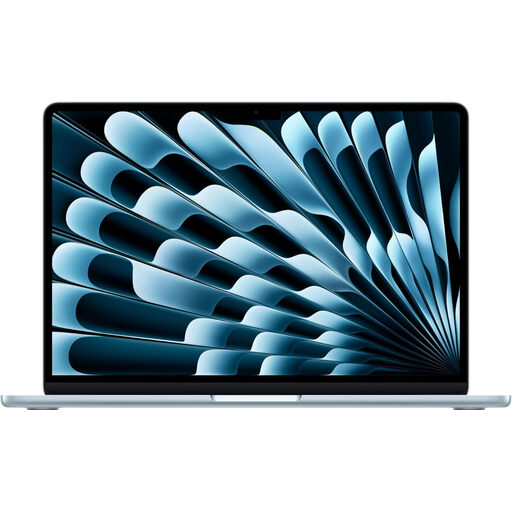
Apple 13-inch MacBook Air (2026), M5, 16 GB, 1 TB SSD
Consider this macOS laptop if your department confirms that its required software and assessments work with the configuration. The named Sky Blue model has an M5 chip with a 10-core CPU and 10-core GPU, 16 GB memory and a 1 TB SSD; those specifications alone do not establish compatibility with specialist applications or peripherals.
Joybuy
 No image available
ASUS Vivobook 14 X1407QA-LY003W, Snapdragon X, 16 GB, 512 GB SSD
This 14-inch Windows laptop is an option to compare for campus carrying and coursework that needs 16 GB RAM and a 512 GB SSD. Because the named configuration uses a Snapdragon X processor, confirm that your required applications, assessment tools, drivers and peripherals support its processor architecture.
Joybuy
 No image available
Acer Aspire Go 15 AG15-71P, Core i5-13420H, 8 GB, 256 GB SSD
Compare this Windows 11 Home laptop for everyday writing and coursework after checking your programme’s requirements. Its named configuration has an Intel Core i5-13420H, 8 GB DDR5 RAM, a 256 GB NVMe SSD and a 15.6-inch Full HD screen; confirm that its memory and graphics meet your heaviest required tasks.
Joybuy
Questions about student laptops
What should I ask my department before buying a laptop?
Ask for the exact required applications, supported operating systems and how you will complete assessments. Also check whether software must run on your own computer or can be accessed through an approved remote service, plus any memory, storage, graphics or peripheral requirements. UWE Bristol says course software determines the device type, and the University of Cambridge warns that some devices may not suit all assessments.
Can a Chromebook be my main coursework device?
It can be a candidate only if your department confirms that its applications and assessments work through supported ChromeOS tools, a browser or approved remote access. The University of Cambridge says Chromebooks may not suit all university assessments, so web browsing alone is not enough to establish course fit.
Should I choose Windows or macOS for a technical course?
Choose a compatible Windows laptop if your course requires Windows-only software; otherwise, check the named applications before deciding between Windows and macOS. The University of Bath identifies Windows-only engineering software, while Loughborough University IT Services recommends a Windows PC for engineering students. Those course-specific cautions do not mean every technical course has the same requirement.
Can a 2-in-1 take the place of a conventional laptop?
A 2-in-1 can serve as your main device if it supports your required coursework and assessments and has a keyboard suitable for your writing tasks. Check the specific configuration: Microsoft describes the Surface Pro keyboard as optional, so tablet capability alone does not tell you what the complete setup includes.
How much memory should a student laptop have?
Use your course’s application requirements to decide, rather than assuming one amount fits every subject. The University of Bristol advises no less than 8GB RAM and says 16GB is preferable for its students; confirm whether your own programme’s most demanding tasks call for more, and check its local storage requirements separately.


