For routine catalogue edits on a Bluetooth-equipped laptop, start with a mouse that covers pointing, clicking and scrolling. If you regularly work through long product lists or need quieter clicks in a shared room, consider a compact productivity model; if a more upright grip is your priority, assess a vertical mouse against your hand size and desk setup. No mouse shape replaces a workstation that lets you keep the mouse comfortably in line with your elbow.
Who this choice affects
Catalogue editors with basic control needs
If you mainly update product entries, stock fields and image selections, standard clicking and scrolling may cover your workflow. The HP 240 is one example of a three-button Bluetooth mouse, according to HP.
Frequent editors in a shared room
Long product lists make scrolling controls worth examining, while click noise may matter when someone else shares the room. Logitech specifies quiet clicks, rapid scrolling and a compact design for the MX Anywhere 3S.
Editors focused on hand fit
If extended mouse sessions make grip and desk arrangement your main concerns, check the dimensions and handedness of a vertical model. Logitech positions Lift for small-to-medium hands; the Health and Safety Executive also advises keeping the mouse in line with the elbow.
What to check before choosing
Match the mouse to the task that matters most in your catalogue routine, then check its connection method and physical fit against the laptop and desk you actually use.
| Concern |
What to check |
Who this matters to |
| Comfort and desk fit |
Check hand-size and handedness guidance. Make sure the mouse can sit in line with your elbow; for prolonged laptop use, consider separate input devices so the screen can be raised. |
During extended editing sessions, I want a grip that fits my hand without overlooking the position of the rest of my desk. Around 33% of consumers put comfort and workstation fit first. |
| Quiet, efficient navigation |
Look for quiet-click and scroll-mode claims on the exact model, particularly if you work through long lists beside a roommate. |
When I repeatedly move through catalogue entries in a shared room, click noise and scrolling feel matter more to me than extra connection options. Roughly 25% of consumers prioritise quieter, easier navigation. |
| Connection flexibility |
Confirm laptop Bluetooth support, the required USB port, receiver inclusion and any multi-device switching claim separately. |
If I alternate between computers or have few free laptop ports, I need a connection method that works with each setup. Around 25% of consumers make connection flexibility their primary concern. |
| Simple everyday controls |
Check that the button layout and scroll wheel cover your usual edits before choosing features you may not use. |
For occasional changes to entries and images, I mainly want familiar pointing and scrolling rather than additional controls. About 17% of consumers put straightforward operation first. |
Buying pitfalls
-
Choosing a vertical mouse without checking fit
A vertical shape is not automatically comfortable for every hand. Logitech describes Lift as suited to small-to-medium hands and offers a left-handed version, so the variant matters.
Check the manufacturer's hand-size and handedness guidance for the exact mouse, and assess whether its grip works at your desk.
-
Expecting a mouse to fix the whole workstation
The Health and Safety Executive identifies poorly arranged display-screen workstations as a contributor to discomfort. Changing mouse shape alone does not address a screen that is too low or a mouse placed too far away.
Keep the mouse in line with your elbow. For prolonged laptop work, a separate keyboard and mouse allow the screen to be elevated.
-
Assuming all wireless connections work alike
Bluetooth, a USB receiver and multi-device switching are different capabilities. Logitech specifies Bluetooth connection to up to three devices for MX Anywhere 3S, while Dell specifies Bluetooth and 2.4 GHz connections for MS3320W; neither statement describes every wireless mouse.
Check the exact mouse's connection methods, whether a receiver is included and which ports or Bluetooth capabilities your computers have.
Relevant mouse brands
Logitech
Its MX Anywhere 3S and Lift illustrate different choices: compact navigation features or a vertical grip.
- Logitech specifies quiet clicks, rapid scrolling, an 8K DPI sensor and Bluetooth connection to up to three devices for MX Anywhere 3S.
- Logitech positions Lift for small-to-medium hands and offers a left-handed version.
- A compatible Logi Bolt receiver is not included with MX Anywhere 3S. Lift's stated hand fit should not be assumed to apply to other models.
HP
The HP 240 illustrates a straightforward Bluetooth choice for routine catalogue editing.
- HP specifies Bluetooth 5.1, three buttons, a scroll wheel, a 1600 dpi optical sensor and an ambidextrous design for the HP 240.
- Its three-button layout offers fewer dedicated controls than a mouse chosen specifically for additional workflow shortcuts.
Dell
The MS3320W illustrates a connection choice for someone moving between computers.
- Dell specifies both Bluetooth 5.0 and 2.4 GHz wireless connectivity for the MS3320W.
- Its three-button layout should not be mistaken for a programmable-control or vertical-grip feature set.
Joybuy mouse options
These mice cover different parts of the catalogue-editing decision: quieter clicks, a vertical shape, a receiver connection or a choice between Bluetooth and 2.4 GHz. Check the exact variant's fit and computer compatibility before choosing.
 No image available
HOFOTEK M311 2.4G+BT Silent Mouse, White-Grey
Consider this model if click noise in a shared room and a choice of wireless connection matter to you. Its title specifies 2.4G+BT connectivity, adjustable DPI and a 1xAA battery arrangement; check compatibility and hand fit for your setup.
View on Joybuy
 No image available
HP 920 Ergonomic Wireless Mouse, Black, with Detachable Wrist Rest
Consider its detachable wrist rest if that arrangement suits your desk and grip. Check hand fit, handedness and compatibility with your laptop before relying on the ergonomic shape for extended editing.
View on Joybuy
 No image available
V7 MW500BT Bluetooth Vertical Mouse, 2.4GHz Dual-Mode
This is a vertical option if you prefer a more upright grip and want two wireless connection methods. Its title specifies six buttons and an adjustable sensor up to 1600 DPI; check hand size and handedness before choosing it.
View on Joybuy
 No image available
Philips 3000 Series SPK7378B/00 2.4GHz Mouse, EU Version
For ordinary pointing and scrolling in a shared room, this model's title specifies silent clicks, a 1600 DPI optical sensor and a USB receiver. It specifies a 2.4GHz receiver connection, so check for a suitable port rather than assuming Bluetooth is available.
View on Joybuy
 No image available
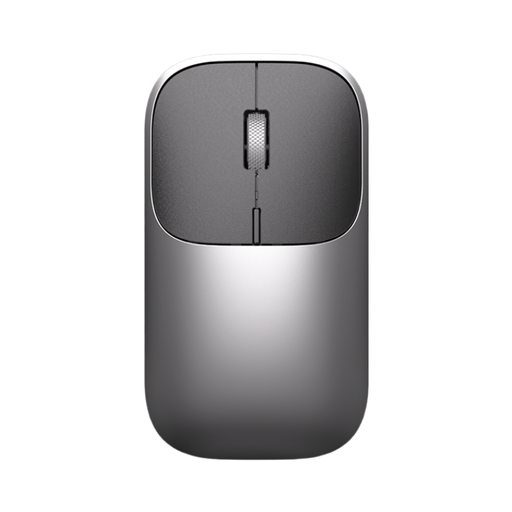
Ochama JZ001 Dual-Mode Mouse, Metallic Grey/Silver White
Consider this mouse if you need to choose between Bluetooth and a 2.4GHz connection for catalogue work. Its title specifies Bluetooth 5.0 and adjustable DPI; check the dimensions, hand fit and compatibility with each computer you plan to use.
View on Joybuy
Common questions
Do I need a vertical mouse to update a catalogue?
No: a vertical mouse is a choice to assess when its grip and hand-size guidance suit you, not a requirement for catalogue editing. For prolonged laptop work, the Health and Safety Executive advises placing the mouse in line with the elbow and using a separate keyboard and mouse so the screen can be elevated.
Should I choose Bluetooth or a USB receiver?
Choose Bluetooth if your laptop supports it and you want to leave a USB port free; consider a dual-mode mouse if you need an alternative connection on another computer. Confirm the exact model's system compatibility and whether its receiver is included.
Is a high DPI figure essential for catalogue work?
No: a DPI figure alone does not tell you whether a mouse will suit routine catalogue edits. Check whether its available sensitivity settings and tracking feel appropriate for your display and desk surface, alongside the controls you repeatedly use.
What if an online mouse purchase does not suit my hand?
For UK online orders, GOV.UK says a customer can tell the seller they wish to cancel within 14 days of receiving an item and then has another 14 days to return it. Check the seller's conditions before opening or extensively using the mouse; remedies for faulty or misdescribed goods are a separate issue from changing your mind.


