Who may need personal connectivity equipment?
Jisc reported that 60% of 15,398 students across 30 UK higher-education providers had Wi-Fi connection issues on or off campus in a survey conducted between October 2024 and April 2025. This indicates a connectivity concern, but does not by itself show that buying personal equipment is the right fix.
Students in managed accommodation
Check whether a working room connection is permitted, or whether the issue needs to go to accommodation IT instead. Rules differ: St Hugh’s College and the University of Edinburgh publish restrictions on extending their networks with personal equipment.
Students joining live classes
If calls drop out, find out whether the problem affects one device or other devices and locations too. Microsoft’s Teams guidance discusses connection factors that can affect meeting quality.
Students studying at several locations
For an independent connection, check reception where you actually study and review the mobile plan’s terms. Ofcom’s coverage and package guidance covers local 4G and 5G availability, fair-use limits and speed restrictions.
What should you check before choosing?
Start by locating the fault—one device, local Wi-Fi coverage or the underlying service—then confirm which equipment and connection modes the network allows.
USB Ethernet adapter
Choose when: your compatible computer needs an Ethernet port and there is an authorised, working socket.
Trade-off: a cable limits where you can study, and the adapter cannot fix an upstream service fault.
Wi-Fi adapter
Choose when: other devices connect in the same place but one computer has a Wi-Fi problem.
Trade-off: it changes that computer’s Wi-Fi interface, not the room’s coverage or incoming service.
Mobile broadband or hotspot
Choose when: you need access independent of accommodation Wi-Fi and the operator has usable reception at your study locations.
Trade-off: you need a suitable SIM and data plan, and the connection depends on local mobile reception.
Travel router or range extender
Choose when: the existing connection works and the network permits the specific routing or rebroadcasting mode.
Trade-off: some managed networks prohibit these devices; a repeater feature alone does not establish permission or compatibility.
| Concern |
What to check when buying |
Who this matters to |
| Network permission and fault source |
Check the residence’s current rules for sockets, routers and repeaters; compare devices and locations to see whether the fault is shared. |
If I live in managed accommodation, I want to know what connection I’m allowed to use and whether buying a device can address the fault. Around 28% of consumers put permission and fault diagnosis first. |
| Reliable connection for live teaching |
Confirm that a room socket is active and authorised, and check computer compatibility; compare calls on wired and wireless connections. |
For live classes at my desk, I need a steady connection for two-way teaching. Around 22% of consumers prioritise a dependable desk connection. |
| Independent access and data allowance |
Check predicted indoor coverage where you study, SIM compatibility and the plan’s data, fair-use and speed terms. |
If I study in different places, I need a connection separate from accommodation Wi-Fi. Around 22% of consumers prioritise independent mobile access. |
| One computer’s Wi-Fi compatibility |
Check the computer’s USB port, operating system, network bands and sign-in requirements; see whether other devices work in the same place. |
When other devices connect but my computer does not, I want to address that device’s Wi-Fi connection. Around 17% of consumers put a single-computer Wi-Fi issue first. |
| Permitted coverage or device sharing |
Confirm that the network allows the intended mode and that the existing connection works; check authentication and the upstream signal. |
If I need to extend a working connection or share it with several devices, I first need to know whether that setup is allowed. Around 11% of consumers prioritise permitted coverage or multi-device sharing. |
Joybuy products for studying off campus
These products represent several ways to connect while studying away from campus: extend an existing network, add Wi-Fi or Ethernet to a computer, or use mobile data. A working upstream service, device compatibility and accommodation rules still determine whether each route suits your setup.
 Image unavailable
TP-Link RE220BE BE3600 Wi-Fi 7 Range Extender
Consider it where an existing Wi-Fi connection needs extending; it cannot repair a fault in the incoming service. Some accommodation networks prohibit extenders, so check the local rules first.
View on Joybuy
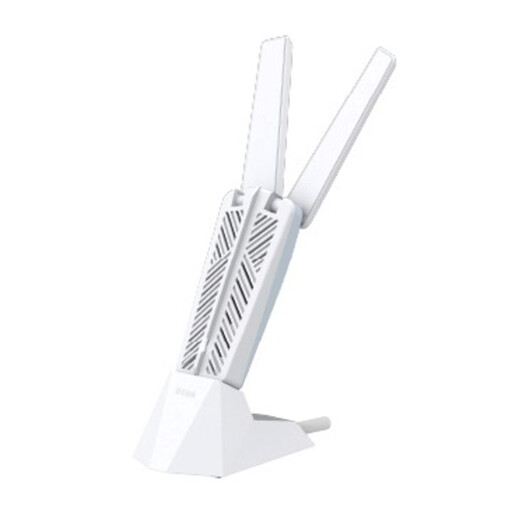 Image unavailable
D-Link AE65U BE6500 Wi-Fi 7 USB Adapter
For a Wi-Fi issue isolated to one computer, check that the host has USB Type-A and runs Windows 10 or Windows 11. The adapter changes that computer’s Wi-Fi interface, not the room’s network.
View on Joybuy
 Image unavailable
D-Link DWR-932W 4G LTE AX300 Wi-Fi 6 Mobile Hotspot
For access separate from accommodation Wi-Fi, using a compatible Nano SIM. Check indoor coverage where you study and review the plan’s data and speed terms.
View on Joybuy
 Image unavailable
HOCO HB42 4-in-1 USB Gigabit Ethernet Adapter (USB 3.0 × 3, RJ45)
For a compatible USB-A computer needing wired access and extra USB connections, it lists USB 3.0 × 3 and RJ45 Gigabit Ethernet. A working, authorised socket is still required, and the port rating does not guarantee internet speed.
View on Joybuy
 Image unavailable
V7 V7UC-U3CRJ45HDVG-BLK USB-C Adapter with 4K HDMI, VGA, Gigabit Ethernet, 100 W Power Delivery and Dual USB 3.0 Ports
For a compatible USB-C host with Alt Mode that needs wired networking alongside display and peripheral connections. Check host support and confirm that the Ethernet socket is authorised and active.
View on Joybuy
Frequently asked questions
Does a university hall have to allow my own router or repeater?
No; permission depends on the accommodation’s rules and the device’s intended mode. St Hugh’s College prohibits routers, bridges and Wi-Fi extenders on its network, and the University of Edinburgh restricts extending its ResNET with wireless access devices. Check your own network’s rules before buying.
Will an Ethernet adapter fix a live-class connection?
It can add a wired port to a compatible computer when an authorised, active socket is available. It cannot repair an upstream fault, and a managed socket may require sign-in or configuration. Compare the affected device and connection with another device, and report a shared fault.
What should I check before using a hotspot for video teaching?
Check the intended mobile network at your actual study locations, especially indoor coverage, then confirm SIM compatibility and the plan’s data, fair-use and speed terms. A hotspot’s rated maximum speed does not guarantee a stable call.
Can an extender make a slow accommodation internet service faster?
No; an extender cannot make the underlying broadband service faster. Ofcom explains that Wi-Fi cannot outperform the broadband feeding it and that repeaters can affect speed and responsiveness. Check whether the issue is limited to Wi-Fi coverage, and confirm the device is permitted.
Does the M7350 name alone confirm the right hardware version?
No; check the complete hardware revision and its specifications before choosing. TP-Link’s UK product information identifies the M7350 V9, so confirm that the revision, SIM requirements and compatibility match the item you are considering.


