For handwriting maths on a tablet while using a separate monitor, the Galaxy Tab S11 Ultra is the most directly documented route: Samsung UK says its DeX Extended Mode creates a dual-screen workspace, and an S Pen is included. If the second screen is for an existing compatible Mac, consider an iPad with Sidecar instead; if desktop Windows tools matter most, consider a pen-capable Surface connected to a display. In every case, check the maths app and the exact display connection before buying.
Who these setups suit
External-monitor maths writers
If you want to write working on the tablet while keeping a problem sheet or reference material on a monitor, look for an extended workspace rather than mirroring. Samsung UK documents that arrangement for the Galaxy Tab S11 Ultra in DeX Extended Mode.
Mac-based handwritten-note users
If you already use a compatible Mac, Apple Support says Sidecar can extend or mirror its desktop on an iPad. This is a Mac-and-iPad arrangement, not the same as a tablet independently extending onto a monitor.
Windows maths-software users
If your coursework depends on desktop Windows applications, a pen-capable Surface may keep those tools and handwriting on one device. Microsoft documents external-display connections for Surface USB-C devices, subject to the model and connection hardware.
What matters when choosing
Galaxy Tab S11 Ultra and monitor
Choose when: You want to handwrite on the tablet while using an external monitor as a separate workspace.
Allow for: Samsung UK documents Extended Mode for this specific model; confirm your monitor and connection hardware.
iPad and Mac with Sidecar
Choose when: You have a compatible Mac and want an iPad to extend or mirror its desktop while providing a handwriting surface.
Allow for: Sidecar requires compatible devices and the same Apple Account; a compatible Apple Pencil is a separate accessory for iPad Air.
Surface and external display
Choose when: Your maths work requires Windows desktop software alongside pen input and a connected display.
Allow for: Check the exact Surface display connection; Microsoft lists the Slim Pen separately for the cited Surface Pro.
| Concern | What to check | Who this matters to |
|---|
| A separate workspace |
Check whether the exact devices extend the desktop rather than only mirror it, and confirm the required monitor connection. |
I want the question visible away from the screen where I write my working; around 42% of consumers would put that separate workspace first. |
| Equation conversion |
Try your usual notation in the intended app, and check its correction and output options. |
If I need to reuse handwritten equations in a document, correcting symbols matters as much as entering them; roughly 33% of consumers would prioritise conversion and correction. |
| A compatible setup |
Confirm stylus compatibility and inclusion, your computer platform, and any required accessories or app subscription. |
I do not want to choose a tablet only to discover that my existing computer or intended pen does not fit the workflow; about 25% of consumers would make setup compatibility their primary concern. |
Buying pitfalls
-
Confusing mirroring with an extended workspace
Mirroring repeats a display, which may not leave a separate area for a problem sheet while you write. Samsung UK describes Extended Mode for the Tab S11 Ultra; Apple Support describes Sidecar as a way to extend or mirror a compatible Mac desktop on iPad.
Decide which device should show the question and which should hold your working, then check that arrangement for the exact models.
-
Assuming the pen comes with every tablet
Samsung lists an S Pen in the Galaxy Tab S11 and S11 Ultra box. Apple lists compatible Apple Pencils as separate iPad Air accessories, while Microsoft lists the Surface Slim Pen separately for the cited Surface Pro.
Check the exact compatible pen and what comes in the box before comparing complete setups.
-
Choosing hardware before the maths app
A stylus does not, by itself, turn handwritten fractions and symbols into typed equations. Microsoft says OneNote lets users correct recognition before conversion; Goodnotes describes conversion of selected handwritten maths to typeset equations and LaTeX.
Check the app on your intended platform with the notation and output format you need, including any subscription requirement.
-
Overlooking the display connection
An external screen may need a suitable adapter and video cable. Microsoft documents a Surface USB-C display-adapter route, but the connection must match the particular device and monitor.
Check the monitor inputs, device output, cable, adapter and charging arrangement together.
Relevant brands and software
Samsung
Relevant to a tablet-and-monitor workspace: Samsung UK documents DeX Extended Mode for the Galaxy Tab S11 Ultra.
- Samsung says apps can move between the Tab S11 Ultra and an external monitor; its Tab S11 and S11 Ultra box listing includes an S Pen.
- Do not assume the same Extended Mode behaviour for every Galaxy Tab. Check the monitor and connection for your setup.
Apple
Relevant when a compatible Mac is already central to the workflow and an iPad will serve as its second display and handwriting surface.
- Apple Support says Sidecar can extend or mirror a Mac desktop on iPad; Apple lists Pencil Pro and Pencil (USB-C) support for the 13-inch iPad Air.
- Sidecar has device and Apple Account requirements, and Apple Pencil is listed separately for iPad Air.
Microsoft
Relevant when Windows desktop applications, pen input and an external display need to work together.
- Microsoft documents handwriting-to-maths conversion in OneNote and an external-display connection route for Surface USB-C devices.
- Check the particular Surface and display hardware. Microsoft lists the Slim Pen separately for the cited Surface Pro and says the referenced OneNote Math feature requires Microsoft 365.
Goodnotes
A maths note-taking software option, rather than a tablet or second-screen hardware route.
- Goodnotes says its Math Conversion can turn selected handwritten equations into typeset equations and generate LaTeX.
- Check the current app platform and plan, and whether conversion handles the notation you use; the software feature does not establish a two-screen connection.
Joybuy tablet choices
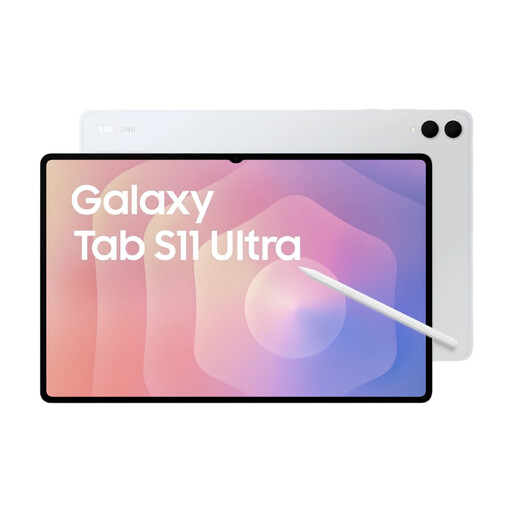
This Galaxy Tab S11 Ultra option is for writing on the tablet while arranging a separate external-monitor workspace. Check the maths app and your monitor connection for the setup you intend to use.
 No image available
Samsung Galaxy Tab S11 Ultra X930 WiFi 14.6, 12GB RAM, 256GB, Silver
Suited to writing maths on the tablet while keeping a separate monitor available: Samsung UK documents a dual-screen Extended Mode for the Galaxy Tab S11 Ultra.
Samsung lists an S Pen in the box for this model. Confirm that your intended maths app supports the notation you need and that your monitor can connect with the appropriate hardware.
View on Joybuy
Questions about the setup
Can a stylus tablet turn handwritten equations into typed maths?
Yes, if a suitable app supports the conversion you need; the stylus alone does not provide it. Microsoft says OneNote can convert selected handwritten equations and lets users correct recognition, with Microsoft 365 required for the referenced Math feature. Goodnotes says its Math Conversion can produce typeset equations and LaTeX from selected handwriting.
Can an iPad give my Mac a second screen for maths work?
Yes, a compatible iPad can extend or mirror a compatible Mac desktop using Sidecar, according to Apple Support. Check both devices against Sidecar requirements and sign in with the same Apple Account; choose extension if you need different content on each screen.
What should I check before connecting a tablet to a monitor?
Check the exact tablet model, its supported display arrangement, the monitor input and the adapter or cable needed between them. Samsung UK documents Extended Mode for the Tab S11 Ultra, while Microsoft documents an external-display adapter route for Surface USB-C devices; those are different setups, so confirm the connection for the device you choose.


