Subtitle editors working across several panes
If you compare translated lines with source dialogue, timing controls and a video preview, check how legible your software remains at the screen size and scaling you intend to use.


For translated-subtitle editing, start by checking whether a 27-inch 4K screen gives you comfortable space for text, timing controls and video preview at your preferred display scaling. At a shared desk, an adjustable position and connections that work with every intended laptop may matter more than specialist colour features. Choose a colour-focused monitor when picture approval is part of the job, and check reflections, charging requirements and the full workstation layout before buying.
If you compare translated lines with source dialogue, timing controls and a video preview, check how legible your software remains at the screen size and scaling you intend to use.
If several users bring different laptops to one workstation, connection compatibility, peripheral access and the ability to reposition the screen affect each changeover.
If your role includes approving video or graphics as well as subtitles, assess the display against your team’s defined colour workflow rather than judging it on text workspace alone.
Check text legibility in your editing software first, then the shared desk’s connections and screen position. Specialist colour features matter when the role includes visual approval.
| Concern | What to check | Who this matters to |
|---|---|---|
| Text and workspace | Compare 27-inch 4K and QHD in your editing software; check text size after display scaling. | If I keep translations, timing controls and a video preview open together, I need readable text without constantly rearranging panes. Roughly 36% of consumers put this workspace need first. |
| Shared-desk connections | Check each laptop’s USB-C or Thunderbolt video support and charging needs; confirm any hub or KVM functions you plan to use. | When colleagues change laptops at the same desk, I want the handover to work with our actual devices and peripherals. Around 29% of consumers make connection compatibility their primary concern. |
| Position and reflections | Check stand adjustment, desk depth and reflections from the office lighting; consider the whole workstation. | I need to reposition the screen when another person takes the desk, without struggling with glare during a long editing session. For roughly 21% of consumers, screen positioning and reflections come first. |
| Colour workflow | Match stated colour-space and calibration features to the team’s video or graphics-review requirements. | If I approve picture colour alongside subtitle files, I need a display that fits the agreed review workflow. Around 14% of consumers prioritise that colour-workflow need. |
A USB-C socket alone does not establish that a laptop can send video, use the monitor’s data connections and receive enough charging power. Manufacturer specifications for relevant models show different power-delivery ratings and hub functions.
Check every intended laptop’s video-output support and charging requirement against the exact monitor. Test the planned cable and connection before standardising the desk.
Height adjustment cannot, by itself, resolve unsuitable desk positioning or reflections. The UK Health and Safety Executive’s display-screen-equipment guidance addresses the workstation as a whole.
Check the screen’s adjustment range alongside the chair, desk, lighting and office workstation assessment.
Models such as the BenQ PD2725U and ASUS ProArt PA279CRV specify colour-workflow features, but those specifications do not establish a need for them when the task is limited to subtitle text and timing.
Confirm whether the role includes picture or graphics approval. If not, assess legibility, positioning and compatible connections before specialist colour features.
The UltraSharp U2723QE is a reference point for a 27-inch 4K shared-desk hub monitor.
The PD2725U is relevant when subtitle work shares a desk with creative review or multiple computers.
The ProArt PA279CRV is a 27-inch 4K option for teams that also review video or graphics.
The ColorEdge CS2731 is relevant where colour-management requirements take priority alongside subtitle work.
LG provides model-specific examples of both 27-inch 4K screens and adjustable QHD desk setups.
These monitors offer different ways to set up a high-resolution subtitle-editing screen. Compare their stated connections and screen finishes against the laptops, lighting and space at your shared desk; a product’s place in this list does not establish suitability for every user.
 No image available
Consider this for subtitle text and a video preview on a 27-inch screen. The product name specifies 4K UHD, IPS, USB-C 65 W and Multi-Control; check each laptop’s video support and charging requirement, as well as reflections at the desk.
 No image available
The 27-inch 4K IPS specification and height-adjustable stand are relevant to text workspace and changing desk users. Its Nano Glossy finish makes office reflections worth checking; confirm USB-C compatibility with every intended laptop, particularly if users have different devices.
 No image available
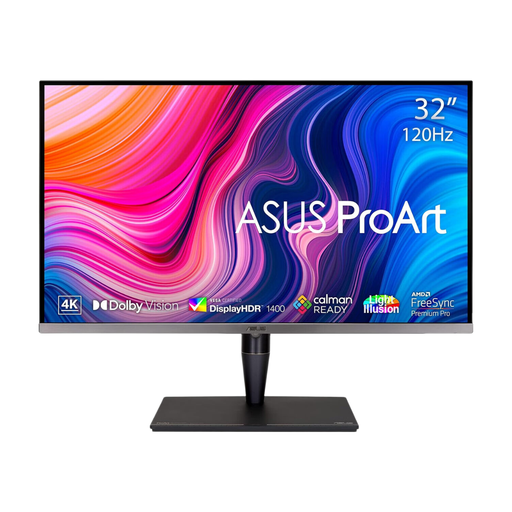
Consider the larger 32-inch 4K screen if your editing layout includes a substantial video preview alongside text. Check desk depth and viewing position; do not assume that its stated Thunderbolt 3 connection provides the charging or docking functions required by each laptop.
 No image available
Its stated 27-inch 4K resolution is relevant when subtitle text and a video preview share the screen. Check how each laptop will connect and whether the screen finish suits the office lighting; confirm the exact dual-mode settings if they affect your choice.
 No image available
The stated 27-inch 4K IPS screen offers a high-resolution option for subtitle text and video preview. The product name lists HDMI and DisplayPort connections; check the intended laptops’ outputs and the screen’s behaviour under your office lighting before choosing it for a shared desk.
In the UK, employers must assess the workstation where workers use display screen equipment daily as part of normal work for continuous periods of an hour or more, according to the Health and Safety Executive. The assessment covers the working setup, not just the monitor.
No. A 27-inch 4K monitor is worth considering when you need subtitle text, timing controls and video visible together, but QHD may suit a less crowded layout. Try your actual software at a comfortable display scaling before deciding.
No: that depends on the video and data capabilities of both devices and on whether the monitor supplies enough power for the laptop. Check each intended laptop and the exact monitor’s connections and power-delivery rating.
Not as a requirement for editing text and timing alone. Colour-management features become relevant when the role also includes picture or graphics review against a defined workflow; otherwise, prioritise readable workspace, screen positioning and compatible connections.