Compact AV-desk owners
If only a few home-cinema devices need mains power, the route to the wall socket, space for the plugs and a suitable mounting position may matter more than extra outlets.


Count the mains plugs that need to stay connected, then choose a surge-protected extension lead that fits the desk and reaches the wall socket without daisy-chaining. Four sockets may be enough for a compact setup; consider USB ports if their output suits your charging devices, or more mains sockets if you genuinely need them. Check the lead’s marked load limit against the equipment you will use together, and follow the exact model’s instructions for checking its protection status.
If only a few home-cinema devices need mains power, the route to the wall socket, space for the plugs and a suitable mounting position may matter more than extra outlets.
Built-in USB-C or USB-A ports may reduce the number of separate chargers on the desk, provided their stated output suits your phone, headset or controller.
If several mains-powered components stay connected, count their plugs and check their combined load against the lead’s marked rating. More outlets do not increase that rating.
Start with the plugs and appliances that will be connected together, then work out where a single lead can sit without an awkward cable route.
| Concern | What to check | Who this matters to |
|---|---|---|
| Loading and protection status | Compare the appliances’ combined load with the lead’s marked limit. If it has a protection indicator, check what that light means for the exact model. | I want my connected equipment within the lead’s limit and a way to tell whether surge protection remains active; around 36% of consumers put safe loading and protection status first. |
| Fit and cable reach | Measure the route to the wall socket and the space needed for the strip and its plugs; check mounting provision if you plan to use it. | With little room beside the screen, I need the lead and its cables out of the way without adding another extension; roughly 29% of consumers prioritise fit and cable routing. |
| Mains sockets and USB | Count simultaneous mains plugs, then check USB port types and stated output against any device you intend to charge. | I need enough outlets for my AV components and would use built-in USB only if it suits my charging devices; around 21% of consumers put connection capacity first. |
| Control and upkeep | Check the available switches and whether status lights will remain visible; follow the model’s inspection and replacement instructions. | When a strip sits behind my desk, I want controls I can reach and a clear prompt to inspect it; about 14% of consumers prioritise everyday control and upkeep. |
Spare outlets take up space, while filling every outlet can still exceed the lead’s marked current rating.
List the devices that may run together, check their combined load and choose enough sockets for those plugs and realistic additions.
Manufacturers advise that protective components can wear out. On models with a protection-status light, its meaning depends on the manufacturer’s instructions.
Check the indicator periodically if your model has one, and follow its instructions for replacement after an over-voltage event or a change in protection status.
USB-C and USB-A describe connector types, not whether a port meets a particular device’s charging requirements.
Compare the lead’s published USB output with each device’s requirements before counting on it to replace a separate charger.
Electrical Safety First warns that plugging one extension lead into another can increase overload, overheating and fire risk.
Choose a single lead with a suitable cable route. If you regularly need more reach, Electrical Safety First advises considering additional wall sockets installed by a registered electrician.
Masterplug lists surge-protected extension leads in several socket counts, including compact options and variants with USB charging or individual switches.
Belkin lists four- and eight-outlet UK surge protectors, including USB-C and USB-A variants with mounting holes and protection indicators.
brennenstuhl publishes guidance on surge-protection ratings as well as power-distribution products.
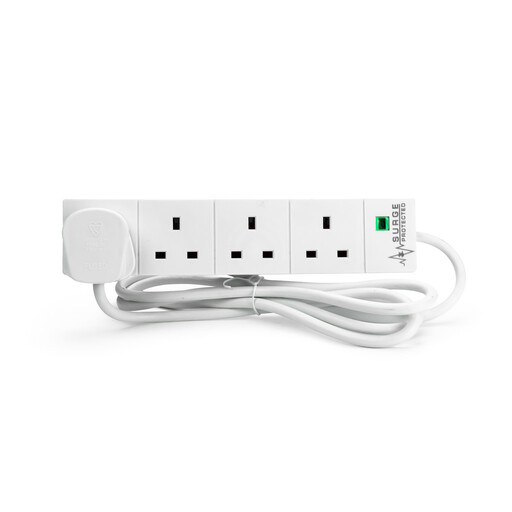
This four-socket option is relevant when a small home-cinema desk needs surge-protected mains outlets and a 2m cable route. Check the marked load limit and the space available for connected plugs before use.
 No image available
Consider this lead if up to four mains-powered AV devices need to share a position within its 2m cable reach.
Check the combined appliance load against the lead’s marked limit, and confirm what any indicator shows if ongoing surge-protection status matters to you.
No. Electrical Safety First advises using only one extension device per wall socket rather than daisy-chaining leads, which can increase overload, overheating and fire risk. Plan a suitable route from the wall socket to the desk instead.
The number depends on both the available sockets and the appliances’ combined load. Electrical Safety First advises checking that the total does not exceed the extension lead’s marked maximum current rating; count devices that may operate together, not just the plugs that fit.
Check for a standard UK three-pin plug and fuse, as Electrical Safety First advises, along with the exact lead’s marked rating and instructions. For product markings, check the requirements that apply where you will use the model rather than assuming Great Britain and Northern Ireland have identical arrangements.
Follow the instructions for your exact model. Belkin recommends replacement after an over-voltage spike for its BSV400 model and says its SRB003 unit should be replaced if the protection light is not on; those instructions should not be treated as a universal replacement interval.
No. brennenstuhl explains that a surge-current rating in amperes and an energy rating in joules describe different properties and cannot be directly converted. Compare the same type of rating and check what the exact model’s documentation says it measures.