Compact desk users
Students connecting a printer, a computer or laptop power supply, and a small number of other desk devices. A four-socket lead is worth considering if its cable reaches the wall socket without crossing a walkway.


For a printer-and-computer desk, choose a UK surge-protected extension lead with enough sockets for the equipment you will connect, a cable that reaches safely and a marked rating that accommodates the combined load. Four sockets and a 2 m cable may suit a compact setup; consider more sockets only for additional devices you have counted, without treating them as extra electrical capacity. Do not connect extension leads to one another, and check your accommodation rules before use.
Students connecting a printer, a computer or laptop power supply, and a small number of other desk devices. A four-socket lead is worth considering if its cable reaches the wall socket without crossing a walkway.
Students who also need mains sockets for equipment such as a monitor, router or speakers. Count those connections before choosing a larger lead rather than adding a second extension lead later.
Students who want to charge a phone or tablet at the same desk. Some surge-protected leads combine USB charging with four AC sockets, but the charging ports are optional for powering the printer and computer.
Count the devices and check their combined rated load before deciding on socket count or charging extras. Electrical Safety First advises using only one extension device per wall socket and keeping the load within the lead’s marked rating.
| Concern | What to check | Who this matters to |
|---|---|---|
| Load safety | Check the lead’s marked rating against the combined ratings of connected appliances; reject a damaged or recalled lead. | If I am connecting a printer and computer to one wall socket, I want to know their combined load will stay within the lead’s rating. Around 42% of consumers put that load check first. |
| Enough outlets | Count every device needing an AC socket. Consider more than four outlets only when additional desk equipment needs them. | With a monitor or router alongside my printer and computer, I need room for the devices I actually use without connecting another lead. For around 33% of consumers, sufficient outlet capacity is the main concern. |
| Desk layout and charging | Check cable reach and whether USB ports would replace separate chargers; confirm any mounting plans against accommodation rules. | In a small room, I want the cable routed safely and may prefer to charge my phone at the desk. A tidier layout and integrated charging come first for around 25% of consumers. |
A larger strip does not raise the permitted load. Electrical Safety First advises checking the extension lead’s rating and warns that a single UK socket is typically limited to 13 A, or about 3,000 W.
Add the connected appliances’ rated loads before use, even if sockets remain empty.
Electrical Safety First warns that connecting one extension lead to another can overheat the plug at the wall socket.
Choose a lead that reaches safely from the wall socket, or ask your accommodation provider about the room’s fixed-socket options.
The UK Office for Product Safety and Standards recalled a particular four-gang extension lead in June 2026 because it was not earthed and presented a serious electric-shock risk.
Choose a traceable product from a reputable retailer, inspect it before use and check official UK recall notices if a particular model is in doubt.
Belkin says the protective components in its strips wear over time and recommends replacement every three years or after an over-voltage event. That interval is Belkin’s product guidance, not a rule for every lead.
Follow the instructions for your model, and stop using a lead with a damaged cable, scorching or signs of overheating.
Masterplug lists UK surge-protected extension leads with four, six and eight sockets in 2 m, 13 A configurations.
Belkin offers four-outlet UK surge-protection strips, including a 2 m model and a version with USB charging.
This four-socket, 2 m surge-protected lead is a choice to consider when the printer, computer and other equipment you have counted fit within its marked load limit.
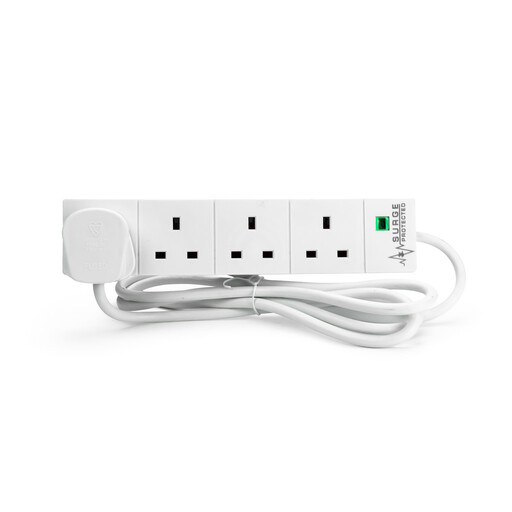 Image unavailable
Consider this lead for a compact printer-and-computer desk where four sockets and approximately 2 m of reach suit the layout.
The stated maximum load is 13 A or 3,120 W; check the combined load of everything connected. Its neon indicator shows that the lead is live, not whether surge protection is active.
Wall mounting is an option if your accommodation permits it. Check the product markings and documentation if conformity details or a stated surge-energy rating matter to your choice.
Count every device that needs mains power: four sockets may accommodate a printer, a computer or laptop supply, and a limited number of peripherals. Consider six or more for known additional devices, while keeping their combined load within the lead’s marked rating.
No. Electrical Safety First advises using only one extension device per wall socket and warns against connecting extension leads to one another because the wall-socket plug can overheat.
Not necessarily. Choose a lead that explicitly states surge protection if that feature matters to you; an ordinary lead may simply add sockets. Neither type makes an excessive connected load safe.
Check your accommodation agreement, residence handbook or housing office before bringing one in. Guidance from the Ministry of Housing, Communities and Local Government lists student halls of residence among tenancies excluded from the cited England rented-sector electrical-safety regulations; that exclusion does not establish an equipment policy for your hall.
Stop using it if the cable or enclosure is damaged, scorched or showing signs of overheating, and follow its manufacturer’s replacement guidance. Belkin recommends replacing its surge-protection strips every three years or after an over-voltage event; check the guidance for the particular model you own.