Who needs which setup?

Students with a basic Wi-Fi setup

If the router and modem need mains sockets but not backup power, look for an explicitly surge-protected lead with enough outlets for the devices you will actually connect. Electrical Safety First advises using only one socket extension device per wall socket.

Students working around a small desk

Check where the wall socket and network equipment sit before choosing the cable length and outlet count. If the power adaptors are bulky, check that they will fit beside each other; mounting or USB features matter only if they suit your layout.

Students who need Wi-Fi during short power cuts

A surge-protected lead will not keep the equipment running when mains power fails. If continuity matters for online classes or calls, compare a router UPS with the voltage, connector and power requirements shown on both devices’ adaptors.

What matters when choosing?

Decide whether you need surge protection or temporary backup power before comparing outlet counts. For a mains lead, plan its position and connected load rather than treating spare sockets as spare electrical capacity.

Concern What to check Who this matters to
Surge protection and safe loading Look for an explicit surge-protection specification and check the lead’s stated current rating against the combined connected load. Electrical Safety First notes that some extension leads are rated below 13 A. I want protected sockets for my network equipment without assuming that empty outlets let me add a heater or kettle. Roughly 45% of consumers put safe loading and surge protection first.
Desk fit and usable outlets Check cable length, outlet count and clearance for both power adaptors. Consider mounting or USB features only if you will use them. A crowded desk makes me want one lead that reaches the wall socket and accommodates both adaptors without another extension. Around 33% of consumers prioritise fitting the setup into their room.
Power-cut continuity If you need a UPS, compare its output voltage, connector and maximum power with each device’s adaptor label; check whether it can power both devices. When a short outage would interrupt my classes or calls, I need temporary power rather than a surge strip alone. Keeping the connection running is the primary need for roughly 22% of consumers.

Mistakes to avoid

  • Assuming more sockets mean more capacity

    The limit is the lead’s stated current rating and the combined load, not its outlet count. Electrical Safety First notes that while many extension leads are rated at 13 A, some are rated at 10 A or less.

    Read the rating on the lead and check everything you intend to connect. Keep high-wattage appliances such as heaters and kettles off the router and modem lead.

  • Joining leads to reach the desk

    Daisy-chaining extension leads can cause overheating. Electrical Safety First advises using only one socket extension device per wall socket.

    Choose one suitably long, correctly rated lead. If the room regularly lacks usable outlets, raise the issue with the accommodation provider rather than joining leads.

  • Buying a surge strip when you need backup power

    Surge protection addresses spikes; it does not supply power during an outage. A router UPS is a different purchase, and a listing that says it is intended for routers does not establish compatibility with both of your devices.

    If staying online during a cut matters, compare the UPS output voltage, connector and maximum power with the labels on the router and modem adaptors before buying.

  • Ignoring damage or recall information

    Electrical Safety First has published recalls for extension leads involving overheating and fire risks. A damaged lead also needs attention regardless of whether it is surge-protected.

    Buy from a reputable seller and keep the model details for recall checks. Do not use a lead with a damaged cable, loose parts, abnormal heat or scorch marks.

Relevant brands to consider

Belkin

Belkin lists UK surge-protected strips in several outlet configurations, including models with USB charging.

  • Belkin specifies eight AC outlets, USB-C and USB-A ports, and 900 J surge protection for one UK-listed model.
  • Those specifications are model-specific. Check the exact strip’s outlet layout, cable length and protection-status features rather than assuming they apply across the range.

Masterplug

Masterplug lists UK surge-protected extension leads, including four- and six-socket, 2 m models rated at 13 A.

  • Some Masterplug models add individual switches or power and surge-status indicators.
  • Features differ by model, and switches or USB ports do not raise a lead’s stated load limit or make daisy-chaining suitable.

APC by Schneider Electric

APC is relevant if you need a router UPS rather than a mains surge strip. A UK retail listing describes the APC Back-UPS Connect CP12036LI as a 12 V DC, 36 W mini UPS for networking equipment.

  • The listed product offers a backup-power route to assess when a short outage would interrupt the connection.
  • Check both devices’ adaptor labels and the exact UPS connectors and output before assuming it can power your router and modem together.

Surge-protected leads on Joybuy

This four-socket surge-protected lead is an option for a router and modem that need mains outlets, with cable reach to check against your room layout. It is not a battery-backup option.
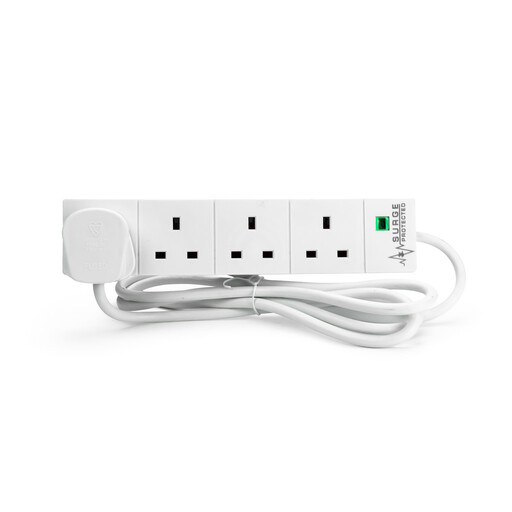
White STATUS four-socket surge-protected extension lead, 2 m

STATUS four-socket surge-protected extension lead, 2 m, white

Consider this lead if the router and modem need surge-protected mains sockets and a 2 m cable reaches the wall outlet. Check that both adaptors fit the socket layout and that the lead’s marked rating covers everything you plan to connect; it will not provide power during an outage.

View on Joybuy

Common questions

Can one surge-protected lead power my router and modem?

Yes, if it is suitable for your mains setup and the combined load stays within the lead’s stated rating. Check the marking or manufacturer instructions, including before connecting other desk equipment.

Will a surge protector keep my Wi-Fi on during a power cut?

No, a surge-protected extension lead does not supply backup power. If you need temporary continuity, check a router UPS against the voltage, connector and power requirement of each device it would run.

Can I plug another extension lead into it?

No. Electrical Safety First advises using only one socket extension device per wall socket and not daisy-chaining extension leads; choose one lead with suitable reach and capacity instead.

What if the wall socket or cable in my room looks damaged?

Stop using the suspect socket or item and report concerns about the property’s electrics to your landlord or accommodation provider, as GOV.UK fire-safety guidance advises. Do not attempt to repair fixed wiring yourself.

When should I stop using a surge-protected lead?

Stop using it if the cable or casing is damaged, parts are loose, or you notice abnormal heat or scorch marks. If it stops working after a surge, follow the manufacturer’s instructions for any applicable replaceable fuse check rather than continuing to use a faulty lead.