What matters when choosing?
Start with the in-game action you most want to make easier, then check whether the mouse’s shape and controls work for your hand and setup.
| Concern |
What to check |
Who this matters to |
| Reachable shortcuts |
Count the controls you would actually assign; check side-button reach and remapping options. |
If crafting and quick-slot changes keep pulling my hand from movement keys, I want commands I can reach without accidental presses. Around 31% of consumers put shortcut access first. |
| Fast movement and aiming |
Compare stated mass in grams, shape and connection mode; treat maximum DPI as a setting limit, not a fit test. |
When rapid camera turns and aiming dominate play, I care more about how the mouse moves and fits than about extra commands. Movement and aiming come first for around 25% of consumers. |
| Grip and wireless routine |
Check dimensions, handedness and button placement; compare battery claims under the stated settings. |
During long exploring or building sessions, I need a shape I can hold comfortably and a charging routine I can manage. Around 25% of consumers prioritise that combination. |
| Support and ownership |
Read the seller’s terms and manufacturer warranty; check accessory availability for the exact model. |
If I expect to keep the mouse for a long time, I want to know how I would deal with a fault or a missing receiver. Support and ownership considerations lead the choice for around 19% of consumers. |
Joybuy mice for these needs
These mice offer different combinations of stated low mass, programmable controls and wireless connections for survival-game play. Compare each model’s controls and grip fit against the actions you want to make easier.
 No image available
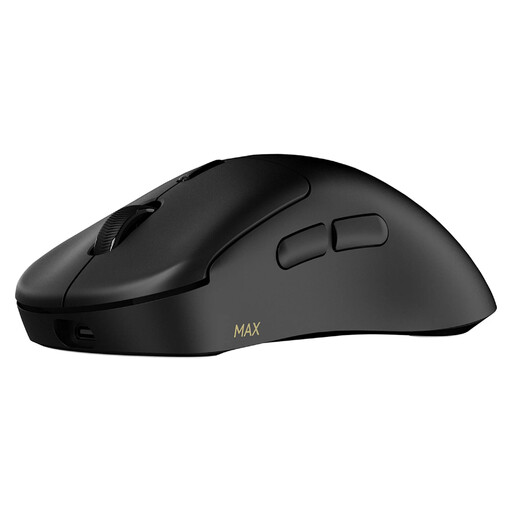
Rapoo VT3 MAX Wireless Gaming Mouse, Black
Consider this model if you want mouse-based shortcuts without setting aside the need for quick movements.
The product name lists a 53 g mass, 10 programmable buttons and 8K wireless polling. Its up-to-750-hour battery claim is conditional on 1,000 Hz operation with low-power mode enabled.
Check its shape and side-button reach for your hand before choosing it.
View on Joybuy
 No image available
Razer Viper V3 Pro Wireless Gaming Mouse, Black
Consider this mouse if aiming and rapid camera movement take priority over a dense bank of thumb shortcuts.
Its product name states 54 g, a Focus Pro 35K Sensor Gen-2 and HyperPolling 8KHz.
Check the shape against your grip and confirm that its available controls cover the commands you want on the mouse.
View on Joybuy
 No image available
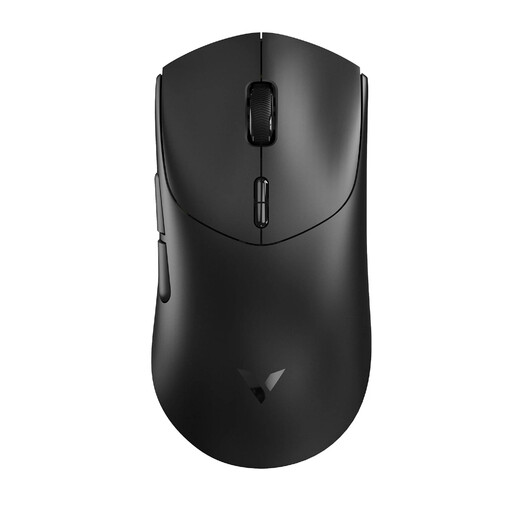
Rapoo VT7 Wireless Gaming Mouse, Black
This is another option to assess if you want to assign survival-game shortcuts while keeping stated mouse mass low.
The product name lists 53 g, 10 programmable buttons and 8K wireless polling. Its up-to-750-hour battery claim is stated at 1,000 Hz.
Check whether the shape and button positions suit your hand, and compare battery expectations at your intended settings.
View on Joybuy
 No image available
MACHENIKE L9X1 Advanced Wireless Mouse
Consider the L9X1 if a low stated mass and a choice of connections matter more to you than a specified shortcut count.
Its product name lists 49 g, a PAW3395 sensor and wired, 2.4G and Bluetooth modes.
If you need mapped game actions, check its button layout and remapping options. Confirm the polling rate for the connection you intend to use.
View on Joybuy
 No image available
AJAZZ AJ159 APEX Wireless Gaming Mouse with Charging Base
Consider this model if you want a charging base alongside a mouse with a low stated mass.
The product name lists 56 g, a PAW3950 sensor and a magnetic charging base.
Confirm the exact DPI specification, connection modes, included accessories and programmable-button layout before deciding whether it covers your shortcuts.
View on Joybuy
Common questions
Do I need an MMO-style mouse for survival games?
No: a multi-button mouse is worth considering when you will regularly assign its extra controls to quick slots, building, inventory or other actions. Check whether you can reach and distinguish the buttons comfortably; a large control count alone does not settle that.
Is a higher DPI figure better for survival games?
Not automatically. Maximum DPI describes a sensor setting limit, whereas a usable sensitivity and suitable shape, mass and button placement depend on your own setup. Logitech G states a maximum of 44,000 DPI for its HERO 2 sensor, but that figure does not establish which mouse will fit your hand.
Can I game over Bluetooth with a wireless mouse?
Check the intended gaming connection in the exact model’s manual rather than assuming its wireless modes are interchangeable. Corsair describes Bluetooth in its Scimitar Elite Wireless guidance as suited to everyday computing and office tasks; check the receiver and connection requirements for the mode you plan to use in games.
What if a new mouse is faulty?
For qualifying faulty goods, the UK Consumer Rights Act 2015 provides a short-term right to reject; legislation.gov.uk describes a minimum 30-day limit, subject to the applicable starting point and conditions. Keep proof of purchase and contact the retailer promptly. Fault remedies are distinct from a retailer’s voluntary change-of-mind returns policy.
How should I dispose of an old gaming mouse?
Check an appropriate electrical-recycling route for the mouse and any battery rather than treating disposal as an ordinary packaging decision. GOV.UK provides guidance on waste electrical and electronic equipment; local collection arrangements and retailer take-back options depend on the device and location.


