What to check when buying
Start with hand fit and the commands you use most, then decide how much you value a cable-free desk or a lighter mouse.
| Concern |
What to check |
Who this matters to |
| Fit during long sessions |
Check handedness and your palm, claw or fingertip grip; compare dimensions with a mouse you already find comfortable. |
If I spend long sessions aiming and sorting inventory, I need a shape I can hold comfortably without stretching for the controls. Around 31% of consumers put fit first. |
| Reachable shortcuts |
Identify the actions you want on the mouse, then check button placement and whether the exact model supports remapping. |
When I switch between tools, maps and communication, I want a few dependable commands within thumb reach. Roughly 31% of consumers prioritise accessible shortcuts. |
| Desk cable and batteries |
Choose between wired use, rechargeable wireless and replaceable-battery wireless; check the battery arrangement for the exact model. |
On a desk shared with work, I would rather move the mouse without a trailing cable, provided I can manage its power routine. Around 19% of consumers make cable-free use their main concern. |
| Weight and movement |
Compare the stated weight of the exact variant alongside its shape and button layout. |
If I make frequent quick turns or broad movements, I want a lighter feel without losing the controls I rely on. Approximately 19% of consumers put movement weight first. |
Joybuy product choices
These gaming mice offer different ways to equip a home-office desk: lightweight wireless models, a wired model and another wireless option. Use the listed controls and connections as starting points, then check the fit and functions that matter for your survival-game commands.
 No image available
Rapoo VT7 MAX Wireless Gaming Mouse, White
Consider this model if you want wireless movement and mouse-mounted commands for survival games.
The product title lists a 53 g weight and 10 programmable buttons. Its stated battery life of up to 750 hours applies at 1000 Hz with low-power mode enabled through an updated driver, rather than to every setting.
Check whether the shape and button positions suit your grip.
Joybuy
 No image available
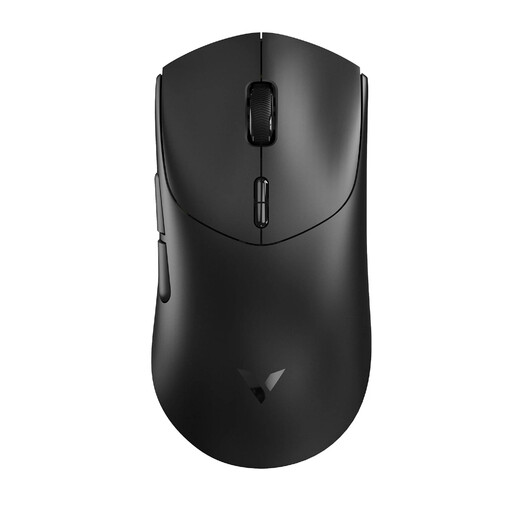
Rapoo VT7 Wireless Gaming Mouse, Black
This wireless model is worth considering if you want several in-game shortcuts without a desk cable.
The product title states 53 g, 10 programmable buttons and battery life of up to 750 hours. Treat the runtime as a stated maximum, not a promise for your settings.
Compare its shape and button placement with your grip before choosing between it and the VT7 MAX.
Joybuy
 No image available
ONIKUMA CW905 Wired Gaming Mouse
A wired connection suits a fixed desk if you do not want to manage mouse batteries.
Before relying on this model for inventory or communication shortcuts, confirm which buttons can be remapped and how configuration works. Check its shape against your usual grip as well.
Joybuy
 No image available
HyperX Pulsefire Fuse Wireless Gaming Mouse
Consider this wireless mouse if cable-free use is important at your shared desk.
Confirm that its right-handed shape suits you, and check the number and placement of programmable controls if you plan to assign several game commands. Review its battery arrangement for your routine.
Joybuy
 No image available
MACHENIKE L9X1 Wireless Gaming Mouse
This model is relevant if you prioritise a lower stated weight and want a choice of connections for a work-and-play desk.
The product title lists 49 g and wired, 2.4G and Bluetooth modes. If you need mapped game commands or a particular polling setting, confirm the available controls and whether your intended connection supports that setting.
Check its shape against your hand and grip rather than choosing on weight alone.
Joybuy
Frequently asked questions
Do survival games require a mouse with lots of buttons?
No: choose enough reachable controls for the commands you actually use, such as inventory, a map or push-to-talk. If the button positions disrupt your grip or you cannot reliably remember the bindings, a higher count offers little practical value.
Should I use a wired or wireless mouse at a home-office desk?
Choose wired if avoiding a battery routine matters more than removing the cable; choose wireless if desk-cable freedom matters enough to manage charging or replacement batteries. Check the exact wireless model's connection and power arrangement before buying.
Can I set different mouse controls for games and work?
You can use separate bindings or profiles if the exact mouse and its configuration software support them. Start with a few commands you use often, and confirm profile or remapping support before buying a mouse for that purpose; Logitech G describes game-specific profiles for the G502 X LIGHTSPEED, while Razer describes configurable Basilisk V3 controls through Synapse.
Can I return an online mouse purchase if the shape feels wrong?
For online purchases covered by its England guidance, Citizens Advice says a change-of-mind cooling-off period normally applies, subject to exceptions; check its timing and the seller's applicable terms before extensively using the mouse. If the mouse is faulty, damaged or misdescribed, assess the remedies for that problem separately rather than treating it as a change-of-mind return. Rules may differ across the UK nations.
What should I do with an old gaming mouse or removable battery?
Take unwanted electrical equipment and batteries to an appropriate collection point rather than putting them in household rubbish, as GOV.UK advises. Check local collection instructions for any battery you remove from a wireless mouse.


