Players choosing for their platform
If you play survival horror on a particular console or computer, confirm controller compatibility before comparing its layout or feedback features.


Choose a controller confirmed for the console or computer you use, then decide whether familiar controls, tactile feedback or adaptable inputs matter most to you. A controller will not make dark scenes easier to see in a bright room: check the game’s picture calibration and your display settings separately.
If you play survival horror on a particular console or computer, confirm controller compatibility before comparing its layout or feedback features.
Daylight or strong room lighting makes picture setup a separate decision from controller choice. Game calibration and console or display settings are worth checking for your setup.
If standard button positions are difficult to reach or use reliably, configurable inputs, alternative caps or external switches may matter more than conventional vibration features.
Start with the device you play on. Then separate the bright-room picture problem from the controller features that affect how you enter commands.
| Concern | What to check | Who this matters to |
|---|---|---|
| Platform compatibility | Match the exact controller variant to your console generation or operating system, and confirm its connection method. | I need a controller that works with the hardware I already use; a similar-looking wireless model may target a different system. Around 33% of consumers put confirmed platform compatibility first. |
| Bright-room visibility | Check the game’s brightness or HDR calibration and the video settings supported by your console and display. | When room light makes dark scenes difficult to read, I need to address the picture rather than change how commands feel. For around 27% of consumers, visibility is the primary concern. |
| Control feel | Consider the layout and grip; check whether your game supports the feedback effects you want. | During tense play, I want controls I can locate comfortably without looking down. Around 20% of consumers prioritise familiar handling or tactile feedback. |
| Adaptable inputs | Check available remapping and whether alternative caps, stick adjustments or external switches suit your platform. | If reaching a button or avoiding an accidental press is difficult, I need more control over input placement. Adaptable controls come first for around 20% of consumers. |
Haptics, triggers and remapping change interaction, not the picture. PlayStation Support and Xbox Support describe video settings separately from controller controls.
Check the game’s picture calibration and your TV or monitor settings before deciding whether a different controller would help with anything else.
Controller support varies by model: PlayStation’s Access controller is for PS5, while 8BitDo lists Windows and Android for its Ultimate 2 Wireless Controller.
Confirm the exact model, your hardware generation and the connection method before ordering.
8BitDo’s latency figures for the Ultimate 2 Wireless Controller are based on its stated ideal-environment lab conditions; your device and connection conditions may differ.
Use those figures alongside confirmed compatibility and the controls you need, rather than as a promise of identical performance at home.
Controllers are electrical products that need an appropriate collection route when discarded.
GOV.UK says waste electrical products can be taken to a local household waste recycling centre; follow the centre’s instructions for batteries.
Sony’s DualSense is a PS5 controller, while its Access controller addresses configurable-input needs on PS5.
The Xbox Wireless Controller is an option for Xbox consoles, Windows PC and the mobile devices listed by Xbox.
Nintendo offers distinct Pro Controller products for Nintendo Switch and Nintendo Switch 2.
8BitDo offers model-specific custom-control options; the Ultimate 2 Wireless Controller is listed for Windows and Android.
These controllers cover PS5 or PlayStation-focused choices and Xbox or Windows-focused choices. Match the stated variant to your device first; none is a substitute for adjusting the picture in a bright room.
 No image available
For PS5 play when you want to tailor your controls; check whether its configuration options suit the commands you use most. Confirm compatibility before buying for any other platform, and check game support for the feedback effects you want.
 No image available
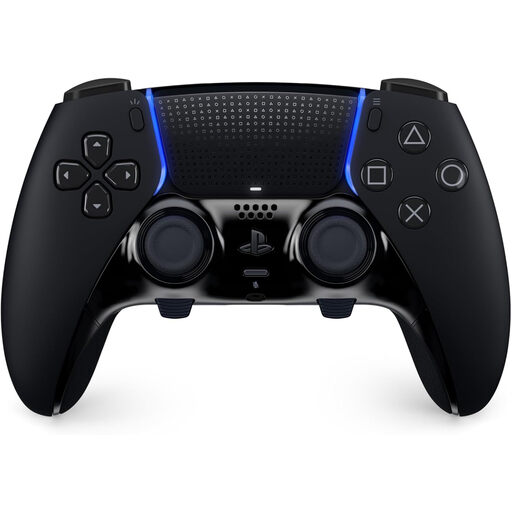
Consider this PlayStation-focused controller if changing the control layout matters to you. Check that the included modules support your intended layout and confirm the wireless connection method for your device.
 No image available
For players on a listed Xbox or Windows platform who want to consider an adaptable layout. Check which connection mode works with your intended device before choosing it.
 No image available
For Xbox or PC play where a wired controller fits your setup. Check that the cable can reach your usual playing position; this model is not a wireless choice.
 No image available
For PS5 players considering the standard DualSense format and its game-dependent tactile effects. Check support in the games you play; if you intend to use another device, confirm compatibility for that setup separately.
No, controller features do not adjust the game’s picture. Check its brightness or HDR calibration and your console and display settings; available options depend on the game and connected equipment.
Match the exact model to your console generation or computer before comparing features. Nintendo has distinct Switch and Switch 2 Pro Controllers, while 8BitDo lists Windows and Android for the Ultimate 2 Wireless Controller; check the connection method as well.
It is a PS5 option when reach, button placement or use of external switches is central to playing comfortably. PlayStation describes configurable inputs and interchangeable caps; check whether you would also need another compatible controller for conventional features.
Use an appropriate electrical-waste collection route rather than general waste. GOV.UK identifies local household waste recycling centres as one option; follow local instructions for any batteries.
Keep your order evidence and contact the retailer about the fault. GOV.UK explains that a fault discovered after an item has been accepted may call for repair or replacement; the appropriate remedy depends on the circumstances, rather than solely on a voluntary returns policy.