Players avoiding another charger
If plug sockets are scarce, a passive headset connected to a compatible 3.5 mm jack lets you play without managing a headset battery. You still need to accommodate its cable.


Choose a passive 3.5 mm wired headset if avoiding another device to charge matters most and your controller or gaming device has a compatible jack. A wired model with an optional USB adapter makes sense when you will use its supported computer software features; choose wireless instead if freedom from a cable outweighs charging and USB-port demands. Check surround-sound support on your actual platform rather than assuming it works wherever the headset connects.
If plug sockets are scarce, a passive headset connected to a compatible 3.5 mm jack lets you play without managing a headset battery. You still need to accommodate its cable.
If you move between a PC, console, handheld or mobile device, check the connector and microphone arrangement on each one. Software-based audio features may work on fewer platforms than ordinary wired audio.
If you want less outside noise and a comfortable fit during survival horror, consider earcup design and cushioning alongside connection type. A published weight or surround-sound feature cannot establish how a headset will fit you or work on your platform.
Start with the connection your main gaming device can use, then decide whether avoiding charging or moving without a cable matters more. RTINGS.com identifies wired listening as a low-latency route that does not rely on a headset battery.
Choose when: avoiding headset charging comes first and your device or controller has a compatible headset jack.
Trade-off: the cable limits movement, and a suitable jack or adapter is still essential.
Choose when: you want direct wired use but will also use a supported computer-only audio feature.
Trade-off: the extra mode can occupy a USB port and require software; Corsair limits HS55 Surround Dolby Audio to iCUE on PC and Mac.
Choose when: moving without a headset cable matters more to you than avoiding recharging.
Trade-off: plan for a compatible receiver port and a way to charge the headset.
| Concern | What to check | Who this matters to |
|---|---|---|
| Avoiding charging | Check for passive 3.5 mm audio and a compatible jack on your device or controller. | I have few free sockets and do not want to charge another device before playing; roughly 38% of consumers put avoiding headset charging first. |
| Device compatibility | Check the audio and microphone connections, plus any USB or software requirements for the feature you want. | When I switch gaming devices, I need both listening and voice chat to work on the one I am using. Around 31% of consumers prioritise matching their existing setup. |
| Isolation and fit | Consider earcup design and cushioning; check whether positional-audio features work on your operating system. | For a longer survival-horror session, I care most about a comfortable fit and hearing the game without as much outside distraction; roughly 31% of consumers place immersion and comfort first. |
A passive analogue connection differs from USB audio or an optional USB-powered feature. A wireless headset also needs charging, even if it plays through a USB receiver.
Check which connection carries the audio and whether the features you intend to use need a separate USB port.
The headset may play ordinary audio while its advertised processing is unavailable on your gaming device. Corsair specifies iCUE on PC or Mac for HS55 Surround Dolby Audio; Razer limits BlackShark V2 X 7.1 surround to Windows 11.
Match the exact model, operating system and required software before treating that feature as a reason to buy.
Neither a listed weight nor an earcup description tells you how the headset will feel with your head shape or glasses through a full session.
Compare cushioning and fit options, then check the retailer’s return terms and try the headset promptly where possible.
A direct wired connection avoids headset recharge management, but keeps you tethered to the gaming device.
If your main device has a suitable jack, decide whether that cable is acceptable before taking on a wireless headset’s charging routine.
The G335 is a direct wired option to consider if your gaming device has a suitable 3.5 mm headset jack.
The HS55 range includes direct 3.5 mm wired use; the Surround version also offers an optional computer-based audio mode.
The BlackShark V2 X is worth examining if closed-back earcups and its platform-specific positional-audio mode matter to you.
These wired headsets are choices to examine if you would rather connect to your gaming device than manage a wireless headset battery. Check the exact audio and microphone connections against your device; lighting and other extra features can have separate port needs.
 No image available
Consider this wired model if you want to avoid managing a headset battery. Confirm that your controller or device supports the required audio and microphone connection.
The listing describes a PC splitter cable; check whether that connection arrangement suits your setup.
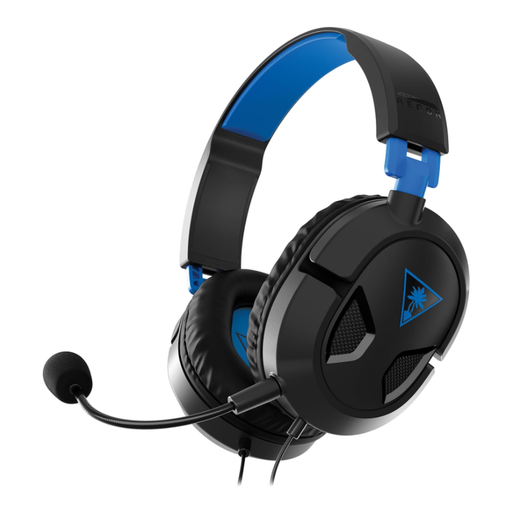 No image available
Consider this wired model for a PS5 or PS4 setup if avoiding headset charging is a priority. Check that your controller has the required headset jack.
If weight is important to your choice, confirm the figure before comparing it with another model.
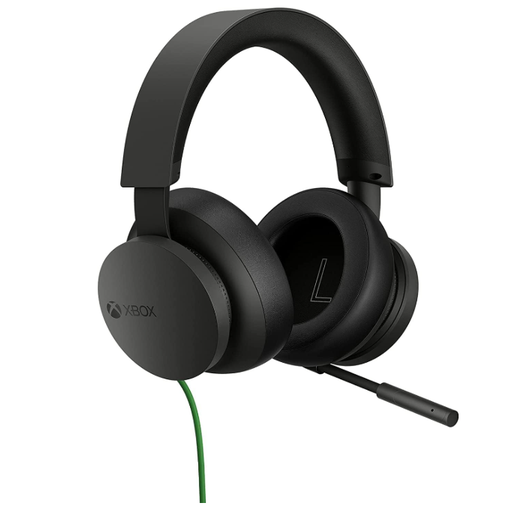 No image available
Consider this wired stereo headset if you mainly play on Xbox or Windows and want to avoid charging a wireless model. Check the headset connection on your particular controller or device.
For another platform, confirm compatibility before buying rather than assuming the Xbox connection arrangement carries over.
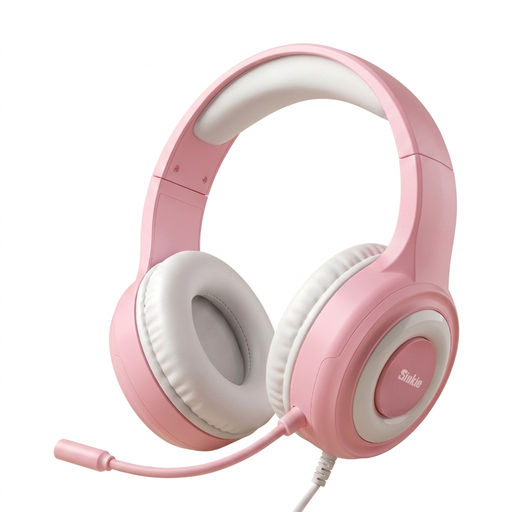 No image available
Consider this model if a wired audio connection suits your limited-socket setup. Its title lists a 3.5 mm jack, USB, a 50 mm driver and blue LED lighting.
Allow for a USB port if you want to use the lighting, and check how its audio and microphone plugs connect to your device.
 No image available
Consider this wired over-ear model if you want an alternative to a rechargeable headset. Its title names PC and Xbox use and a flexible microphone; check the connections for your exact device.
If you want to use the RGB lighting, allow for a USB port. Do not rely on the surround wording alone to establish platform-specific positional processing.
A passive 3.5 mm analogue headset normally runs through a compatible audio jack without a separate wall socket. RTINGS.com distinguishes this battery-independent wired route from wireless use; check your device or controller’s jack, and do not assume the same answer applies to every USB-connected headset or extra feature.
No: the feature depends on the exact headset and platform, even if ordinary audio works through the connection. Corsair requires iCUE on PC or Mac for HS55 Surround Dolby Audio, while Razer specifies Windows 11 for BlackShark V2 X 7.1 surround.
Wireless can make sense if moving without a headset cable matters more than avoiding charging. Check that your gaming device supports the receiver and that you have a practical way to recharge the headset between sessions.
Check the collection options for electrical equipment before disposing of the headset, and check battery collection instructions if it contains a battery. GOV.UK provides separate guidance on waste electrical equipment and waste batteries; your local authority or collection provider can identify the appropriate route.