What matters when choosing?
For a shared-bedroom survival-game mouse, settle the noise requirement first, then choose the controls and connection that fit how you play.
| Concern |
What to check |
Who this matters to |
| Click noise |
Look for a quiet-click claim for the exact model or a credible acoustic measurement. Switch type alone is not a noise rating. |
If someone is sleeping nearby, I would rather change my choice than risk disruptive clicks. Around 42% of consumers put low click noise first. |
| Game shortcuts |
Check the accessible button layout and whether its remapping software supports your intended setup. |
When I repeatedly open inventory or use tools, I want those actions within easy reach while playing. Around 33% of consumers make assignable controls their primary concern. |
| Desk movement |
Confirm connection modes, stated weight and how the receiver and charging arrangement fit your desk. |
A cable gets in the way on my compact desk, so flexible placement matters more to me than the largest button count. Around 25% of consumers prioritise wireless movement and manageable weight. |
Brands to consider
These product families illustrate different control and handling choices; a brand name or gaming-switch label does not establish quiet clicking.
Logitech G
The G502 X family is relevant when you want several assignable survival-game commands. Logitech’s M330 Silent Plus offers a separate office-mouse example of an explicit quiet-click claim, not a quiet specification for the G502 X family.
- Logitech G lists wireless connectivity and 13 customisable controls for the G502 X LIGHTSPEED.
- Logitech G describes its LIGHTFORCE switches as retaining crisp tactile feedback; assess click sound separately if room noise is decisive.
Razer
The wired Cobra and wireless Cobra HyperSpeed offer different ways to keep a gaming mouse relatively light.
- Razer lists the wired Cobra at 58 g and the wireless Cobra HyperSpeed at 62 g; it specifies nine customisable controls for the HyperSpeed.
- Razer’s crisp, responsive switch description for the HyperSpeed is not a quiet-click specification.
SteelSeries
The Rival 5 and Aerox 5 are relevant if several programmable actions matter more than a minimal button layout.
- SteelSeries lists nine programmable buttons on each model and specifies a 66 g build for the Aerox 5.
- Those button and weight specifications do not indicate click volume; check sound separately for shared-room use.
Joybuy product choices
These gaming mice offer wired or wireless ways to place controls within reach during survival games. If quiet clicking is essential in your shared bedroom, establish how the exact model sounds before choosing on buttons, weight or connection alone.
 Image unavailable
AJAZZ AJ159 APEX wireless gaming mouse with charging base
Consider this model if you want wireless placement on a compact desk while keeping a wired connection option.
The listed variant has a 56 g weight, PAW3950 sensor, 2.4G and wired connections, a magnetic charging base and a colour screen. Check the exact DPI specification if it affects your choice, and assess click sound separately for shared-room use.
Joybuy
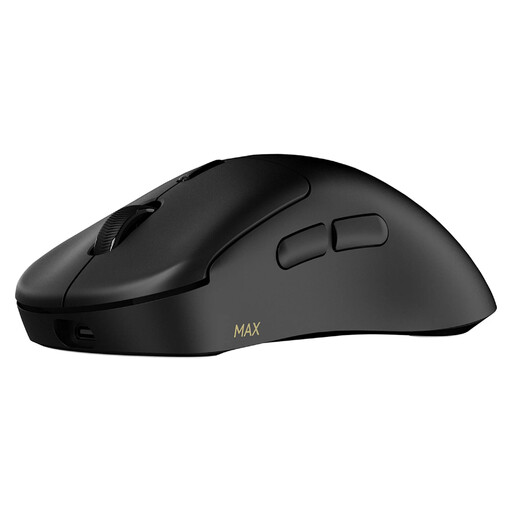 Image unavailable
Rapoo VT3 MAX black wireless gaming mouse
Consider this model when you want several assignable survival-game actions on a wireless mouse.
Its name specifies a 53 g weight, ten programmable buttons and macro support. Assess the button layout before relying on it for rapid commands, and check click sound independently if quietness is essential.
Joybuy
 Image unavailable
AJAZZ AJ200 AI MC wireless gaming mouse with charging dock
Consider this model if flexible connection and a charging dock suit the space on your desk.
Its name lists Bluetooth, 2.4G and USB-C modes and a PAW3311 sensor. Confirm the exact variant’s weight if handling is a deciding factor, and check click sound before treating it as suitable near a sleeping roommate.
Joybuy
 Image unavailable
ONIKUMA CW905 wired gaming mouse
Consider this wired option if a mouse cable fits your desk and you want buttons for recurring actions.
Its name lists adjustable DPI, programmable buttons and RGB lighting. Check how its buttons are assigned for your game, and assess click sound separately if another person shares the room.
Joybuy
Frequently asked questions
Does an optical gaming switch make a mouse quiet?
No: an optical or hybrid switch label does not establish click volume. Logitech G and Razer describe crisp or tactile feedback on the gaming models discussed here; look for sound information about the exact model if a roommate may be disturbed.
How many mouse buttons do survival games need?
There is no fixed number; choose enough accessible controls for the actions you actually want off the keyboard. Logitech G lists 13 customisable controls for the G502 X LIGHTSPEED, while SteelSeries lists nine programmable buttons for the Rival 5 and Aerox 5. A layout you can use without accidental presses matters more than the count alone.
What if a new mouse starts double-clicking unintentionally?
Contact the seller about the fault and keep a record of when it occurs. CORSAIR notes that switch wear, debris and software conflicts can contribute to unintended double-clicking; check the mouse software and visible debris without opening the device if doing so could affect support or warranty coverage.
What if a mouse I bought in the UK is faulty?
For goods supplied under a UK consumer contract, section 9 of the Consumer Rights Act 2015 requires satisfactory quality, assessed in light of relevant circumstances including the goods’ description. Keep the order confirmation, listing and details of the fault when contacting the seller; a voluntary returns policy is separate from statutory rights.
How should I dispose of an old mouse?
Use an appropriate electrical recycling route rather than putting it in general rubbish. GOV.UK sets out the UK waste electrical and electronic equipment framework; check your local authority’s collection or recycling-centre guidance and any eligible retailer take-back option.


