
24/7 Customer Support

Free returns

Same-day & Next-day Delivery

Quality Guaranteed

Unlock Your Welcome Offers: FREE Delivery | Up to 80% OFF | Free 30-day JoyPlus trial
Download the APP
As a Joybuy Product Recommendation Officer, my role is to help you navigate the crowded market of gaming accessories. With the arrival of the Nintendo Switch 2, a flood of peripherals has hit the shelves, and not all are created equal. For families and multiplayer fans, keeping multiple Joy-Con 2 controllers charged and ready is a priority. A dedicated Switch 2 charging dock seems like a simple purchase, but a few common pitfalls can lead to frustration and wasted money.
This guide cuts through the clutter to focus on what truly matters, ensuring your controllers are always ready for the next game night.
Before you add any charging station to your basket, be aware of these frequent issues that often aren't obvious from the product page.
To avoid the traps above, focus on these three non-negotiable features. They are the difference between a useful accessory and a piece of plastic destined for the cupboard.
The most significant practical upgrade in modern charging accessories is the connection method. Instead of a friction-based slide-in system, look for a magnetic Joy-Con 2 charger.
A reliable Nintendo Switch 2 charging station needs adequate power. A dock designed to be a 4 Joy-Con charger for Switch 2 should ideally come with its own USB-C power adapter, not just a cable.
Your gaming area's tidiness is one of the main reasons to get a dock. A vertical or "tower" design is often superior to a flat, wide one as it uses vertical space, keeping your entertainment unit or desk clear. For those who value aesthetics, an RGB controller dock can add a touch of personality, but check if the lighting is customisable or can be turned off.
Based on the criteria above, we've matched some available options to different types of Switch 2 owners.
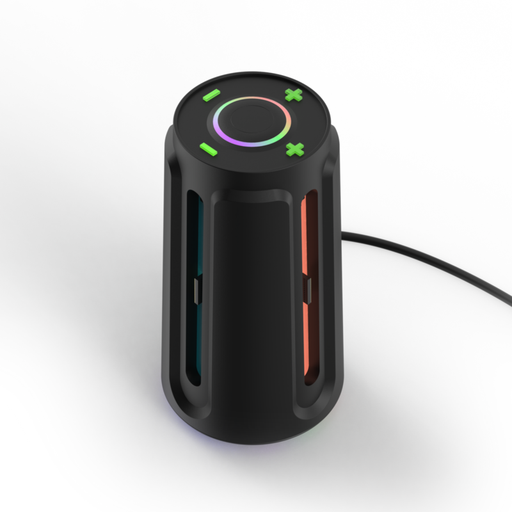
Why This Fits Their Persona: This user wants their gaming setup to look as good as it performs. The Power Beacon serves as both a functional charger and a display piece, with customisable RGB lighting to match the mood of their gaming room or other peripherals.
It uses a secure magnetic mounting system, avoiding the wear-and-tear of slide-in docks. The customisable RGB with 8 modes also solves the "annoying bright light" problem, as you can adjust it to your preference.
Charges four Joy-Con 2 controllers simultaneously. Features clear, individual LED status indicators for each controller, so you know exactly which ones are ready to go.
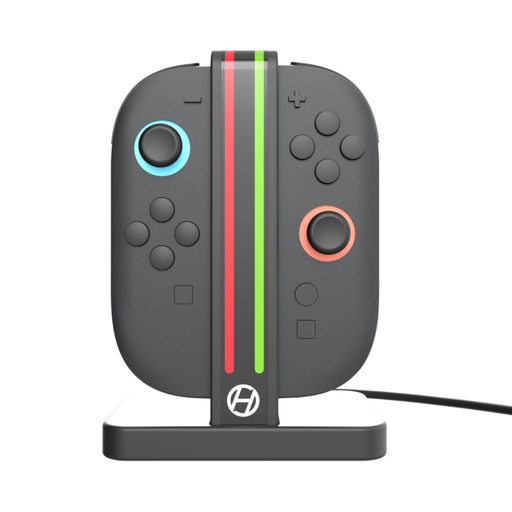
Why This Fits Their Persona: This user needs a no-fuss solution to stop arguments over whose turn it is to charge their controller. They value reliability, space-saving design and ease of use for everyone in the family, from kids to adults.
Its vertical design has a small footprint, avoiding the bulky dock issue. It includes a USB-C cable and is designed for a sufficient power input, ensuring all four controllers charge efficiently. Built-in protection prevents battery damage.
The magnetic connection is its standout feature for a family setting—it’s satisfyingly simple and durable enough for frequent use. The plug-and-play setup requires no complicated instructions.
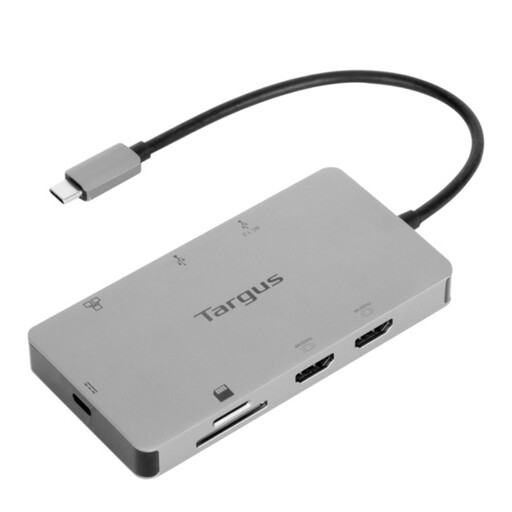
Why This Fits Their Persona: This user has a desk that serves for both work and gaming. They want a single, powerful hub to manage their laptop, external monitors and charge their Switch 2 console, reducing cable clutter across the board.
While not a Joy-Con dock, it charges the Switch 2 console itself via its 100W USB-C power pass-through. This frees up the console's own charger to be used elsewhere, or packed for travel.
It's a complete workstation solution. It supports dual 4K monitors, has Gigabit Ethernet and multiple USB ports for peripherals, consolidating an entire desk setup into one device.
We have compiled a complete, real-time list of products that fully satisfy these strict selection criteria and UK safety regulations.
This depends on the dock's power output. A quality station with a dedicated adapter providing at least 5V/2A can typically charge four controllers from empty in around 2.5 to 3.5 hours. Docks that rely on a simple USB-A cable connected to your console or a weak power source will take significantly longer.
Yes, provided you choose a reputable model. Products like the Hyperkin Power Beacon include built-in protection circuits to prevent overcharging and overheating. This technology stops the flow of electricity once the battery is full, making it perfectly safe to leave controllers docked and ready for your next session.
While not mandatory, a magnetic Joy-Con 2 charger is a highly recommended feature for convenience and durability. It ensures a perfect connection every time without any fumbling, which reduces wear on the charging contacts of both the controller and the dock over the long run. It is one of the key features that separates a basic accessory from the more thoughtfully designed Switch 2 accessories.