Choose a compact tablet if carrying and holding it through the journey matters most, or a larger screen if you want more room for dialogue, maps and touch controls. Before choosing iPadOS or Android, check that your adventure games run on it and can be played as you intend; prepare downloads and plan for the journey without relying on train Wi-Fi or a power socket.
Who these tablets suit
Compact-gear commuters
You want a tablet that is easy to pack and hold, while leaving enough screen space to read dialogue. Apple lists an 8.3-inch iPad mini, while Lenovo lists an 8.8-inch Legion Tab Gen 3; check the size and weight of the configuration you would carry.
Offline-first rail players
You want to prepare a game before boarding and keep playing without depending on a connection or seat socket. National Rail says onboard Wi-Fi and power availability vary by train company, so check your service and your game’s offline behaviour separately.
Performance-led Android gamers
You also play demanding Android games and want to consider gaming-oriented hardware in a travel-sized tablet. Lenovo lists a high-refresh display, 256 GB of storage and cooling for its UK Legion Tab Gen 3 configuration, but those specifications do not establish how a particular game will run.
What matters on a train
Check your must-play games’ platform and offline requirements before comparing tablets. Then decide whether handling, playing away from a socket or gaming hardware is your primary concern.
| Concern |
What to check |
Who this matters to |
| Carrying and handling |
Compare screen size, weight and dimensions for the exact configuration, allowing for any case or controller you plan to carry. |
If I am taking the tablet in and out of a bag and holding it to read dialogue, I want a manageable size. Around 42% of consumers put carrying and handling first. |
| Offline play and power |
Check your game’s download, sign-in and offline behaviour; check the train operator’s facilities and plan battery use for the journey. |
I want to keep playing when the connection drops or there is no usable socket. For around 33% of consumers, playing away from Wi-Fi and power is the primary need. |
| Gaming hardware |
Check each game’s operating-system and storage requirements, then compare the exact tablet’s processor, memory and display specifications. |
If I also play demanding Android games, I want hardware suited to those titles rather than choosing by screen size alone. Gaming specifications come first for around 25% of consumers. |
Buying mistakes to avoid
-
Counting on train Wi-Fi or a seat socket
A game that needs a connection, or a tablet that needs charging, could interrupt your journey if those facilities are unavailable. National Rail says Wi-Fi and power availability vary by train company.
Check the operator for your service, download games and updates before departure, and plan how you will power the tablet for the full journey.
-
Reading a video battery claim as gaming runtime
Apple’s figure of up to 10 hours for the iPad mini refers to Wi-Fi web browsing or video playback, not gaming. It cannot tell you how long your chosen game will run.
Check what activity a quoted battery figure covers, and try the games you intend to play before relying on the tablet for a long trip.
-
Choosing hardware before checking the games
Processor and display specifications cannot establish whether a particular adventure game supports iPadOS or Android, works offline, has enough storage available or accepts your preferred controls.
Check each must-play title’s platform, download size, account requirements, offline behaviour and controller support before choosing a tablet.
-
Treating water resistance as unrestricted protection
Samsung states an IP68 rating for the Galaxy Tab S9 FE and its included S Pen under specified freshwater laboratory conditions; it also says that protection is not permanent. That rating does not remove the need to handle the tablet carefully while travelling.
Check the conditions attached to an IP rating and use a suitable case if you want additional protection in your bag.
Relevant tablet brands
Apple
The iPad mini is a compact iPadOS option if your chosen adventure games support that platform.
- Apple lists an 8.3-inch display and a weight of 293 g for the current Wi-Fi model.
- Confirm each game’s availability and offline requirements. Apple’s stated battery figure covers web browsing or video, not gaming.
Lenovo
The UK Legion Tab Gen 3 is an 8.8-inch Android option for consumers who also consider gaming-oriented specifications.
- Lenovo lists Snapdragon 8 Gen 3, 12 GB of memory, 256 GB of storage and a 165 Hz display for its cited UK configuration.
- Those specifications do not establish compatibility, offline access or performance for a particular adventure game.
Samsung
The Galaxy Tab S9 FE 5G is a 10.9-inch Android option if you prefer more screen space and are considering mobile data.
- Samsung identifies a 10.9-inch display for the cited UK 5G model.
- Check the exact configuration, network plan, signal and game requirements; a 5G model does not make a game playable offline.
Joybuy tablets for train journeys
These choices span a compact iPad, a compact Android tablet and a larger Android tablet. Pick by the games you intend to play and the screen size you are comfortable carrying, rather than assuming any tablet will support every title.
 No image available
Apple iPad mini 7 (A17 Pro), 512GB, Space Grey
Consider this compact iPad if your must-play adventure games support iPadOS. Its stated configuration has 512GB of storage and an A17 Pro chip; check each game’s offline behaviour and controls before choosing it.
View on Joybuy
 No image available
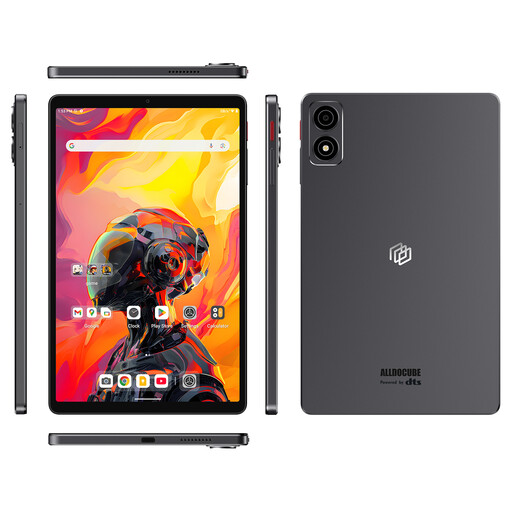
ALLDOCUBE iPlay 70 Mini Ultra, 8.8-inch, 12GB+256GB
Consider this compact Android 14 tablet if your chosen games support Android. The product title specifies a Snapdragon 7+ Gen3 chip and a 7300mAh battery, but does not establish gaming runtime; it also says no charger is included.
View on Joybuy
 No image available
Xiaomi Pad 8 Pro, Gray, 12G RAM/512G ROM
Consider this larger Android-tablet route if you favour viewing space over a compact setup. The named variant has 12G RAM and 512G ROM; check its physical dimensions, your games’ requirements and their offline behaviour before choosing it for train travel.
View on Joybuy
Questions about gaming on trains
Can I rely on Wi-Fi or a plug socket on a UK train?
Check the service rather than relying on either facility. National Rail says many train companies offer onboard Wi-Fi and power outlets, but availability varies by train company; download games and updates before travelling.
Will my adventure game work offline on a tablet?
It will work offline only if that particular game allows it under the conditions you need. Check its downloaded content, account and licence requirements, then try launching it without a connection before your journey. Google Play Games includes some offline games, but that does not establish offline access for your chosen adventure title.
Does a battery claim show how long I can play on a train?
Not unless the claim measures gaming under relevant conditions. Apple’s up-to-10-hour figure for the iPad mini covers Wi-Fi web browsing or video playback, so plan for your journey without treating it as a gaming-runtime figure.


