What matters when choosing
Start with where you will play—holding the tablet or using a table—then check your game’s compatibility and connection requirements before weighing up display and processor specifications.
| Concern |
What to check |
Who this matters to |
| Handheld comfort |
Compare the exact variant’s weight and screen size; allow for a case and anything else you will carry. |
If I will hold the tablet while waiting at the gate, I want it to feel manageable without giving up too much card-reading space. Around 40% of consumers put lighter handheld carry first. |
| Play away from home internet |
Check offline play, advance downloads and whether the exact model can use the mobile connection you intend to arrange. |
For live matches or account syncing, I need a way to connect that does not depend entirely on airport Wi-Fi. Dependable access comes first for around 30% of consumers. |
| Readable cards and decks |
Look at the game’s interface on a screen of the size you are considering, particularly its card text and deck editor. |
If small card text slows me down, I would accept more to carry for a roomier view. Around 20% of consumers make interface space their primary concern. |
| Hardware headroom |
Confirm game compatibility and storage needs before paying attention to processor or refresh-rate specifications. |
If I also run more demanding games or multitask, I want hardware that fits those uses, not just a higher display refresh rate. That is the leading need for around 10% of consumers. |
Relevant tablet brands
These product lines illustrate different size and operating-system choices; check the specification and game support of the exact model you intend to buy.
Apple
An iPadOS option if your card game, account and existing purchases work on iPad. Apple’s UK comparison lists an 11-inch iPad with Wi-Fi and a Wi-Fi + Cellular variant.
- Apple lists the 11-inch model at 477g for Wi-Fi and 481g for Wi-Fi + Cellular.
- Apple’s up-to-10-hour Wi-Fi web-browsing or video rating does not describe card-game runtime.
Samsung
An Android option with an approximately 11-inch screen. Samsung lists the Galaxy Tab S10 FE with a 10.9-inch display and microSD support up to 2TB.
- Samsung specifies a 90Hz display and up to 800 nits in High Brightness Mode for this model.
- Check your game’s Android availability and the exact Wi-Fi or 5G variant; display specifications do not establish performance in a particular game.
Lenovo
A compact Android gaming option for travellers who expect to hold their tablet. Lenovo lists the Legion Tab Gen 3 with an 8.8-inch display and a 350g weight.
- The listed UK configuration has a Snapdragon 8 Gen 3 processor, 12GB RAM and 256GB storage.
- The smaller display leaves less room for card text and deck-management screens than an approximately 11-inch or larger tablet.
OnePlus
A large Android tablet option if card games will mostly be played at a table and the device will also serve other screen-intensive uses. OnePlus lists the Pad 3 with a 13.2-inch display.
- OnePlus specifies a Snapdragon 8 Elite platform and 256GB or 512GB storage options.
- The listed 675g weight matters for handheld use. Its up-to-18-hour usage figure is for video playback, not gaming.
Joybuy tablets to consider
These tablets cover compact handheld play and larger screens for seated card games across iPadOS and Android. Check your game’s operating-system and account requirements before choosing between them.
 No image available
Apple iPad mini 7 (A17 Pro), 512GB, Space Grey
Consider this compact iPad for handheld waits if your chosen card game and account work on iPadOS. Its 8.3-inch screen gives you less room for dense card layouts than a larger tablet; the listed configuration has an A17 Pro chip and 512GB storage.
View on Joybuy
 No image available
Apple iPad Pro 13-inch (M5), Wi-Fi + Cellular, 1TB, Standard Glass, Silver
This 13-inch iPad suits seated play if you want a large card interface and your game supports iPadOS. The named variant has an M5 chip, 1TB storage and Wi-Fi + Cellular; check its weight and arrange a suitable data service before relying on mobile connectivity.
View on Joybuy
 No image available
DOOGEE Tab G6 Plus 11-inch Android tablet, 256GB, Grey
Consider this Android tablet if an 11-inch interface is more useful to you than a compact screen. The title lists an FHD+ display, 256GB storage, an 8000mAh battery and a SIM slot; check your game’s compatibility and the mobile service needed for the exact variant. Battery capacity does not establish gaming runtime.
View on Joybuy
 No image available
TECLAST ArtPad Pro 2025 Edition, 12.7-inch, 256GB, with stylus
This larger Android tablet is worth considering for table-supported play if your game works on Android. Its name specifies a 12.7-inch 2K display, 256GB storage, dual-SIM 4G LTE and an included stylus; check the exact model’s weight and your intended mobile-data service before travelling.
View on Joybuy
 No image available
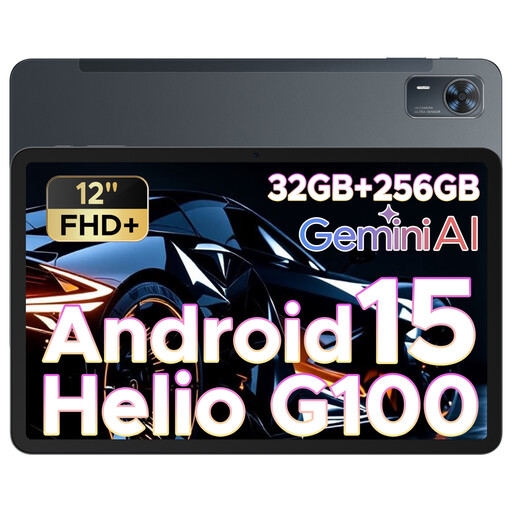
DOOGEE Tab E3+ Android 15 tablet, 12-inch, 256GB, Grey
The 12-inch FHD+ screen makes this a larger-interface option for Android card games, subject to game and account support. The name lists a Helio G100 processor, 90Hz display, 256GB storage and 8800mAh battery; confirm cellular capability for this exact SKU before counting on mobile data. Battery capacity is not a card-gaming runtime.
View on Joybuy
Frequently asked questions
Can I take a gaming tablet in hand luggage?
Check the rules for your flight and route before packing it. GOV.UK advises travellers to confirm the number and size of cabin bags permitted by their airline; also check applicable electronic-device instructions for the airports and destination on your itinerary.
Can I bring a power bank for my tablet?
Check your operating airline’s power-bank policy before travel. For example, easyJet says passengers may carry a maximum of two power banks per person, in cabin baggage only; do not assume that limit applies to another airline.
Should I choose Wi-Fi or cellular for airport card games?
Wi-Fi may meet your needs if the game works offline or you have another suitable connection; consider a cellular-capable variant if mobile data is central to how you play. Apple lists both Wi-Fi and Wi-Fi + Cellular versions of its 11-inch iPad, but you still need to check your game, data service and any roaming terms.
Is airport Wi-Fi suitable for game-account logins?
Do not assume a public Wi-Fi connection is private. The National Cyber Security Centre warns that attackers on an insecure network may be able to intercept or modify traffic, so use your game’s account protections and consider a suitable mobile-data connection for account-sensitive activity.
Do card games need a high-refresh display?
A high refresh rate is not, by itself, a reason to choose a tablet for a particular card game. Samsung, OnePlus and Lenovo list 90Hz, 144Hz and 165Hz displays respectively for the models discussed here, but check how your actual game looks and works alongside screen size, weight and compatibility.


