Plan and image reviewers
If your reports contain colour site plans, section drawings, photographs and dense page layouts, screen area and the legibility of small details are central to your choice.


Choose a larger conventional colour tablet if inspecting plans, photographs and dense pages is your priority, particularly if you also want to annotate reports. Consider colour ePaper if reading in bright conditions matters more than page area, but check fine colour keys and your PDF annotation workflow on the reports you actually use. Pen inclusion varies by model.
If your reports contain colour site plans, section drawings, photographs and dense page layouts, screen area and the legibility of small details are central to your choice.
If you highlight findings or write notes while reading, check the pen arrangement and whether your PDF app can preserve and share your annotations.
If you often read in bright places or for extended periods, compare reflections and the legibility of your own report pages rather than choosing by screen size alone.
Choose it when: Full-page plans, photographs and colour-coded drawings drive your reading, or you want to annotate alongside other tablet tasks.
Trade-off: A larger display takes more space to carry; check the exact model's pen arrangement rather than assuming a stylus is supplied.
Choose it when: Reflection control is a stronger priority than maximum page area. BOOX describes an anti-glare screen on its 10.3-inch Note Air5 C.
Trade-off: Check whether small plan labels and colour distinctions remain clear on your own PDFs before choosing the smaller screen.
For consumers choosing a tablet primarily for archaeological reports, start with the pages and annotations you use most, then consider lighting and carrying needs.
| Concern | What to check | Who this matters to |
|---|---|---|
| Detailed colour pages | Open a typical report and inspect plan legends, scale bars, labels and colour keys at a comfortable zoom level. | I need to inspect plans and photographs without constantly losing my place while zooming; around 36% of consumers would put detailed visual inspection first. |
| Annotation workflow | Check pen inclusion and whether your PDF app can export marked copies with annotations intact. | When I mark up findings, I need my notes to remain usable when I share the report; roughly 29% of consumers would make annotation their primary concern. |
| Glare during reading | Compare representative PDFs under your usual lighting, including shaded plans and small text. | I often read in bright conditions and need the page to remain legible; about 21% of consumers would prioritise glare control. |
| Carrying and accessories | Compare the exact tablet's carrying weight and confirm which pen, case or keyboard you would need. | If I move between reading locations, the device and the items I carry with it matter; around 14% of consumers would put portability and the complete setup first. |
A larger display can give plans more room, but its carrying size may matter if you read away from a desk.
Compare a typical report at your normal reading distance and consider the tablet with its protective case.
Samsung says an S Pen is bundled with the Galaxy Tab S10+, while Apple lists compatible pencils as separate options for iPad Air. Pen support and pen inclusion are different checks.
Confirm the contents and compatibility of the exact configuration you intend to order.
An anti-glare feature does not establish whether your scans, small labels or colour-coded plans will be easy to inspect in your usual lighting.
Try representative report pages under those lighting conditions, not just a sample page of body text.
A Joybuy listing for a 13-inch-titled iPad Air also described a 14-inch display. Conflicting descriptions make the exact configuration worth checking before ordering.
Confirm the model and display size on the current product page, along with the accessories and return terms that apply to your order.
iPad Air is a conventional colour-tablet option for readers who also want a general-purpose iPad.
Galaxy Tab S includes large conventional colour tablets for readers considering plan viewing and pen input.
Note Air colour ePaper devices are an option for readers who put reflection control and note-taking high on their list.
These conventional tablet and E Ink listings offer different screen sizes for archaeological reports. Use your own PDFs to assess page viewing, and check pen arrangements and annotation sharing for the model you choose.
 No image available
Consider its stated 12.7-inch display if you want more room for report pages. The product title specifies 2K resolution and an included stylus; check colour plans and annotation export in the PDF app you intend to use.
 No image available
Consider its stated 10.65-inch E Ink screen if you favour an ePaper format for reading. Check how your colour plans appear and whether the device can export PDF annotations in the form you need.
 No image available
This conventional tablet is an option for viewing report pages. If handwriting matters, confirm the exact box contents: the product title says a Focus Pen is included, while its description indicates compatibility rather than inclusion.
 No image available
Consider this 11-inch tablet if that page size fits the reports you read. Check small plan labels on a representative PDF, and confirm pen compatibility separately if you need to handwrite notes.
 No image available
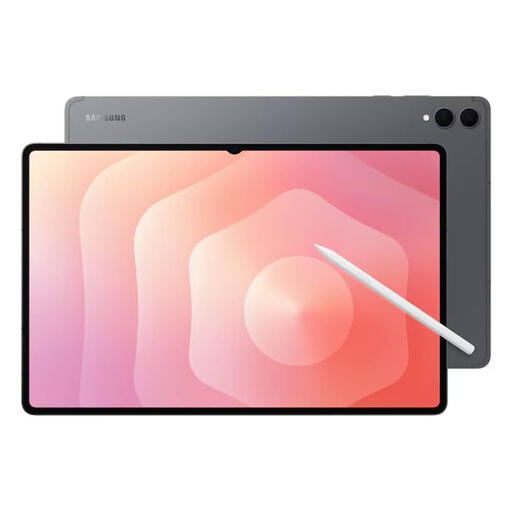
Consider its stated 14.6-inch display if viewing large report layouts at a desk is your priority. Check carrying weight, pen arrangements and the display with your own plans before deciding.
A larger screen is worth considering if full-page plans and dense illustrations are your main task. Samsung specifies a 12.4-inch display for the Galaxy Tab S10+, while Apple offers a 13-inch iPad Air; BOOX describes a smaller 10.3-inch Note Air5 C for readers considering colour ePaper. Try a representative report, because diagonal size alone cannot establish whether its labels and keys will be legible.
Some do, but inclusion depends on the exact model and listing. Samsung says an S Pen is bundled with the Galaxy Tab S10+, whereas Apple lists compatible Apple Pencils separately for iPad Air. Check the box contents before ordering any tablet for handwriting.
Open several of your actual PDFs and check navigation, zoom, search and any annotation tools you need. Include scans, photographs, plans and colour-coded drawings, then confirm that a marked copy can be shared in the format your colleagues use.
Keep an old tablet out of general waste and use an appropriate electrical-equipment recycling route. Oxfordshire County Council identifies battery-powered electronics as waste electrical and electronic equipment and advises against putting them in general waste. Remove your personal data before handing the tablet over.