For reviewing a beach-access map in a hotel room, start with a tablet around 11 inches and decide how you will prop it up. A built-in or compatible stand matters for hands-free viewing; prepare an offline map if the connection may be unreliable, and prioritise a pen or outdoor-oriented features only if you expect to use them.
Who needs which setup?
Hotel-room map reviewers
If the map will stay open beside a bed or on a desk, focus on readable screen area and a stable viewing angle. Lenovo lists an 11.5-inch display and a built-in kickstand for its Tab Plus; those features address this room-based task without requiring you to hold the tablet throughout.
Offline-ready holiday planners
If hotel Wi-Fi may be slow or unavailable, prepare the relevant map area before travelling. Google Maps Help says offline navigation requires the whole route to fall within the downloaded area; walking directions are unavailable offline, so keep any essential access instructions separately.
Map annotators with occasional outdoor use
If you intend to mark routes or notes and sometimes carry the tablet outside, check pen compatibility, what comes in the box and the conditions attached to display-brightness claims. Apple lists Pencil compatibility for iPad Air, while Samsung specifies a High Brightness Mode for Galaxy Tab S10 FE.
What matters when choosing?
Settle the room-viewing position and map-access plan before paying for annotation or outdoor features. The table separates these needs by the concern each group of consumers puts first.
| Concern |
What to check |
Who this matters to |
| Map area and viewing position |
Compare screen size and resolution, then check for an integrated stand or a compatible case stand. |
If I will study small paths and labels at a hotel desk, I want the map upright without holding the tablet. Roughly 37% of consumers put readable, hands-free viewing first. |
| Access without hotel internet |
Check offline downloads in your chosen map app and save an area covering the intended route; Google Maps does not provide walking directions offline. |
When the connection drops, I still need the map covering my route. For around 27% of consumers, dependable map access is the primary concern. |
| Route annotation |
Confirm pen compatibility and whether the exact bundle includes a pen; check that your intended app can mark up maps or screenshots. |
If I plan to circle an entrance or add access notes, I need a workable way to annotate them. Approximately 18% of consumers place annotation first. |
| Carrying and occasional outdoor use |
Check the exact model’s weight and the conditions behind its brightness and water- or dust-resistance specifications. |
If the tablet will leave the room for a terrace or beach-access point, carrying comfort and visibility become more pressing. Outdoor use is the leading concern for roughly 18% of consumers. |
What is easy to overlook?
-
Relying on hotel Wi-Fi for every map task
A downloaded Google Maps area can help when internet access is slow or unavailable, but Google Maps Help says the entire route must be within that area. Walking, cycling and public-transport directions are unavailable offline.
Download an area covering the hotel, beach and intended access route before travel, and save walking-specific instructions separately.
-
Choosing screen size without planning where the tablet will sit
A larger display alone will not keep a map upright on a bedside table. Lenovo lists a 175-degree integrated kickstand for Tab Plus; another tablet may need a suitable case.
Check the viewing position you need and whether the exact tablet or its compatible case can hold it steadily.
A separate stand case may be needed if the tablet has no suitable integrated stand.
-
Reading brightness figures as directly comparable results
Samsung’s stated up-to-800-nit figure for Galaxy Tab S10 FE applies in High Brightness Mode, while Lenovo lists a 400-nit panel for Tab Plus. Those figures do not establish how the two screens compare in the same viewing conditions.
Give outdoor brightness more weight only if you expect to inspect maps outside, and check the conditions attached to the exact model’s specification.
-
Assuming charging and annotation accessories are included
Samsung UK says the Galaxy Tab S10 FE line does not include a travel adapter. Apple documents compatible Pencils for iPad Air, but compatibility alone does not establish what a particular bundle contains.
Check the exact listing for its power adapter, cable and compatible pen before ordering.
Depending on the model and bundle, a travel adapter or compatible pen may need to be obtained separately.
Relevant brands for reference
Apple
Apple’s 11-inch iPad Air is a route for room-based map viewing when carrying weight and optional Pencil annotation matter.
- Apple lists an anti-reflective display coating, 500-nit brightness and support for Apple Pencil Pro and Apple Pencil (USB-C).
- Apple lists the 11-inch Wi-Fi model at 464 g and the 13-inch Wi-Fi model at 616 g: choose between viewing area and carrying weight, and check Pencil bundle contents separately.
Samsung
Samsung’s Galaxy Tab S10 FE is a 10.9-inch Android option for consumers who may also inspect maps in bright outdoor areas.
- Samsung specifies up to 800 nits in High Brightness Mode, S Pen support and IP68-rated water and dust resistance for the model.
- The brightness figure depends on that mode, and a manufacturer water- and dust-resistance rating is not a reason to expose the tablet unnecessarily to sand or water. Samsung UK says the line does not include a travel adapter.
Lenovo
Lenovo’s Tab Plus suits a room-first setup built around hands-free viewing on a desk or bedside table.
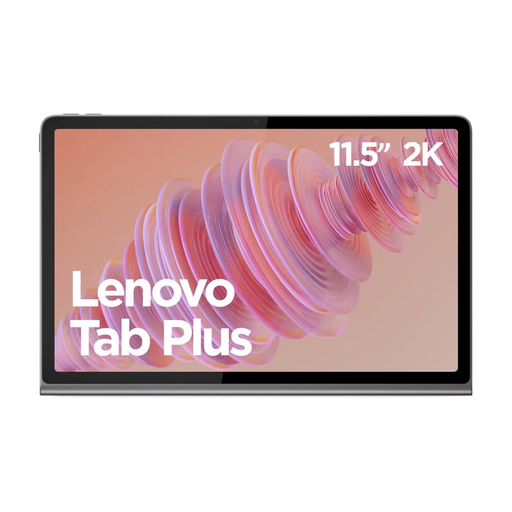
- Lenovo lists an 11.5-inch, 2000 × 1200 display and a 175-degree kickstand for Tab Plus.
- Lenovo specifies 400 nits for the display. If outdoor viewing is important, assess that need separately rather than treating the room-viewing setup as sufficient for every lighting condition.
Joybuy tablets for map review
These tablets address different parts of hotel-room map review: an integrated stand, bundled annotation tools, more screen area or a cellular option. Check the exact variant’s viewing setup and your preferred map app before choosing.
 No image available
Lenovo Tab Plus 128GB Grey
Consider this model if the map will stay open on a hotel desk: Lenovo lists an 11.5-inch, 2000 × 1200 display and a 175-degree kickstand for Tab Plus. Check your map app’s offline-download options before travelling.
View on Joybuy
 No image available
TABWEE T20 10.1-inch, 256GB, with keyboard, mouse and stylus
The named stylus makes this a candidate if you want to mark up route notes as well as view a map. Its stated 10.1-inch screen is smaller than the approximately 11-inch options here; check whether that viewing area works for your map.
Purchase link unavailable
 No image available
TECLAST ArtPad Pro 2025 Edition, 12.7-inch 2K, 256GB, with stylus
If you want a larger surface for examining map detail and an included stylus for notes, this variant names a 12.7-inch 2K display and stylus. Check its weight and how you would support it on a hotel desk before committing to the larger size.
View on Joybuy
 No image available
Xiaomi Pad 7 Gray, 8GB RAM, 128GB, Focus Pen included
This variant names an included Focus Pen for consumers who intend to annotate access notes. If hands-free map viewing matters, check for a stable compatible stand or case; check the charging equipment you will need as well.
View on Joybuy
 No image available
TABWEE W90 11-inch, 256GB, dual-SIM 4G LTE
The named 4G LTE option is worth considering if you expect to use mobile connectivity away from hotel Wi-Fi. For room viewing, check how the 11-inch tablet will be propped up; download needed map areas before travel if you intend to rely on them offline.
Purchase link unavailable
Common questions
Is a Wi-Fi-only tablet enough for a beach-access map in a hotel room?
Yes, if you can use the hotel connection or prepare the map area beforehand. Google Maps Help says a downloaded area can guide you when internet access is slow or unavailable, provided the whole route stays within that area.
Will Google Maps give me walking directions offline?
No. Google Maps Help says walking, cycling and public-transport directions are unavailable offline. Save the walking route or written beach-access instructions separately if you may need them without a connection.
Do downloaded Google Maps areas need updating?
Yes. Google Maps Help says offline maps need updating before they expire and may update automatically over Wi-Fi when they are within 15 days of expiry. Check your saved area before setting off rather than relying on an automatic update.
Can I assume a power adapter comes with the tablet?
No. Samsung UK says the Galaxy Tab S10 FE and S10 FE+ do not include a travel adapter. Check the contents and charging requirements of the exact tablet bundle you choose before travelling.


