For mainly checking calendars, PDFs and messages, start with a portable tablet around 11 inches if your schedule service works on it and Wi-Fi or a phone hotspot meets your needs. Prioritise a compatible pen if you mark up schedules, or a larger screen if you regularly view notes alongside them; for a bright cafe seat, check screen readability rather than relying on a brightness figure alone.
Who is this for?
Quick schedule checkers
If you open a calendar, PDF or group message between journeys and rehearsals, a tablet that is easy to carry may matter more than extra workspace. Apple lists its 11-inch iPad (A16) Wi-Fi model at 477 g as one reference point.
Schedule annotators
If you mark call times or rehearsal PDFs by hand, check both pen compatibility and what comes in the box. Samsung lists an S Pen with the Galaxy Tab S10 FE; Lenovo offers an Idea Tab Plus configuration with a pen.
Long-session organisers
If you keep a timetable beside notes or messages, a larger screen may be worth carrying. Lenovo lists a 12.1-inch Idea Tab Plus configuration weighing around 530 g; check the exact configuration before comparing it with a smaller tablet.
What matters when choosing?
Start with how you use the schedule: quick reference, reading in bright seating, handwritten changes or dependable access to live updates. The concerns below separate consumers by the need they would put first; other needs can still affect the final choice.
| Concern |
What to check |
Who this matters to |
| Carry comfort |
Compare the exact model’s weight and whether its case adds bulk at a small cafe table. |
If I pull up a schedule briefly between journeys, I want a tablet that is easy to bring along; around 33% of consumers would put carry comfort first. |
| Screen readability |
Check how a familiar PDF looks near a window, and distinguish typical, peak and conditional high-brightness figures. |
At a bright table, I need to read call times without struggling with reflections; roughly 25% of consumers would make screen readability their primary concern. |
| Handwritten notes |
Confirm the supported pen, whether it is included and whether your preferred app allows PDF annotation. |
When rehearsal changes need marking on a schedule, I want handwriting to fit my workflow; around 25% of consumers would prioritise annotation. |
| Access and security |
Decide whether Wi-Fi or a phone hotspot will suffice, and protect schedule-related accounts with updates and two-step verification. |
If call times change while I am away from home, I need dependable access to the live schedule; about 17% of consumers would put access and account security first. |
Buying pitfalls
-
Assuming every accessory is in the box
Samsung lists an S Pen and data cable with the Galaxy Tab S10 FE but excludes a travel adapter. Lenovo says the folio keyboard for its researched Idea Tab Plus configuration is sold separately.
Check the contents of the exact package against the pen, charger, case or keyboard your workflow requires.
-
Treating brightness figures as interchangeable
Samsung’s figure of up to 800 nits for the Galaxy Tab S10 FE applies to High Brightness Mode. Lenovo distinguishes 600 nits typical from 800 nits peak for its researched Idea Tab Plus configuration; neither label guarantees readability at every cafe table.
Compare figures under their stated conditions and, if possible, view a familiar calendar or PDF near a bright window.
-
Choosing cellular without checking where you connect
Apple offers separate Wi-Fi and cellular iPad (A16) variants. Mobile-network access is useful when it solves a recurring problem, not simply because schedules can change.
Review where you check live schedules. Wi-Fi or a phone hotspot may cover your routine; consider a cellular variant if you repeatedly need independent mobile access.
-
Overlooking the account behind a shared schedule
A calendar or shared document may be tied to an online account. The National Cyber Security Centre recommends software and app updates and two-step verification to help protect accounts.
Update the tablet and schedule apps, and turn on two-step verification for the linked account where available.
Brands to consider
Apple
Consider the iPad route if your schedule service works on iPadOS and you prefer an 11-inch device for routine viewing.
- Apple lists the iPad (A16) Wi-Fi model at 477 g with an 11-inch display and Apple Pencil compatibility.
- Check the exact screen treatment if reflections matter: Apple lists an anti-reflective coating for the iPad Air, but not for the base iPad (A16) in the cited specifications.
Samsung
The Galaxy Tab S10 FE is a route to consider when handwritten schedule changes and bright seating are priorities.
- Samsung lists a 10.9-inch display, an included S Pen and up to 800 nits in High Brightness Mode.
- That brightness figure is conditional, and Samsung says a travel adapter is not included.
Lenovo
The researched Idea Tab Plus configuration suits buyers who want more room for a timetable and notes and can carry a larger tablet.
- Lenovo lists a 12.1-inch display, a pen and a weight of around 530 g for that configuration.
- Lenovo says its folio keyboard is sold separately; check the configuration and included accessories before choosing.
Joybuy products for this task
These tablets offer different sizes, screen formats and accessory arrangements for viewing a rehearsal schedule or making notes. Match the exact model to your schedule service, the light where you sit and what you need to carry.
 No image available
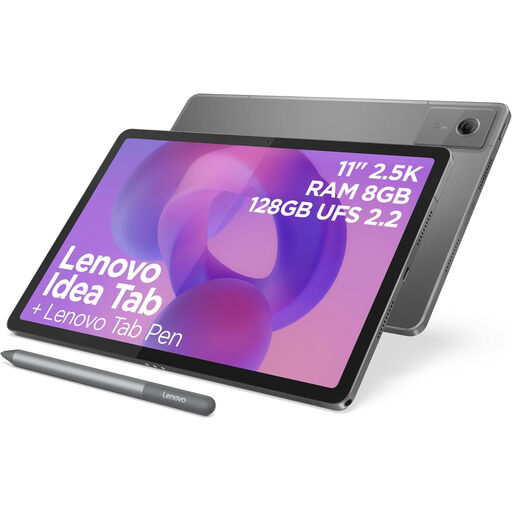
Lenovo Idea Tab 11-inch 2.5K 128GB tablet
Consider this 11-inch tablet for schedule viewing if your preferred service works on it. Check the package if you plan to annotate by hand: the Precision Pen is optional.
View on Joybuy
 No image available
iFLYTEK AINOTE 2 10.65-inch E-Ink tablet with protective case
Consider this E-Ink device for handwritten rehearsal notes if your schedule service works with it. Check visibility in your usual cafe lighting: it has no reading light.
View on Joybuy
 No image available
Xiaomi Pad 7 Gray 8GB/128GB with Focus Pen
Consider this model if you want to mark up rehearsal notes with the included Focus Pen. Check its weight and how your schedules look in the lighting you normally use.
View on Joybuy
 No image available
Samsung Galaxy Tab A11+ Gray 8GB/256GB Wi-Fi
Consider this Wi-Fi model for opening schedules when you have a suitable connection. If you often sit near bright windows, check screen readability, and confirm whether the package includes the charger you need.
View on Joybuy
 No image available
Apple iPad Pro 11-inch (M5) Wi-Fi 256GB, Standard Glass, Silver
Consider this iPadOS model if your schedule service works on it and you want an 11-inch screen. For handwritten mark-up, check Apple Pencil compatibility with the exact model; the Pencil is sold separately.
View on Joybuy
Common questions
Is an 11-inch tablet large enough for a rehearsal schedule?
An 11-inch tablet is a practical starting point if you mainly open calendars, PDFs and messages one at a time. If you regularly keep a timetable beside notes, compare the layout on a larger model, such as Lenovo’s 12.1-inch Idea Tab Plus, against the extra size you would carry.
Do I need cellular connectivity in cafes?
Not if trusted Wi-Fi or your phone hotspot reliably covers your schedule checks. Consider cellular when you repeatedly need live updates without either connection; Apple lists mobile-network capability for cellular, rather than Wi-Fi-only, iPad (A16) variants.
Will a pen, charger or keyboard be included?
It depends on the exact package, so check its contents before choosing. Samsung lists an S Pen and data cable but no travel adapter with the Galaxy Tab S10 FE; Lenovo lists a pen with the researched Idea Tab Plus configuration but sells its folio keyboard separately.
How can I protect a shared schedule account while using a cafe?
Keep the tablet and schedule apps updated, and enable two-step verification for the linked account where offered. The National Cyber Security Centre recommends both measures for protecting devices and online accounts.


