If calls will usually happen on reliable Wi-Fi, start with a Wi-Fi tablet, the family’s chosen calling app and a stand that works comfortably in the relative’s usual seat; consider cellular only for regular trips or a genuine Wi-Fi gap. Test the screen, sound and controls in the intended position, and check the care home’s Wi-Fi, charging and setup arrangements before choosing a model. A refurbished tablet may suit a tighter budget, but check its condition, previous-owner account locks and available updates.
Who this guidance is for
Families setting up straightforward calls
If the relative needs help with menus or account access, plan the calling app, accessible controls and ongoing support together. Age UK covers device accessibility, while Apple Support explains options for calls and account recovery.
Families replacing a small screen
If the relative struggles to see or hear calls from their usual seat, try the screen, sound and hands-free position there rather than choosing by display size alone. Apple UK and Samsung UK list 11-inch tablet options, but a call in the intended setting is still useful.
Families planning calls away from Wi-Fi
If calls may happen outside reliable Wi-Fi, check where the tablet will be used and whether mobile data is actually needed. Age UK notes that video calling uses data, and Ofcom provides predicted indoor and outdoor mobile-coverage information.
What to prioritise
For a tablet intended mainly for family calls with a relative in residential care, decide where calls will happen first, then check the calling app and the setup the relative can use comfortably.
| Concern |
What to check when buying |
Who this matters to |
| Straightforward calls and support |
Try a complete call; check the app on both ends, control size, account ownership and recovery arrangements. |
If I am setting this up for a relative who needs help with menus, I want a call routine we can maintain together. About 24% of consumers put simple, supportable calling first. |
| Seeing and hearing the call |
Try the display, camera position and sound from the relative’s usual seat, at the intended viewing distance. |
From the usual seat, I need the caller to be visible and audible without having to hold the tablet. A viewable, audible call is the main priority for about 24% of consumers. |
| Connection where calls happen |
Ask about Wi-Fi at the call location; check actual trips without Wi-Fi and predicted indoor coverage before choosing cellular. |
If calls may happen where Wi-Fi is unavailable or unreliable, I want to know whether mobile data will work there and what allowance is needed. About 19% of consumers prioritise calls without dependable Wi-Fi. |
| Stable positioning and charging |
Try the exact tablet and stand together on the intended surface; ask the care home about charging and setup help. |
When the tablet will stay near one seat, I want a hands-free position that is practical to charge and use. Around 19% of consumers put a stable, maintainable setup first. |
| Purchase cost and usable life |
For the exact device, check condition, available updates, calling-app support and any previous-owner account lock. |
If I am considering a refurbished tablet, I need its condition and support to suit the planned calling routine. About 14% of consumers prioritise manageable cost without losing app or update support. |
Pitfalls to avoid
-
Choosing cellular before checking the actual connection
Predicted outdoor coverage does not establish reception in the room, and reliable Wi-Fi may already meet the need. Mobile data can also use an allowance or incur charges.
Ask the care home about its Wi-Fi and check the locations where calls will take place. If mobile data is needed, use Ofcom’s coverage information as an initial check and confirm the exact network and data arrangement.
-
Relying on an outdated calling-app recommendation
Microsoft says Skype retired on 5 May 2025, so older instructions recommending it may no longer fit the family’s plans.
Agree on a currently usable app with the family and make a test call on both devices before settling on a tablet.
-
Assuming a refurbished tablet is ready for a new user
A used iPad may still be linked to its previous owner, and older Android devices cannot always run newer versions.
Check the seller’s condition information, account-lock status, available updates and support for the intended calling app before buying.
-
Treating a folding cover as proof of a suitable stand
A cover’s advertised positions do not establish that it will sit securely on the relative’s surface or work with their charging arrangement.
Check that the case fits the exact tablet model and try the complete setup at the intended calling position.
Relevant brands to consider
Apple
Apple’s UK iPad (A16) range includes Wi-Fi and cellular variants with an 11-inch display. Apple’s Assistive Access includes a Calls app that supports FaceTime video.
- Apple Support describes Assistive Access as a focused setup for users who may benefit from it.
- Check that the relative and family can use the intended calling experience; these features do not establish that the setup will suit everyone.
Samsung
The UK Galaxy Tab A11+ is available in Wi-Fi and 5G models. Samsung also offers a model-specific Book Cover.
- Samsung specifies an 11-inch display, a 5 MP front camera and quad speakers for the cited Wi-Fi model.
- The Book Cover is a separate accessory for the specified model; manufacturer specifications are not a test of call quality.
Lenovo
The UK Tab M11 is another 11-inch Android option to assess for screen, camera and accessory fit.
- Lenovo lists an 11-inch display and an 8 MP front camera for a UK Tab M11 configuration.
- Check the exact configuration, software support and calling app rather than assuming these details apply to every Lenovo tablet.
Joybuy tablets for family video calls
These Joybuy options include Wi-Fi and cellular tablets for family video calls. Check calling-app compatibility and local connectivity for the exact model before choosing.
 Image unavailable
Samsung Galaxy Tab A11+ 11-inch 128GB Wi-Fi, Grey
A Wi-Fi model to consider for calls where reliable Wi-Fi is available; check that the chosen calling app works for both people.
The listing identifies an 11-inch display, 128GB storage and a Wi-Fi connection.
Joybuy
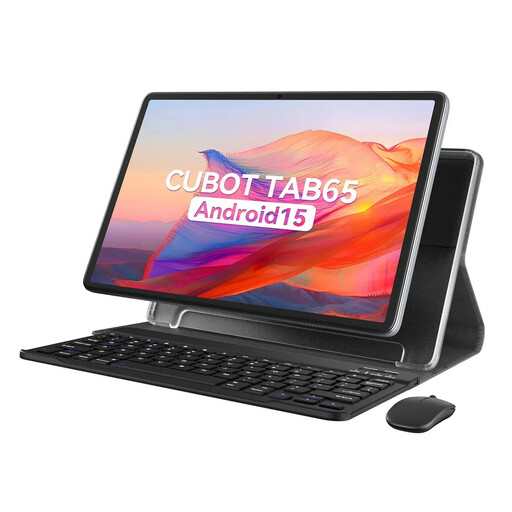 Image unavailable
CUBOT Tab 65, 12GB + 128GB/1TB, 10.1-inch
Consider this Wi-Fi tablet for calls where Wi-Fi is reliable; confirm the calling app and whether the planned stand or case suits the relative’s usual position.
The product name specifies an HD+ 90Hz screen, Android 15, Wi-Fi and OTG.
Joybuy
 Image unavailable
TECLAST T65, 13.4-inch, Dual SIM 4G
Its stated cellular option may be relevant for calls away from Wi-Fi; check indoor reception, data arrangements and app compatibility before choosing it for a care-home room.
The product name specifies a 120Hz display, Android, 26GB RAM (6GB + 20GB virtual), 128GB storage and dual-SIM 4G with Wi-Fi 5G.
Joybuy
 Image unavailable
TECLAST ArtPad Pro, 12.7-inch 2K, Dual SIM 4G LTE
Consider its stated cellular connection only if calls need to work away from reliable Wi-Fi; check actual coverage and the family’s calling app.
The product name specifies a 12.7-inch 2K display, Android 15, 256GB storage and dual-SIM 4G LTE with 5G Wi-Fi.
Joybuy
 Image unavailable
DOOGEE Tab E3+, 12-inch, SIM card slot
A tablet with a SIM card slot to consider if calls may need mobile data; confirm the required network, coverage and calling app for the intended location.
The product name specifies Android 15, an FHD+ 90Hz display, a SIM card slot and quad speakers.
Joybuy
Frequently asked questions
Can the family rely on an older guide that recommends Skype?
No. Microsoft says Skype retired on 5 May 2025. Agree on a currently usable calling service and test it on both devices before choosing the tablet.
How should we prepare the tablet if the relative finds menus difficult?
Try accessible display and interaction settings with the relative. If Apple’s focused interface suits their needs, its Assistive Access Calls app supports FaceTime video; also arrange a way to recover account access.
How should we arrange the stand and charging?
Test the stand’s angle and stability on the surface where calls will happen, including access to the charging port. Ask the particular care home about setup help, charging arrangements and suitable calling times.
Will a SIM guarantee calls inside the care home?
No. Ofcom distinguishes predicted indoor and outdoor mobile coverage by location, but a prediction does not confirm reception in a particular room. Check the intended network at the call location; mobile-data use may incur charges if the allowance is exceeded.
What return period applies to a tablet bought online from a UK trader?
GOV.UK says that, for most distance-sold items, a customer generally has 14 days from receiving the item to tell the seller they want to cancel, followed by another 14 days to return it. Exceptions may apply, and cancellation rights are separate from remedies for faulty goods.


