What matters when choosing?
Start with the software you will use to maintain the catalogue, then weigh the work you will do around the home against the time you will spend entering and reviewing records at your desk. A tablet with a suitable camera still needs an app that can attach images to the right entries; a keyboard is useful only if the software and bundle suit your workflow.
| Concern |
What to check |
Who this matters to |
| Photos and documents |
Check the rear camera and whether your inventory app can attach item photos and document scans. |
If I am moving between rooms, I want to photograph an item and attach its paperwork before I forget where it belongs. For around 42% of consumers, capturing those records would be the primary concern. |
| Desk entry and software |
Confirm that your spreadsheet, database or inventory app runs on the chosen operating system; check the exact keyboard bundle. |
When I have many descriptions and locations to enter, comfortable typing and access to my chosen software take priority. Roughly 33% of consumers would put that desk-entry need first. |
| Storage and review |
Choose an internal-storage variant for the files you intend to keep locally, and check expansion and backup options for that model. |
With a growing collection of item photos and reference files, I need a manageable way to store and review them. For about 25% of consumers, that would be the main consideration. |
Joybuy tablets for this task
These tablets provide options for creating and maintaining a household catalogue with a tablet-based workflow. Compare their stated configurations with the app you intend to use, particularly if photographs, local files or keyboard entry will be central to your records.
 Image unavailable
TECLAST ArtPad Pro 12.7-inch 2K 256GB (2025 Edition)
Consider this larger-screen Android tablet if you want to capture belongings and review their records on the same device.
The product name lists a 12.7-inch 2K display, 256GB storage, 8MP and 13MP cameras, Android 15 and an included stylus. Check that your inventory app can attach photos, and confirm the keyboard arrangement if you will enter many records at a desk.
View on Joybuy
 Image unavailable
HONOR MagicPad 4 256GB Grey
The 256GB configuration is worth considering if you plan to keep catalogue files on the tablet.
Before using it for room-to-room capture or desk entry, check its camera and photo-attachment workflow with your chosen app, along with the contents of any keyboard or pen bundle.
View on Joybuy
 Image unavailable
SAMSUNG TAB A11+ SM-X230 6/128GB Silver
This 128GB tablet is an option for a household catalogue if its camera and your chosen app meet your capture needs.
The named configuration is 6/128GB. Check photo attachment and any keyboard requirements before committing to a desk-based workflow.
View on Joybuy
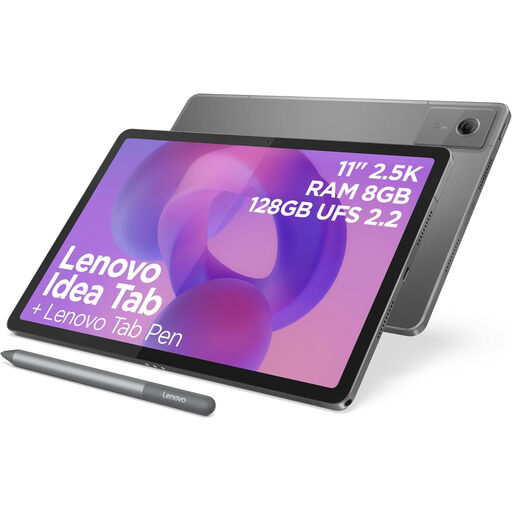 Image unavailable
Lenovo Idea Tab 11-inch 2.5K 128GB
Consider this model if an 11-inch screen and a defined 128GB configuration suit the way you will review and store records.
Check that the intended inventory app runs on the tablet and confirm the exact keyboard or pen bundle if you plan to type or annotate entries.
View on Joybuy
 Image unavailable
TABWEE T20 10.1-inch 256GB with keyboard, mouse and stylus
If you expect to enter records at a desk as well as capture items, this tablet is listed with typing and pointing accessories.
The product name lists a 10.1-inch display, 256GB storage and an 8MP camera. Confirm the supplied Android version before checking inventory-app compatibility, as the version is stated inconsistently in the product information.
View on Joybuy
Common questions
Do I need a high-resolution rear camera for a household inventory?
Not necessarily: what matters is whether you can capture the items and paperwork you need and attach the images to the right records. Apple lists a 12MP rear camera and document scanning for the iPad 11-inch (A16), while Samsung lists a 13MP rear camera for the Galaxy Tab S10 FE; check the photo workflow in your chosen inventory app as well as the camera specification.
Should I get a keyboard for cataloguing belongings?
A keyboard is worth considering if you will repeatedly enter descriptions, locations or spreadsheet data at your desk. Apple describes Magic Keyboard Folio compatibility for the iPad 11-inch (A16), Lenovo says the Idea Tab Plus Folio Keyboard is sold separately, and Microsoft describes attaching a keyboard to turn the Surface Pro 12-inch into a laptop-style setup. Check the contents and layout of the exact bundle.
Is a Windows 2-in-1 necessary for a household catalogue?
A Windows 2-in-1 is most relevant when your catalogue depends on desktop Excel, a Windows database or another Windows-only application. If an iPad or Android app or a browser-based tool meets your recording and export needs, choose between those tablet routes on capture, storage and typing requirements instead.
Do I need to pay a UK data protection fee for a personal household catalogue?
For personal information processed only for personal, family or household affairs, the Information Commissioner's Office says the data protection fee is not payable. If you intend to use the catalogue beyond those purposes, check the rules applicable to that use.
What should I do with an old tablet when replacing it?
Consider reuse or an appropriate electronics recycling route for an old tablet in the UK. GOV.UK describes waste electrical and electronic equipment regulations as encouraging recovery, reuse and recycling; ask your retailer or local authority which collection options are available to you.


