Room-by-room photo cataloguers
If you photograph belongings, labels, receipts and serial numbers as you move through the home, plan for local photo storage and confirm how your chosen app exports and backs up records.


For photographing belongings around the home and reviewing records in a quiet study, start with a tablet you can carry comfortably and use at a desk. Choose its storage capacity alongside an inventory app that meets your needs for export, offline use and backup. A pen matters more if you regularly handwrite notes; a stand matters more if the tablet will usually stay on the desk.
If you photograph belongings, labels, receipts and serial numbers as you move through the home, plan for local photo storage and confirm how your chosen app exports and backs up records.
If you add condition notes, box labels or annotations by hand, check pen compatibility and whether the pen comes with the exact tablet package.
If you mainly enter descriptions and review lists or photographs in a quiet study, consider screen size and desk support. Check keyboard compatibility if you expect to type longer entries.
Settle on the inventory app and how you will keep a backup before choosing storage or accessories. Then weigh room-to-room use against the time you will spend reviewing records at your desk.
| Concern | What to check | Who this matters to |
|---|---|---|
| Photos and records | Check the rear camera, the storage tier and whether your app can retain, export and back up the photos you need. | If I photograph labels and receipts as well as the objects themselves, I need room for those records and a way to keep a copy. Around 36% of consumers would put capturing and retaining this evidence first. |
| Notes and annotation | Confirm pen compatibility, package contents and whether the app accepts the kind of handwriting or keyboard input you intend to use. | When I regularly mark box locations or record an item's condition, entering notes easily is my priority. For around 29% of consumers, note entry would come first. |
| Desk comfort | Compare display size and weight, and check whether the tablet has suitable desk support. | If I spend longer reviewing room lists and photographs than taking them, I want a screen I can position comfortably at my desk. Desk-based review would be the main concern for around 21% of consumers. |
| Package contents | Read the exact package list for a pen, wall adaptor or other accessories you need. | If I need the tablet ready for handwriting or desk use, I do not want to assume an accessory is in the box. Checking package contents would take priority for around 14% of consumers. |
A camera and storage capacity cannot tell you whether your intended app handles barcode capture, offline work, exports or backup restoration.
Decide which records you need to keep, then check the app's operating-system compatibility, photo handling, export format and backup options before choosing a tablet.
A compatible pen is useful only if handwriting suits your workflow, and package contents vary. Samsung lists an S Pen in the Galaxy Tab S10 FE box, while Apple presents compatible Pencil options separately in its UK iPad purchase flow.
Check the in-box list for the exact model and configuration you intend to buy.
A supplied cable does not necessarily mean the package contains a wall adaptor. Samsung says the Galaxy Tab S10 FE excludes a travel adaptor; Xiaomi says the Pad 7 power adaptor is sold separately.
Check the package contents and whether you already have a suitable charger.
GOV.UK warns that products bought from sellers based outside the UK may not be manufactured or labelled in accordance with UK safety laws.
Before buying an electrical product, check who is selling it and look for manufacturer details, instructions and applicable product markings. Keep the product information for future reference.
Apple's iPad range is worth considering if your chosen catalogue app and household devices already fit an iPadOS workflow.
The Galaxy Tab S10 FE is relevant if handwriting and a storage-expansion option matter to your catalogue.
The Xiaomi Pad 7 offers an 11.2-inch, 3:2 display for working through lists and reviewing photographs at a desk.
The Lenovo Tab Plus is a desk-oriented option when you will spend more time consulting records than writing with a pen.
These tablets offer different screen sizes and listed storage configurations for photographing belongings or reviewing a catalogue at a desk. Choose an inventory app and check any pen or charger requirements for the exact package before deciding.
 Image unavailable
Consider this configuration if you plan to keep catalogue records on the tablet. It is listed with 256GB storage; check your intended app and the exact package if you also want to use a pen.
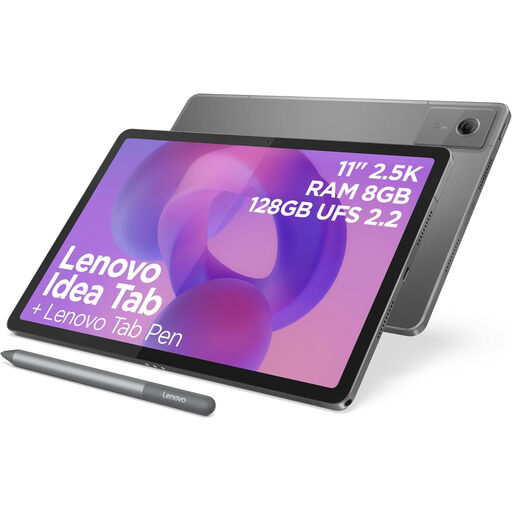 Image unavailable
Its 11-inch display gives you room to review lists at a desk while using the tablet around the home. This configuration lists a 2.5K display and 128GB storage; check whether your photo and backup plan suits that capacity.
 Image unavailable
Consider the listed 256GB configuration if you expect to keep many catalogue records locally. Confirm that your chosen app meets your photo, export and backup needs, and check the charger supplied with the exact package.
 Image unavailable
The Pad 7's 11.2-inch, 3:2 display is relevant if you frequently review lists and photos at a desk. This configuration lists 128GB storage; Xiaomi specifies a 13MP rear camera for the Pad 7. Confirm the exact package before relying on a Focus Pen or wall adaptor.
 Image unavailable
The larger display may suit a catalogue that you mainly review at a desk rather than carry from room to room. Its listed configuration has a 12.7-inch 2K display and 256GB storage. Confirm the exact pen and package contents if handwriting is important.
An approximately 11-inch tablet is a starting point if you need to carry it between rooms and read records at a desk. Compare its actual dimensions and weight with the space you have for reviewing lists and photographs.
You do not need one for a photo-and-list catalogue, but it may be useful if you regularly handwrite labels, condition notes or annotations. Check that your app accepts the input you want and that a compatible pen is included or available for the exact tablet.
Check the specific app's backup and restoration options before relying on it. Confirm where photos are stored, whether you can export records, how offline entries are handled and how you would restore the catalogue after losing a device.
Package contents depend on the model and configuration. Samsung lists an S Pen but no travel adaptor with the Galaxy Tab S10 FE; Xiaomi says the Pad 7 power adaptor is sold separately. Read the in-box list for the exact product you choose.
Check the seller's identity, manufacturer details, instructions and applicable product markings. GOV.UK warns that electrical products bought from sellers based outside the UK may not be manufactured or labelled in accordance with UK safety laws.