Guests charging one tablet
If the tablet is the only device needing a charger, focus on its connector, charging requirements and cable before considering extra ports.


For one tablet in a UK holiday cottage, start with a wall charger that meets the tablet maker’s charging requirements and a cable that fits its port. If several guests need the same socket, a multi-port charger can serve more devices; choose a desktop station when its mains lead helps you place the charging point somewhere practical. Check the output available when ports are used together and the connection to the UK socket rather than choosing by headline wattage alone.
If the tablet is the only device needing a charger, focus on its connector, charging requirements and cable before considering extra ports.
When a tablet, phones and other devices need the same charging point, count what will be plugged in at once and check how the charger divides its output.
In an unfamiliar room, the distance from the socket to a dry, usable surface can affect whether a plug-in charger or a station with a mains lead is more practical.
Choose the charger format around the devices sharing the socket and where they can be placed. Then check the particular tablet and cable: a USB-C socket on a charger does not establish what fits the tablet end.
Choose it when: One compatible tablet is the main device to charge and you have the correct cable.
Trade-off: One port cannot charge guests’ other devices at the same time; check whether a cable comes with the charger.
Choose it when: A tablet and other devices need to share one cottage socket.
Trade-off: Output is divided between connected devices, and a charger plugged directly into a socket behind furniture may be awkward to reach.
Choose it when: Several devices need a shared charging spot away from the wall socket.
Trade-off: A station takes up more space than a compact wall charger; check its lead length, UK connection and output with several ports in use.
| Concern | What to check | Who this matters to |
|---|---|---|
| Tablet and cable compatibility | Identify the tablet’s charging port and maker’s requirements; check that you have a matching cable and whether one is included. | I need to know my own tablet can be connected before I pack the charger, especially if it uses Lightning rather than USB-C at the tablet end. Around 40% of consumers put tablet and cable compatibility first. |
| Ports and shared output | Count devices charging together and read the stated output for that combination of ports, not just the maximum rating. | When several of us share one socket, I want the tablet and our other devices connected without assuming each port gets the headline output. Shared-device capacity comes first for around 30% of consumers. |
| Safe placement and reach | Confirm a suitable UK socket connection and enough reach to place the charger somewhere dry and uncovered, without daisy-chaining extensions. | With a socket in an inconvenient spot, I need a charging position that keeps leads clear and equipment away from water or heat. Roughly 30% of consumers prioritise safe placement and reach. |
The charger’s USB-C port does not tell you which connector the tablet needs. Some iPads use Lightning at the tablet end.
Check the tablet model and pack a cable with the correct connectors. Apple says its 20W USB-C Power Adapter is sold without a charging cable.
If you do not already have a compatible cable, you will need to obtain one separately.
Connecting more devices changes how a multi-port charger’s output is divided. Anker specifies different total outputs for one-, two- and three-device use of its Prime 67W three-port charger.
Read the output arrangement for the number of devices you expect to charge together, particularly if the tablet shares the charger with a laptop.
A damaged plug, lead or socket is a reason to stop using that charging position, not to work around it. Electrical Safety First also warns about risks from substandard or counterfeit USB chargers.
Use a charger from a reputable retailer, follow its instructions and keep it dry and uncovered. Stop using equipment that shows damage or scorch marks.
Electrical Safety First warns that connecting one extension device to another, or overloading one, can cause overheating and fire.
Use no more than one appropriately rated extension device per socket. Alternatively, consider a desktop charging station whose own mains lead reaches a suitable surface without another extension.
These examples show different charger formats, not a ranking of brands. Check the specifications of the particular model and variant you intend to use.
Apple’s 20W USB-C Power Adapter is a single-port option for compatible iPads.
Anker offers multi-port wall chargers and desktop stations for shared charging points.
UGREEN’s Nexode desktop station is an example of a fixed shared charging point with a mains lead.
Belkin’s USB-C charger range includes wall chargers aimed at charging tablets and other devices.
These plug-in multi-port chargers are relevant when a tablet may share a cottage socket with other devices. Check the exact tablet and cable for every option; if socket placement calls for a station with its own mains lead, assess that format separately.
 No image available
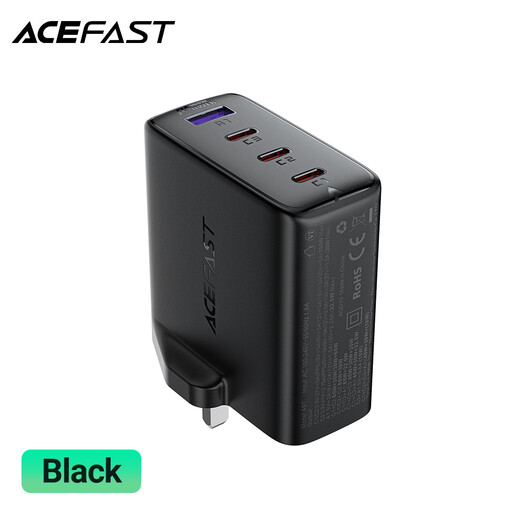
A plug-in option to consider when a tablet and other devices need one cottage socket.
The product information identifies three USB-C ports, one USB-A port, a 100W rating and a UK charger. Match the cable to your tablet and check the output arrangement if several ports will be used together.
 No image available
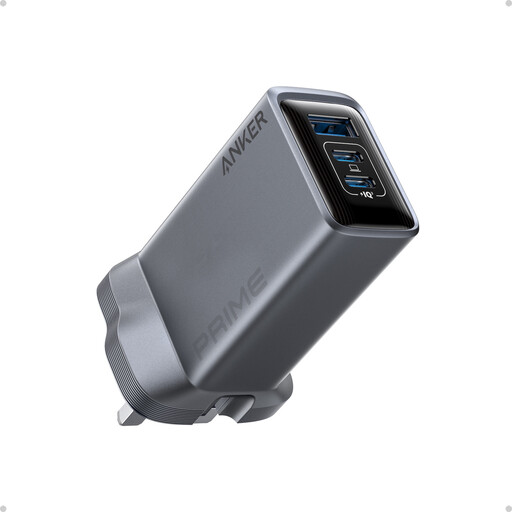
Consider this wall charger when an iPad or another compatible tablet will share a charging point with other devices.
Its product information lists two USB-C ports, one USB-A port and a 100W total rating, with output limits for multi-port use. Before taking it to a UK cottage, confirm the plug connection and the cable needed for your tablet.
 No image available
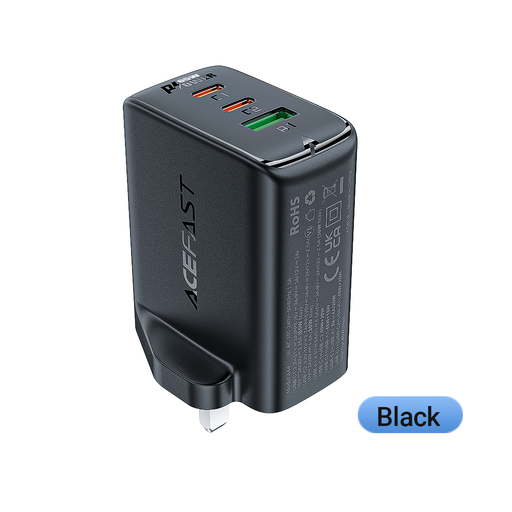
This is another plug-in arrangement for charging an iPad alongside other devices from one UK socket.
The product information states two USB-C ports, one USB-A port, a 65 W maximum output and an included UK plug. Check the tablet cable and the output available when several devices are connected.
 No image available
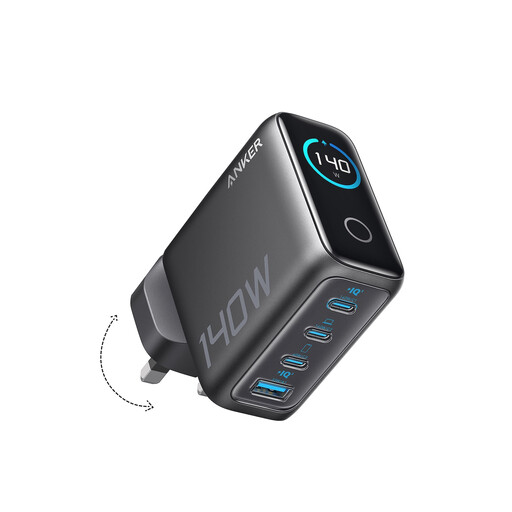
This four-port option is relevant when several devices need the charging point, rather than for its wattage alone when charging one tablet.
The product information states a 140W rating and four-device charging. Confirm the plug connection for a UK cottage, the cable and requirements of your tablet, and the output available across the ports you plan to use.
Not if the charger already has a suitable UK Type G plug or UK mains lead. Electrical Safety First states that the UK supply is 230 V at 50 Hz; if you bring a charger from elsewhere, check its input rating, because a travel adaptor changes the plug connection but does not convert voltage or frequency.
A 100W rating does not mean the tablet will charge at 100W. Charging depends on the compatible tablet, cable and charger, and a multi-port station divides its available output when other devices are connected. Check the tablet maker’s requirements and the charger’s output arrangement for your planned connections.
Use a dry position where the charger can remain uncovered and its lead will not be damaged or obstruct a walkway. Avoid using a plug, lead or socket that shows damage or scorch marks, and unplug the equipment when charging is finished.
It can be used with an appropriately rated extension arrangement that is not overloaded. Electrical Safety First advises using only one socket extension device per socket and not connecting extension leads to one another. Check the extension’s rating alongside the devices plugged into it.
For self-catering holiday homes in England, GOV.UK guidance dated October 2026 says operators must follow HSE guidance on electrical safety. If the property is elsewhere in the UK, check the guidance applicable to its location rather than treating the England guidance as a UK-wide rule.