Home video and casual-game families
Parents or carers choosing a screen mainly for video, approved apps and casual games at home, without making portable communication the reason to buy a phone.


Choose around the child's main activity and the supervision your household can maintain: consider a tablet for home video and casual games, a phone when portable communication is a deliberate need, or a console when gaming comes first. Set up a separate child account and check the relevant app, game and communication settings before handing over the device; parental controls do not cover every service or guarantee safety.
Parents or carers choosing a screen mainly for video, approved apps and casual games at home, without making portable communication the reason to buy a phone.
Families weighing game suitability, playtime, spending and communication settings before choosing a console or another gaming-capable device.
Parents or carers considering a phone because the child needs to communicate away from the main household screen as well as watch videos and play games.
For a child who watches videos, games online and communicates, decide which activity drives the device choice. Treat the child account and adult-managed settings as part of that choice, not something to sort out afterwards.
Consider it when: Video, apps and casual games are mainly used at home, without a need for an always-carried phone.
Bear in mind: A general-purpose tablet can also open messaging-capable apps, so household rules need to extend beyond screen time.
Consider it when: Portable communication is a genuine requirement alongside video and games.
Bear in mind: Personal messaging and portable access make ongoing app and communication supervision particularly important.
Consider it when: Gaming is the main activity and the household wants a game-focused device.
Bear in mind: Console settings differ by platform, and online play can still involve chat and purchases.
| Concern | What to check | Who this matters to |
|---|---|---|
| Home video and casual games | Check child-account setup, app-download permissions and content settings on the intended tablet. | I want one home screen for videos and approved games, without choosing a phone just for those activities; around 25% of consumers would put this flexible home use first. |
| Online gaming boundaries | Check game ratings, chat permissions and whether controls apply to an account or the whole console. | If online games are the main reason to buy, I need to understand who my child can play and communicate with; roughly 25% of consumers would make gaming boundaries their primary concern. |
| Portable communication | Confirm the intended phone supports the chosen child-account system and the communication settings you plan to use. | My child needs to communicate away from our main household screen, not just watch videos at home; about 19% of consumers would place that portable access first. |
| Family setup and supervision | Identify the adult managing the child account and check which device, store and service settings that person can control. | Before choosing hardware, I need a setup I can keep managing across apps, playtime and purchases; around 31% of consumers would prioritise that ongoing supervision. |
Apple, Google and console family controls have different account and adult-management requirements. The label on a device does not establish which settings your household can use.
Decide who will manage the device, then check the child-account and parent-device requirements for the specific system before buying.
Ofcom identifies parents' concerns about strangers, violent content and bullying in online gaming. A game-focused device does not remove chat or multiplayer features.
Check the game's PEGI age rating alongside the account, chat and purchase settings you intend to use.
Nintendo says Switch parental controls apply to the whole console, while PlayStation's controls are tied to accounts. Controls on a phone or tablet may also differ from those inside an app.
List the child's main video, gaming and communication services, and review device, account and service settings separately.
Microsoft says Xbox purchase approval is not needed when existing currency or Xbox gift cards are used.
Review payment methods, stored balances and game-specific purchase settings as well as store approval.
The useful distinction is how each system manages a child's account and settings. Check the particular device and services your household intends to use.
An iPhone or iPad route for households prepared to set up Family Sharing, a Child Account and Screen Time.
An Android-account route for households planning to supervise a child's Google Account through Family Link.
A Switch or Switch 2 route for gaming-first households using Nintendo's companion parental-controls app.
A console route for households prepared to use family management and a child account.
A console route for families wanting to manage gaming settings through the Xbox Family Settings app.
These tablets are options to examine if home video and games lead your choice. Before choosing one, check whether its child-account and app settings will work with the supervision your household plans to use.
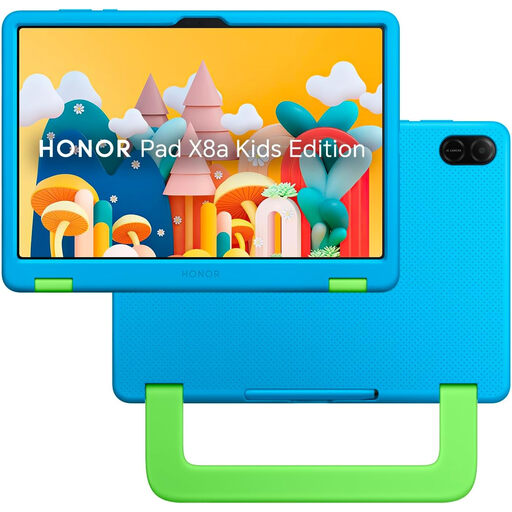 No image available
Consider this tablet for home video and games if its child-account arrangement fits the way your family plans to manage apps and use.
 No image available
Consider this tablet for home video and games if its child-account and management options suit your household.
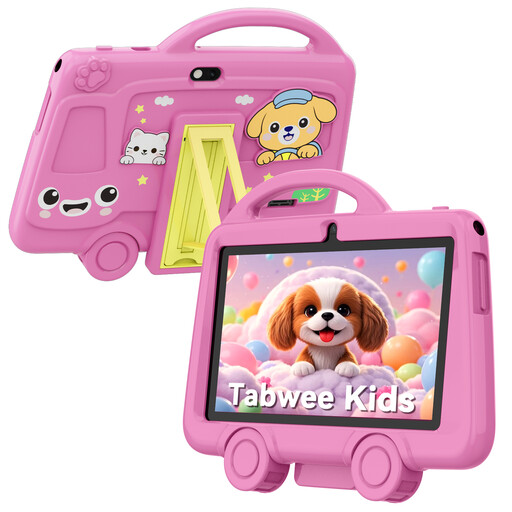 No image available
Consider this tablet for video and games where a 7-inch format suits the child's use, provided you can establish the supervision you need.
Use a separate child account if you plan to use Apple or Google family controls. Apple says family members need individual Apple Accounts, with a Child Account in the family group; Google supervision is attached to the child's Google Account. Check settings within the child's apps as well as on the device.
No: their scope depends on the platform, account and service. Nintendo says Switch controls apply to the whole console, whereas PlayStation ties parental controls to accounts. Check how the particular device and each intended game or app handle settings.
Not necessarily. Microsoft says Xbox approval is not needed when existing currency or Xbox gift cards are used. Review the account's payment methods, balances and in-game purchase settings alongside approval controls.
No. PEGI says its age rating concerns the suitability of game content, not difficulty. Consider the child's experience separately, and check the game's online communication features before allowing play.
No. Ofcom advises parents to check settings and talk regularly with children about games and contacts, particularly when online play involves people the child has not met offline. Device and account controls support those conversations; they are not a complete safety guarantee.