Choose the software workflow before the tablet: an iPad or Android model can suit drafting and proofing in mobile apps, while a Windows 2-in-1 is the clearer choice if the programme depends on desktop Office or Windows-only software. For repeated edits at a kitchen table, check the keyboard and viewing setup, then confirm pen compatibility and Microsoft 365 editing access if you need them.
Who each setup suits
Editors using desktop-style files
If the programme relies on desktop Office or Windows-only supporting software, a Windows 2-in-1 avoids making mobile apps the centre of the workflow. Microsoft Support says Office and email can be installed on a Surface Pro as they would be on a desktop computer.
Kitchen-table writers and proof-readers
If you mainly draft copy, read PDFs and make routine corrections, concentrate on a comfortable screen position and a keyboard you can use for repeated edits. Check that the document apps you intend to use handle your actual programme files.
Editors marking up proofs by hand
If you annotate programme drafts or supplied PDFs, check stylus compatibility for the exact tablet and whether the pen comes with the configuration you are buying. Apple, Samsung and Lenovo identify pen options for the tablet lines discussed here; inclusion varies by product or bundle.
What matters when choosing
For a concert programme prepared at a kitchen table, settle any essential software requirements before choosing the screen, typing arrangement and accessories.
| Concern | What to check | Who this matters to |
|---|
| Desktop files and software |
List the applications and file features the programme requires. For mobile Microsoft 365 apps, check editing rights for your plan and tablet screen size. |
If my programme depends on desktop templates or Windows-only tools, I need to keep using them while revising it; around 36% of consumers put desktop-file and software compatibility first. |
| Proofing and annotation |
Compare display sizes for your proofs and confirm that a compatible pen is available for the exact model. |
When I review page layouts and mark corrections by hand, I want enough room to see the proof comfortably; roughly 29% of consumers prioritise proofing and annotation space. |
| Long-form typing |
Check the keyboard layout and whether the keyboard and viewing support work on your table. |
Repeated changes to biographies, credits and running orders call for a typing position I can maintain; around 21% of consumers make typing comfort their primary concern. |
| Complete working setup |
Confirm the exact bundle contents and any software access needed for your files. |
I want to start drafting and marking up with the accessories I actually need, rather than assume they come with the tablet; roughly 14% of consumers prioritise a ready-to-use setup. |
Mistakes to avoid
-
Choosing the tablet without its working setup
Repeated copy edits can be awkward if the keyboard or viewing support you intended to use is absent. Microsoft describes Surface keyboards and pens as optional, while Lenovo lists these accessories in a specific Tab Plus bundle.
Check the contents of the exact offer and the compatibility of any keyboard, pen or case you plan to use.
-
Assuming mobile Office has the same editing access everywhere
Microsoft Support distinguishes document viewing from editing access, which can depend on the Microsoft 365 plan and device screen size.
Check your licence against the intended tablet and try a representative programme file in the apps you expect to use. If desktop software is essential, consider a Windows 2-in-1.
-
Matching accessories by brand rather than model
A keyboard cover or pen intended for a different tablet size or generation may not provide the typing or annotation setup you expect.
Match the exact tablet model and accessory compatibility before ordering. Samsung's cited keyboard cover, for example, is for the Galaxy Tab S10 FE+, not the smaller S10 FE.
-
Assuming similar product names identify the same configuration
Screen size, storage and included accessories can distinguish tablets with otherwise similar names.
Read the model and configuration details on the product page, especially when a title and description disagree, and confirm what comes in the box.
Relevant brands to consider
Apple
The iPad Air is a tablet-first option for working in iPad apps, with 11-inch and 13-inch display choices according to Apple UK.
- Apple UK specifies Apple Pencil Pro and Apple Pencil (USB-C) support for iPad Air.
- Check the keyboard and Pencil for the configuration you choose, and confirm Microsoft 365 editing access if it is part of your workflow.
Samsung
Samsung UK identifies the Galaxy Tab S10 FE as a 10.9-inch Android tablet with S Pen compatibility.
- The screen and compatible pen give you a route to reading and marking up programme proofs in Android apps.
- Check keyboard-cover compatibility against the exact tablet: a cover specified for the S10 FE+ should not be assumed to fit the S10 FE.
Microsoft
Surface Pro is a Windows 2-in-1 to consider when programme production requires desktop applications.
- Microsoft Support says Office and email can be installed on Surface Pro as on a desktop computer.
- Microsoft describes the keyboard and Slim Pen as optional; check the setup needed for typing and annotation.
Lenovo
The Lenovo Tab Plus Essentials Bundle is an Android option for drafting and reviewing when its included accessories suit the task.
- Lenovo UK lists an 11.5-inch display, 8GB memory, 256GB storage, a UK-English keyboard, Tab Pen Plus, sleeve and charger for that bundle.
- Check the precise bundle before ordering; an Android workflow does not replace software that requires Windows.
Tablet choices on Joybuy
These tablets offer mobile-app routes for drafting, reading or annotating a concert programme. Check your document workflow separately if you need desktop Windows software.
 No image available
TABWEE T20 10.1-inch tablet with keyboard, mouse and stylus
Consider this configuration if you want the listed typing and pen accessories for programme drafts. The title specifies a 10.1-inch display and 256GB storage; check your document apps before relying on it for editing.
View on Joybuy
 No image available
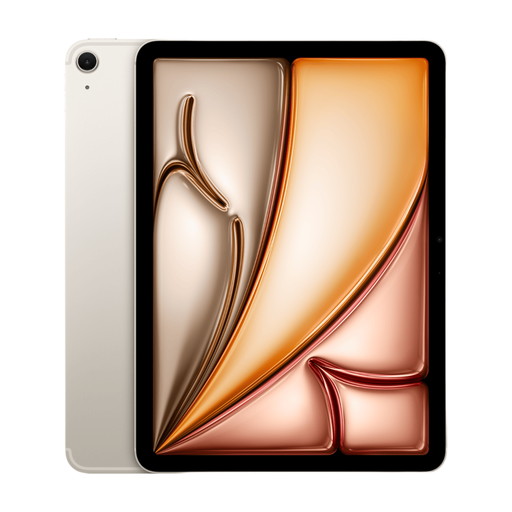
Apple iPad Air M4 Wi-Fi 256GB, Starlight
Consider this iPad Air for drafting and proofing in iPad apps. The product information conflicts on display size, so confirm the exact model before choosing it for page review; also check the keyboard, Pencil and Microsoft 365 access you would need.
View on Joybuy
 No image available
TECLAST ArtPad Pro 2025 Edition, 12.7-inch 2K, with stylus
The specified 12.7-inch display and included stylus make this a configuration to examine for reading and marking up proofs. It has 256GB storage; check the keyboard and viewing support you would use for longer typing sessions.
View on Joybuy
 No image available
Xiaomi Pad 7 Grey 8GB/128GB with Focus Pen listed
Consider the 11.2-inch tablet for reviewing programme pages and making pen annotations. The title says a Focus Pen is included, but the accessory details differ elsewhere in the product information; confirm the pen, charger and any typing accessories before ordering.
View on Joybuy
 No image available
TECLAST T65 13.4-inch 120Hz tablet, 128GB
The listed 13.4-inch display gives you a larger tablet format to consider for viewing programme pages. Check the display details and the keyboard, stand or stylus needed for your own editing routine, as well as compatibility with your document apps.
View on Joybuy
Questions about programme preparation
Do I need Microsoft 365 to edit my concert programme on a tablet?
Your editing access depends on the apps, Microsoft 365 plan and tablet you use. Microsoft Support says its mobile apps allow document viewing across plans, while editing access and additional features can depend on the plan and screen size; check your licence against the device before committing to that workflow.
When does a Windows tablet make more sense than an iPad or Android tablet?
Choose a Windows tablet when essential programme work requires desktop Office or Windows-only software that your mobile apps cannot handle. Microsoft Support says a Surface Pro can install Office and email as on a desktop computer; confirm that your other required applications run on the particular device you choose.
Will a keyboard and pen come with the tablet?
Check the exact configuration rather than assuming either accessory is included. Microsoft describes Surface keyboards and pens as optional, while Lenovo UK explicitly lists a keyboard and Tab Pen Plus in its Tab Plus Essentials Bundle; pen support alone does not establish that a pen is in the box.


