For PDF proofing and short edits in a train seat, start with a compact tablet; consider a Windows detachable when preparing the programme requires desktop software or sustained typing. Check your exact apps, fonts and export process before choosing an operating system, then account for the pen, keyboard and offline files you will need.
Who needs which setup?
PDF proof annotators
If you mostly read programme drafts and mark corrections by hand, look for a manageable tablet and an annotation method that works with your PDF app. Apple says Markup can annotate PDFs in supported apps, and current iPad Air models support compatible Apple Pencil models.
Desktop-workflow programme editors
If layout software, complex files or long typing sessions drive the work, check whether a Windows detachable can run your exact applications. Microsoft describes Surface Pro as a tablet that can be used with an optional keyboard in a laptop-style setup.
Android organisers who use a pen and offline files
If you want to carry programme materials and write notes on an Android tablet, Samsung lists an S Pen in the box with the Galaxy Tab S10 FE range and microSD expansion of up to 2TB. Check that your editing and export apps meet the programme's requirements.
What matters when choosing?
Settle the programme's app and file requirements before choosing a screen size or accessories; a comfortable train setup still needs to open, edit and export the right files.
iPad
Consider it when: Your work centres on PDF proofs, handwritten corrections and edits in compatible iPad apps.
Check first: Apple Pencil and keyboard options are separate accessories, and your production apps and exports must work on iPadOS.
Android tablet
Consider it when: Handwritten notes and locally stored programme files matter more than a desktop application; Samsung's Galaxy Tab S10 FE includes an S Pen.
Check first: Confirm your editing apps and the keyboard cover for the exact model if you expect to type extensively.
Windows detachable
Consider it when: Your programme depends on a Windows desktop application or regular laptop-style typing.
Check first: Microsoft sells the Surface Pro keyboard and Slim Pen separately; confirm that your particular software runs on the model you choose.
| Concern | What to check | Who this matters to |
|---|
| Apps and files |
Check your layout or notation app, required fonts and offline export process on the intended operating system. |
If the working programme must retain its layout and assets, I need my existing production process to work from start to finish. Around 33% of consumers would make app and file compatibility their primary concern. |
| PDF proofing |
Confirm pen compatibility or inclusion, and test annotation and export in the PDF app you use. |
When corrections arrive as PDF proofs, I want to mark them by hand and return a usable annotated copy. For around 25% of consumers, proofing would be the first priority. |
| Space and carrying |
Compare screen size and the combined weight and footprint of the tablet and any keyboard cover. |
I need to read programme pages without making the kit awkward to hold or use in a confined seat. Train-seat handling would come first for around 25% of consumers. |
| Offline access |
Open essential files without a connection before departure; check storage and the charging equipment you will carry. |
If a connection drops, I still need the draft, final PDF and key materials to hand. Around 17% of consumers would prioritise dependable offline access. |
Mistakes to avoid
-
Buying before checking the production app
A tablet that annotates PDFs may still be unsuitable for a Windows-only layout application, specialist notation files or an export process that depends on particular fonts.
List the exact apps, file types, fonts and export destinations. Check the complete process on the intended operating system before relying on a mobile app as a substitute.
-
Comparing tablets without the working kit
A pen, keyboard or stand can change both how much you carry and how comfortably you can work in a train seat.
Check what comes in the box and which accessories fit the exact model and screen size. Include the charger you need when planning the kit.
-
Depending on Wi-Fi for essential files
Network Rail says download speeds on its managed-station Wi-Fi fluctuate with the number of users; that does not establish connectivity on your train.
Save the working draft, final PDF and essential assets locally before leaving, then check that they open without a connection.
-
Choosing the largest screen without testing the fit
More display space can help you view programme pages, but the tablet and keyboard must still fit your seat and bag. Apple lists its 13-inch iPad Air Wi-Fi model at 616 g, compared with 464 g for the 11-inch model.
Compare the complete kit's footprint and weight. Choose the larger workspace when your actual page-viewing or editing tasks justify carrying it.
Brands to consider for this work
Apple
The iPad Air is an iPadOS option for PDF annotation and portable document work, with 11-inch and 13-inch models in Apple's current range.
- Apple documents PDF annotation with Markup in supported apps; current iPad Air models support Apple Pencil Pro and Apple Pencil (USB-C).
- Compatible Pencil and keyboard accessories are separate, and programme-production apps and exports need checking on iPadOS.
Samsung
The Galaxy Tab S10 FE offers a 10.9-inch Android tablet with S Pen input; the FE+ has a larger 13.1-inch display.
- Samsung lists an S Pen in the box and up to 2TB microSD support for the FE range.
- Keyboard covers are optional and model-specific. Samsung says a travel adapter is not included with the tablet.
Microsoft
Surface Pro is a Windows detachable to consider when programme work calls for tablet reading alongside laptop-style use.
- Microsoft describes a tablet-to-laptop setup using an optional Surface Pro keyboard.
- The compatible keyboard and Slim Pen are sold separately; check the exact application and accessory compatibility.
Lenovo
The Tab Plus Gen 2 is a larger Android tablet to consider if screen area and local storage matter to your reading setup.
- Lenovo lists a 12.1-inch, 2560 × 1600 display, 8GB memory and 128GB storage for the cited configuration.
- Check that your programme-editing process works on it and confirm the availability of the exact configuration before choosing it.
Our top recommendations
These Joybuy tablets offer iPad and Android options for reading programme files or preparing handwritten notes. Choose against your own app, export and train-seat requirements rather than assuming that a pen or a larger display completes the production process.
 No image available
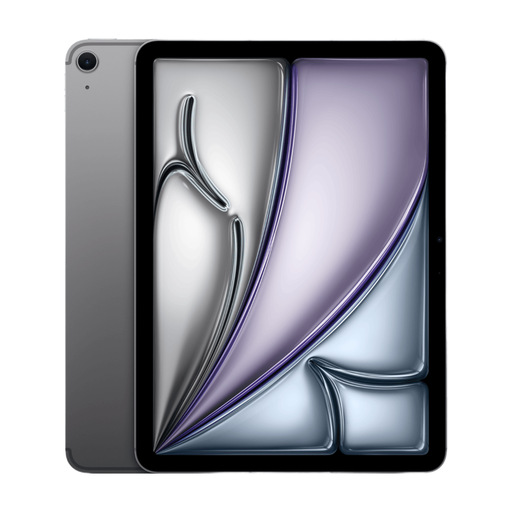
Apple 11-inch iPad Air (2026, M4), Wi-Fi, 512GB, Space Grey
Consider this 11-inch iPad Air for reviewing programme PDFs and making edits in compatible iPad apps.
Apple says Markup can annotate PDFs in supported apps. Check your production app, export process and compatible pen or keyboard before buying.
View on Joybuy
 No image available
Apple iPad mini 7 (A17 Pro), 512GB, Space Grey
Consider the iPad mini if compact handling matters more than a spacious programme-editing workspace.
Apple documents PDF annotation through Markup in supported apps. Check the exact PDF and export process, along with any pen you intend to use.
View on Joybuy
 No image available
Xiaomi Pad 7 Grey, 8GB RAM, 128GB, Focus Pen included
Consider this Android option if you want an included pen for notes while carrying programme files locally.
The listed configuration has 8GB RAM and 128GB storage. Check your PDF annotation and export process, plus the charging equipment you need.
View on Joybuy
 No image available
TECLAST ArtPad Pro (2025 Edition), 12.7-inch 2K, 256GB, stylus included
Consider the larger display if viewing programme pages matters more to you than a compact train-seat footprint.
The product name specifies a 12.7-inch 2K display, 8GB RAM plus 12GB virtual memory, 256GB storage and an included stylus. Check app and export compatibility, device weight and keyboard options for your intended setup.
View on Joybuy
Frequently asked questions
Can I annotate concert programme PDFs on an iPad?
Yes, Apple says Markup can annotate PDFs in supported iPad apps. Check that the production team's PDF app retains your annotations and exports the version they need.
Should I download programme files before travelling?
Yes, save the working draft, final PDF and essential assets for offline use, then check that they open without a connection. Network Rail says speeds on its managed-station Wi-Fi fluctuate with user numbers; that is not a guarantee of connectivity on a train.
Will I need to buy a pen, keyboard or charger separately?
That depends on the exact tablet and working setup. Samsung lists an S Pen with the Galaxy Tab S10 FE range but says a travel adapter is not included; Apple lists Pencil and keyboard options separately for iPad Air, while Microsoft sells the Surface Pro 12-inch keyboard and Slim Pen separately.
Do I need cellular connectivity for train journeys?
Not solely because you travel by train. Consider it if you regularly need online access away from Wi-Fi and have a suitable mobile-data plan; Apple says its Wi-Fi + Cellular iPad Air can connect when Wi-Fi is unavailable. Keep essential programme files available offline either way.


