Choose by the child’s actual games and video services: a tablet suits portable app-based use, a console fits controller-led play on a shared TV, and a laptop makes more sense when the same device must handle computer tasks. Before buying, check app and operating-system compatibility, the game’s own communication settings, household screen arrangements, storage and any subscription requirements; parental controls vary by platform.
Who these choices suit
Portable video-and-game families
If your child mainly watches video and uses compatible games, focus on a personal screen and a child account or profile. Ofcom reports that watching video and gaming online are popular activities among UK children aged 8–17.
Shared-TV gaming families
If your child wants particular games on the household TV, check the game’s local-player options, controller needs and communication settings. Nintendo UK and Xbox Support document platform controls, but the game’s own options also matter.
Computer-and-play families
If one device must also handle computer-based tasks, check that each intended game or service supports the chosen operating system. Microsoft Support UK and Google For Families describe family-account tools for Windows and compatible Chromebooks.
What to check before buying
Start with the child’s named games and video services, then decide whether the household needs a portable personal screen, TV-led play or a computer for other tasks.
Tablet
Choose it when: portable video and compatible app-based games are the main uses.
Trade-off: app availability differs by ecosystem, and a tablet does not by itself provide a shared-TV setup.
Games console
Choose it when: the intended games are available on the console and the household wants controller-led play, often on a TV.
Trade-off: local multiplayer, communication controls and online requirements depend on the specific game and platform.
Laptop
Choose it when: the same device must support computer-based tasks or a game that requires a computer.
Trade-off: confirm that each game supports the chosen operating system; family-account settings do not establish how every game handles chat.
| Concern |
What to check when buying |
Who this matters to |
| Communication controls |
Check the platform’s child-account settings and the intended game’s voice, text and friend controls. |
If online play is planned, I want to know who can contact my child and whether the game has separate chat settings; roughly 28% of consumers put communication controls first. |
| Games and video apps |
List the specific games and services, then check their availability on the device and child account. |
If my child has particular games and video services in mind, I need those to work on the chosen device; roughly 22% of consumers prioritise app and game compatibility. |
| Screen sharing |
Decide whether the child needs a personal screen or the TV, and check the game’s local-player options. |
Where siblings or other household members share screens, I need play to fit the available setup; roughly 22% of consumers focus first on screen arrangements. |
| Child account setup |
Check who will manage the account, how the child signs in and whether restrictions apply per user or to the whole console. |
If an adult will manage the child’s access, I want controls that fit the family’s account setup; roughly 17% of consumers prioritise account management. |
| Storage and ongoing services |
Check the intended games’ storage needs, compatible expansion options and whether online features require a subscription. |
If the plan includes several games or online play, I need to understand storage and continuing service requirements; roughly 11% of consumers put these costs and capacity considerations first. |
Buying pitfalls
-
Assuming the child-account settings control every conversation
Communication options can exist both at platform and game level. Nintendo documents separate controls for Switch 2 GameChat.
Before use, test the intended game with the child account and review its voice, text and friend settings.
-
Choosing a tablet before checking the required apps
Tablet ecosystems do not all offer the same apps, so a device can fail to support a game or video service the child expects to use.
Check each essential app in the intended device’s store and confirm it works with the supervised account.
If an essential app is unavailable, using another device may be necessary.
-
Treating the stated console storage as the whole setup
Installed games use storage, expansion requirements differ, and some online multiplayer features have subscription conditions. Nintendo specifies microSD Express for Switch 2 storage expansion; Sony identifies a PlayStation Plus requirement for applicable PS5 online multiplayer.
Check the games’ storage and player requirements, compatible expansion and online-service terms before choosing a console or accessories.
A compatible expansion card, an additional controller or a required membership may add a separate setup requirement.
-
Assuming shared-console restrictions follow each sibling
Nintendo says parental restrictions on a Switch console apply to everyone using that console.
Plan shared-console restrictions around the youngest user and check any separate account-level settings.
Relevant brands to consider
Nintendo
Switch consoles suit households considering handheld, tabletop or TV gaming.
- Nintendo UK describes Switch 2 play modes and separate controls for GameChat.
- Nintendo’s Switch guidance says console restrictions apply to everyone using that console; check the setup against your household.
Microsoft Xbox
Xbox Series S is an all-digital option for TV-based gaming within an Xbox family group.
- Xbox Support documents member-specific screen-time, communication and multiplayer settings.
- Microsoft specifies that Series S cannot use disc-based games; check the exact game and online requirements.
Sony PlayStation
PS5 models may suit households whose intended games and TV setup align with PlayStation.
- The PlayStation Family app documents communication restrictions and spending controls.
- Sony describes the 825 GB Digital Edition as disc-free and requires paid PlayStation Plus for applicable online multiplayer; check the exact model and bundle.
Apple
iPad (A16) is a tablet option for portable video, compatible games and other tablet activities within an Apple Family Sharing setup.
- Apple lists an 11-inch display and 128 GB starting storage for iPad (A16).
- Apple’s updated Screen Time controls depend on compatible software across the family group; check the available setup for your devices.
Samsung
Galaxy tablets, including Tab A9+, may suit families considering an Android tablet and Samsung Kids.
- Samsung documents Samsung Kids and lists microSD expansion for Galaxy Tab A9+.
- Storage capacities and features vary by tablet variant; check the exact model and whether it supports the intended games.
Joybuy products
These Joybuy choices cover portable tablets for games and video, alongside consoles for handheld or TV-connected gaming.
 No image available
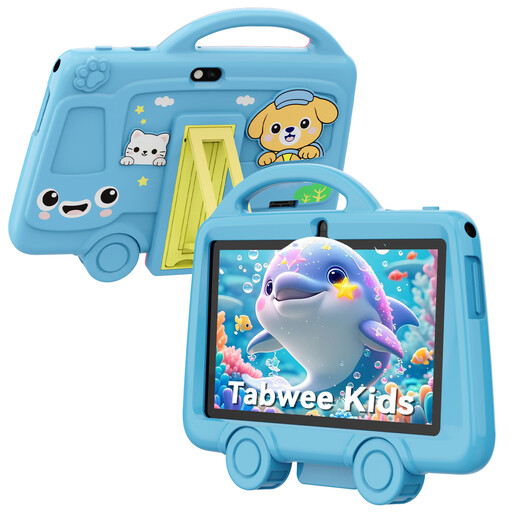
TABWEE K8 Kids’ Tablet, 7-inch, 3 GB RAM, 32 GB storage, blue
Its product description identifies games and videos as intended uses, for families looking for a portable screen.
Specifications stated in the product name: 7-inch screen, 3 GB RAM, 32 GB storage, 3000 mAh battery, 2.4 GHz Wi-Fi, Bluetooth 4.2, 3.5 mm headphone jack and 285 grams.
View on Joybuy
 No image available
TABWEE K8 Kids’ Tablet, 7-inch, 2 GB RAM, 32 GB storage
Its product description identifies games and videos as intended uses, for families looking for a portable screen.
Specifications stated in the product name: 7-inch screen, 2 GB RAM, 32 GB storage, 3000 mAh battery, 2.4 GHz Wi-Fi, Bluetooth 4.2, 3.5 mm headphone jack and 285 grams.
View on Joybuy
 No image available
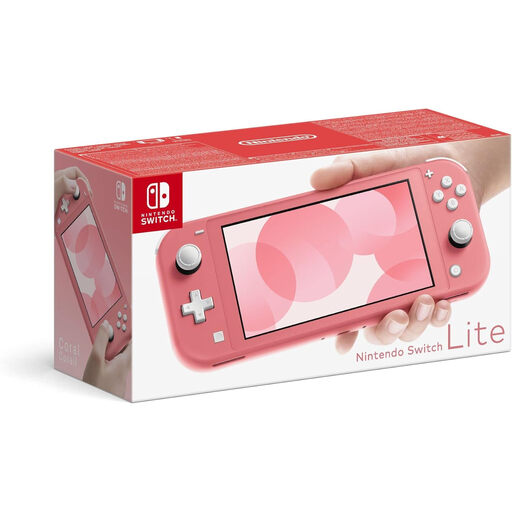
Nintendo Switch Lite, Coral
This handheld-only console may suit a child who will play on a personal screen rather than the household TV.
The product description states 32 GB internal storage and Wi-Fi connectivity. It also says online play on compatible games requires a Nintendo Switch Online subscription.
Limitation: the description states there is no TV output.
View on Joybuy
 No image available
Nintendo Switch 2 Console, UK Version
Its handheld, tabletop and docked play modes give households options for portable or TV-connected gaming.
Nintendo specifies 256 GB storage and compatible microSD Express cards for storage expansion.
Limitation: microSD Express cards for expansion are sold separately, according to Nintendo.
View on Joybuy
 No image available
Alldocube Kido Children’s Tablet, 8-inch, Android 15, 3 GB RAM, 32 GB storage
The product description identifies games and videos as intended uses and states that the tablet has a child lock.
Specifications stated in the product name: Unisoc T310, 3 GB RAM, 32 GB storage, 5000 mAh battery, 3.5 mm socket, blue protective case and no adapter included.
View on Joybuy
Frequently asked questions
Are a console’s parental controls enough to manage multiplayer chat?
Check the platform, game and any separate communication feature. Xbox and PlayStation describe account communication settings, while Nintendo documents separate controls for Switch 2 GameChat; review the intended game’s own options too. UK government guidance recommends checking that controls work after setup.
What changes when siblings share a Nintendo Switch?
Nintendo says parental restrictions on a Switch console apply to everyone using it, so consider the youngest player when setting them. Nintendo Account family-group and eShop restrictions are separate settings.
Can a parent manage a child’s iPad if family devices cannot all run the newest software?
Apple says its updated Screen Time controls require specified current software versions across the Family Sharing group. If that is not possible, Apple says the family can continue with the previous Screen Time version or adjust controls on the child’s device.
How should we check storage and subscriptions before buying?
List the games to install and check their storage needs and online requirements. Nintendo specifies microSD Express for Switch 2 expansion, while Sony identifies a PlayStation Plus requirement for applicable PS5 online multiplayer. Check the exact model and the terms for the games and services your child will use.


