What matters when choosing?
Start with how you will hold and view magazine pages, then check your app’s offline rules and whether you will actually use a pen. Screen and connectivity specifications cannot establish what a particular magazine subscription permits.
| Concern |
What to check |
Who this matters to |
| Page readability |
Compare screen size and resolution, then check reflection control and the conditions attached to brightness figures. |
If small instructions and colour photographs make me zoom repeatedly, I want a page I can read in changing window light. Around 31% of consumers put page clarity first. |
| Carry comfort |
Compare the exact variant’s weight and dimensions, allowing for the case you intend to carry. |
When I hold a tablet through much of the journey, bag space and arm comfort matter more to me than a larger spread. Portability comes first for around 31% of consumers. |
| Offline access |
Check your magazine app’s download rules and storage needs before deciding between Wi-Fi, tethering and a cellular model. |
I do not want a weak connection to interrupt an issue halfway through a journey. Around 25% of consumers place access without a live connection first. |
| Notes and patterns |
Confirm pen compatibility, bundle contents and whether your magazine app permits annotation or export. |
If I mark patterns or sketch alterations as I read, writing on the tablet is my main reason to choose one model over another. Around 13% of consumers prioritise annotation. |
Tablet choices on Joybuy
These tablets offer different ways to read craft magazines on the train: Wi-Fi models for a download-ahead routine, an LTE model for readers considering mobile access, and a larger model for supported reading. Check your magazine app’s rules and the exact bundle before choosing.
 No image available
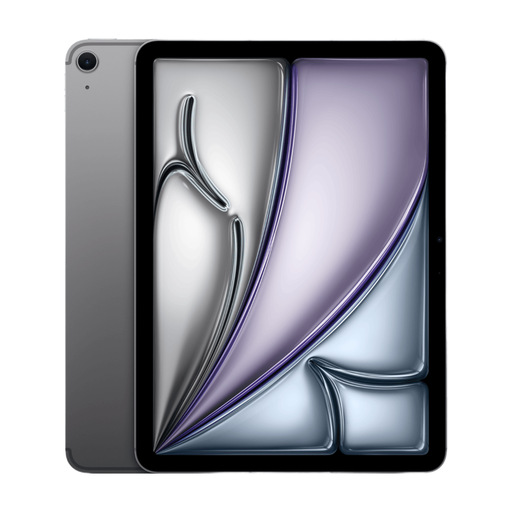
Apple 11-inch iPad Air (2026, M4) Wi-Fi, 512GB, Space Grey
Consider this model if you expect to hold the tablet while reading and want local storage for issues your app permits you to download.
Apple lists the 11-inch Wi-Fi iPad Air at 464 g with a laminated, anti-reflective display. This configuration has 512GB of storage; check the magazine app’s offline rules and the exact Pencil bundle if you plan to annotate.
View on Joybuy
 No image available
Xiaomi Pad 8 Wi-Fi, 8GB RAM, 128GB, Grey
This Wi-Fi tablet is an option if you plan to arrange magazine access before travelling rather than depend on its own mobile connection.
The listed configuration has 8GB RAM and 128GB storage. Check your magazine app’s download rules and the retail bundle if you want to use a stylus.
View on Joybuy
 No image available
Xiaomi Pad 7, 8GB RAM, 128GB, Grey, Focus Pen included
Consider this bundle if handwritten craft notes matter alongside magazine reading.
The product name specifies 8GB RAM, 128GB storage and an included Focus Pen. If you will hold the tablet for long periods, check its weight; confirm that your magazine app supports the notes and offline access you need.
View on Joybuy
 No image available
TECLAST ArtPad Pro (2025), 12.7-inch 2K, 256GB, 4G LTE, stylus included
The 12.7-inch format is worth considering if you normally rest the tablet on a tray or lap and want room for magazine pages and notes.
The product name specifies a 2K display, 256GB storage, 4G LTE and an included stylus. Check its weight and the space available on your usual journey; LTE access also depends on your network and plan.
View on Joybuy
 No image available
OPPO Pad SE OPD2420 EUN, 6GB RAM, 128GB, LTE, Twilight Blue
Consider the LTE configuration if a direct mobile connection matters when you cannot read a downloaded issue.
The product name specifies 6GB RAM and 128GB storage. Check the tablet’s weight for handheld use, and confirm your network plan, route coverage and magazine app’s offline options.
View on Joybuy
Common questions
Is a Wi-Fi tablet enough for craft magazines on a train?
A Wi-Fi tablet can be enough if your magazine app permits you to download the issues you need before travelling. Check its download and expiry rules; if you need the tablet to connect directly while away from Wi-Fi, compare a cellular model and the mobile plan it requires.
Is a bigger tablet easier to read on a train?
A bigger screen offers more room for a magazine page, but it also takes more space when you hold or prop up the device. Apple lists its 11-inch iPad Air Wi-Fi model at 464 g and its 13-inch version at 616 g; choose with your usual reading position and case in mind.
Will I need to buy a pen to annotate patterns?
That depends on the exact tablet bundle. Samsung lists an S Pen in the Galaxy Tab S10 FE box, while Apple’s iPad Air Pencil compatibility does not establish that a Pencil is included. Check both the bundle and whether your magazine app allows the marks you want to make.
What if a tablet or paid digital magazine is faulty?
In the UK, faulty goods and faulty digital content are distinct issues under the Consumer Rights Act 2015. GOV.UK states that the Act provides for repair or replacement where digital content is faulty; identify whether the problem concerns the tablet, the downloaded issue or the connection, and contact the relevant seller or publisher about the fault.


