Pattern-and-photo readers
You read detailed instructions, charts and colour project photographs, so being able to inspect a page matters more to you than carrying the smallest tablet.


Choose a tablet around 11 inches if you expect to hold it while reading craft magazines on a coach; consider 12–13 inches if viewing full-page patterns matters more and you can rest the tablet on a stand or tray table. Check that your magazine app supports offline downloads, allow enough storage for issues, and consider screen reflections if you often sit beside a window.
You read detailed instructions, charts and colour project photographs, so being able to inspect a page matters more to you than carrying the smallest tablet.
You want a tablet that is manageable in a confined seat and a reading plan that does not depend on onboard charging. National Express notes that charging facilities can vary by vehicle and service.
You want to download issues before departure and keep enough space for them. Readly says its tablet app supports offline magazine reading, provided the issues have been downloaded.
Start with whether you will hold the tablet or rest it while reading. Then check page visibility and whether your chosen magazine app can keep issues available offline.
| Concern | What to check | Who this matters to |
|---|---|---|
| Page detail and glare | Compare screen size and resolution, then assess reflections in bright light where possible; a stated brightness figure alone cannot establish how the screen will look beside a window. | When I need to follow small pattern symbols and compare colour photographs, I want the page to remain legible without constant zooming. Roughly 40% of consumers put page detail and visibility first. |
| Carrying and holding | Compare the stated weight of the exact tablet variant and the size and weight of any case you plan to use. | If I will hold the tablet through a long journey, a larger page is less useful if the device feels awkward in my seat. Around 30% of consumers prioritise comfortable carrying and handling. |
| Offline reading | Confirm offline support in your magazine app and choose storage for the issues you intend to keep; check expandable storage for the exact model if you need it. | I want my downloaded issues ready when connectivity is unreliable, rather than having to fetch a pattern during the journey. Approximately 30% of consumers put offline continuity first. |
A larger page comes with more tablet to carry. Samsung UK lists its 13.1-inch Galaxy Tab S10 FE+ Wi-Fi at 664 g, compared with 497 g for the 10.9-inch Galaxy Tab S10 FE Wi-Fi.
If you usually read with the tablet in your hands, compare weights before moving up in size. A larger model makes more sense when you can rest it securely on a stand or tray table.
A suitable stand case adds something else to carry and check for fit.
Amazon UK states that Google Play is not supported on Fire tablets, so an app available on another Android tablet cannot be assumed to work on a Fire model.
Check your publisher’s or subscription service’s current app support for the exact tablet family before buying.
Readly supports offline downloads, while National Express says onboard charging arrangements can vary. Neither a connection nor a usable charging point should be essential to opening your issues.
Download the issues before departure and check that they open without a connection. Start a long journey with enough charge for your planned reading.
Downloading issues during the journey may use mobile data instead of a connection you have already arranged.
Samsung UK states that its Galaxy Tab S10 FE and S10 FE+ purchase configurations do not include a travel adapter.
Check the exact model’s box contents and the compatibility of any adapter, cable or stand you intend to use.
A separate compatible adapter or stand may be needed for your planned setup.
The iPad Air range offers an 11-inch option for hand-held reading and a 13-inch option for more page area.
The Galaxy Tab S10 FE range offers a 10.9-inch model for a smaller setup and a 13.1-inch FE+ for readers who favour page area.
The Tab Plus Gen 2 is a larger-screen route to consider if you usually rest the tablet rather than hold it throughout the journey.
Fire Max 11 is an 11-inch colour-tablet option when your intended magazine service is available in Amazon’s supported app selection.
These tablets offer screen sizes for either hand-held magazine reading or a larger page rested on a surface. For any model, check your magazine app and preferred way of reading before choosing.
 No image available
Consider this tablet if you want a compact device for reading downloaded magazines; confirm that your chosen app supports offline reading on it.
The listed configuration is 6/128GB. If window glare or charging equipment matters to you, check the display details and box contents for this model.
 No image available
Consider this 11-inch tablet if you plan to keep many magazine issues locally and want to assess its glass finish for window-side reading.
This is the Wi-Fi, 1TB Nano Glass variant. Check its weight for hand-held use and confirm your magazine app before buying.
 No image available
The 11-inch format is worth considering if you expect to hold the tablet while reading; confirm that your magazine app works on the exact device.
The title lists 256GB storage and dual 4G SIM support. Check the precise Android version and battery specification for this variant before relying on either.
 No image available
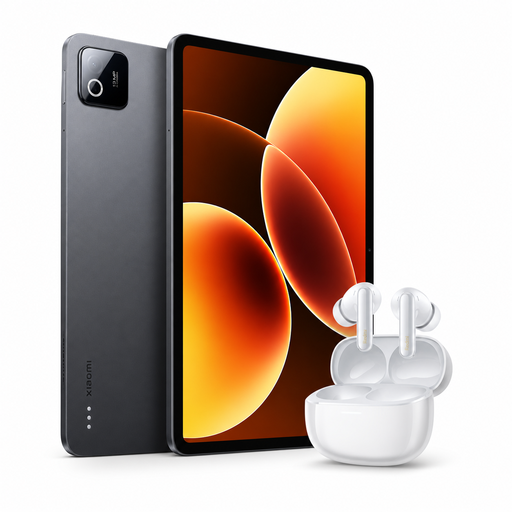
Consider this Wi-Fi bundle if you will download craft magazines before travelling and can use the included earbuds.
The title specifies 8GB RAM, 128GB storage, a grey tablet and Redmi Buds 6 Pro in Glacier White. Confirm the exact tablet and battery specifications, as well as magazine-app compatibility, before choosing it.
 No image available
Consider this larger tablet if you would rather view more of a craft page at once and can rest the device while reading.
The title specifies a 12.7-inch 2K display, 256GB storage and an included stylus. Check its weight, stand-case fit and magazine-app compatibility for your coach setup.
An approximately 11-inch tablet is the more manageable choice if you expect to hold it; consider 12–13 inches if seeing more of a full-page pattern matters more and you can support the device. Samsung UK lists its 10.9-inch Galaxy Tab S10 FE Wi-Fi at 497 g and its 13.1-inch S10 FE+ Wi-Fi at 664 g, before adding a case.
Yes, if you download the issues in Readly’s phone or tablet app before travelling. Readly says offline downloads depend on having sufficient device storage, so open a downloaded issue without a connection before you leave.
Not if you normally download your magazines over Wi-Fi before departure. Consider a cellular model if you regularly need to fetch new issues or use other online services away from Wi-Fi, while accounting for mobile-data use and signal availability.
Plan to start with enough charge rather than relying on a seat socket. National Express describes USB-A charging and, on some vehicles, a 240V socket, but arrangements can differ by vehicle and service; check your booked operator’s facilities and bring a suitable cable.