Readers of illustrated garden guides
You need colour photographs, plant diagrams or fixed-layout PDFs to remain useful while travelling, without carrying a larger device than your pages require.


A compact colour tablet is a sensible starting point if you want to read illustrated gardening books and PDFs on a coach while also using reading apps and the web. An 11-inch tablet gives pages more physical space but is more to hold; a dedicated e-reader is a separate choice for compatible, mainly text-led books rather than a substitute for every tablet app or colour document. Check a page from your own books, your preferred app and the device's weight before deciding.
You need colour photographs, plant diagrams or fixed-layout PDFs to remain useful while travelling, without carrying a larger device than your pages require.
You want books alongside browsing, downloaded files or reading apps, and are willing to accept a smaller page view for a more compact device.
You mainly read compatible books and would choose a purpose-built, glare-free reading device over the broader functions of a colour tablet.
Choose when: You want colour gardening pages and general reading apps in a device you expect to hold on the coach.
Trade-off: Full-page diagrams and fixed-layout PDFs may need more zooming on an 8–9-inch screen.
Choose when: Seeing more of an illustrated or fixed-layout page matters more to you than compact handling.
Trade-off: Apple UK lists its 11-inch iPad (A16) Wi-Fi model at 477 g, against 293 g for the cited iPad mini Wi-Fi model.
Choose when: Compatible, mainly text-led books and a reading-focused device matter more than colour and general-purpose apps.
Trade-off: Confirm your book source and document workflow before replacing a tablet with an e-reader.
| Concern | What to check | Who this matters to |
|---|---|---|
| Comfort while holding it | Compare the exact model's weight and dimensions, then consider whether you will hold it or rest it on your lap. | If I read with the device in my hands, I want to reposition it without struggling with its size or weight; around 37% of consumers would put holding comfort first. |
| Illustrations and PDFs | Open a page from your own book at your usual zoom; check diagrams, small text and landscape viewing. | When a planting diagram fills the page, I need to make out its details without constant zooming; around 27% of consumers would make page readability their primary concern. |
| Reading apps and files | Confirm the apps and file formats you use, the exact storage variant and how you will download material before travelling. | I want my downloaded guides and preferred reading services on one device; around 18% of consumers would prioritise flexible access to files and apps. |
| Focused reading and charging | Check book compatibility, display type and the conditions behind any stated battery life. | If I mainly read compatible text-led books, I would rather minimise distractions and charging stops; around 18% of consumers would put reading focus and infrequent charging first. |
A larger page can help with diagrams, but size also affects what you carry and hold. Apple UK lists the Wi-Fi iPad mini at 293 g and the cited 11-inch Wi-Fi iPad at 477 g.
Compare dimensions and weight as well as screen size, then view an illustrated page from your own book at your normal zoom.
Google Play Help says Play Books can read uploaded PDF and EPUB files, while an e-reader may use a different book service or document workflow.
List your book sources, file formats and annotation needs, then check each one against the app or device you intend to use.
The Galaxy Tab A11 and Galaxy Tab A11+ have different model names. Specifications for one should not be assumed to describe the other.
Check the complete model name, storage and connectivity variant on the listing before comparing it with a device you have researched.
Apple's cited iPad mini and iPad (A16) provide compact and 11-inch colour-tablet options. Apple UK lists the Wi-Fi models at 293 g and 477 g respectively.
Samsung's cited Galaxy Tab A11 is an 8.7-inch Android tablet offered with 64 GB or 128 GB storage, according to Samsung UK.
Amazon Kindle offers dedicated reading alternatives rather than general-purpose colour tablets. Amazon UK describes a 7-inch glare-free Paperwhite display and a 10.2-inch glare-free Kindle Scribe display.
These colour-tablet options include compact models for holding while you read and larger models for giving illustrated pages more space. Check your books and reading apps against the exact device you choose; a dedicated e-reader serves a different reading need.
 No image available
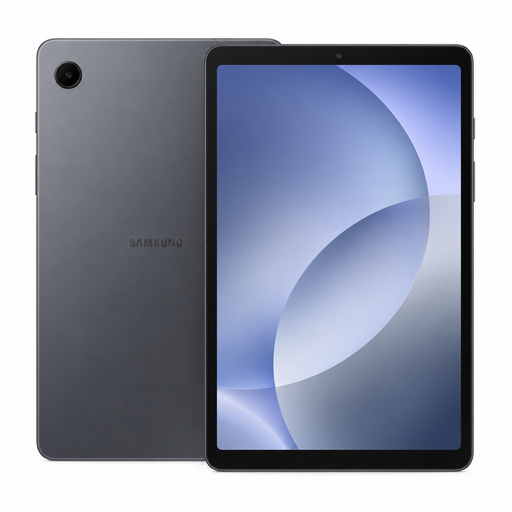
Consider this compact colour-tablet option if you expect to hold your gardening books while travelling. It has 256GB storage; check the listing's connectivity variant and try a page from your own illustrated book or PDF before choosing the smaller screen.
 No image available
This compact tablet suits readers who want a Wi-Fi device for books and other reading apps. Samsung UK specifies an 8.7-inch, 1340 × 800 display for the Galaxy Tab A11; check a detailed gardening page at your preferred zoom and download books before travel if you will not have Wi-Fi.
 No image available
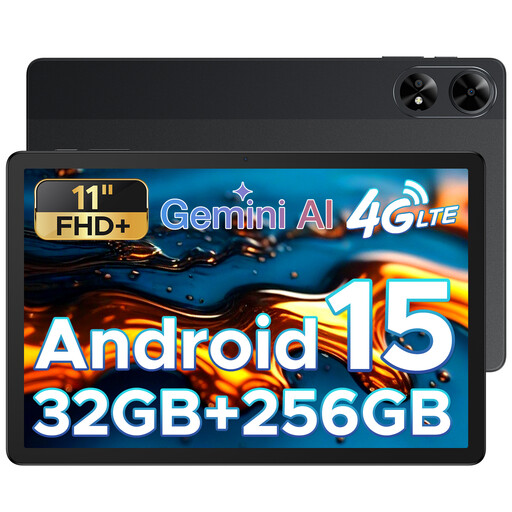
Consider this larger tablet if physical page area matters more than compact handling. Joybuy describes this A11+ variant as having an 11-inch display and 256GB storage; it is a different named model from the compact Galaxy Tab A11. Check its weight and your reading-app compatibility before buying.
 No image available
This full-size tablet is worth considering if you prefer to view gardening-book pages on an 11-inch display. Its product name specifies 256GB storage and expansion up to 2TB; check a representative PDF in your chosen app and consider how you would support the device during a long journey.
 No image available
Consider this larger tablet if page viewing and pen use are part of your reading plans. The named variant has 128GB storage and includes a Focus Pen; check the device's weight, your gardening-book apps and whether your PDFs display comfortably before relying on it for coach reading.
It can be large enough if compact handling matters most, but full-page diagrams and fixed-layout PDFs may require more zooming. Apple UK lists the cited iPad mini at 8.3 inches and its iPad (A16) at 11 inches; compare a page from your own book at the size you would actually use.
Yes, if the app you choose accepts your files: Google Play Help says Play Books can read uploaded PDF and EPUB documents. Check your particular files in the intended app and download what you need before boarding.
Not if you can download your books before leaving or have suitable Wi-Fi when you need it. If you require mobile data during the journey, check that the exact tablet variant offers cellular connectivity rather than assuming every version of a model does.
A Kindle can suit compatible, mainly text-led books when focused reading matters more to you than colour pages and general-purpose apps. Amazon UK describes the Paperwhite as having a 7-inch glare-free display and the Kindle Scribe as supporting document and PDF markup; check your own book sources and illustration needs before choosing either route.