What should you check?
Start with the task that most often interrupts your research: reading a record, entering a finding, organising a file or setting up the tablet at the table. Then compare the exact device and accessory configuration against that task.
| Concern | What to check | Who this matters to |
|---|
| Readable workspace |
Compare screen size and resolution alongside weight, especially if you alternate between table use and holding the tablet. |
I regularly inspect detailed scans alongside my tree and need enough room to read without constantly changing views. Around 36% of consumers may put readable workspace first. |
| Tree editing and notes |
Try your essential editing tasks in the service’s app or browser, and check pen compatibility and what comes in the box. |
When I find a possible family link, I want to enter it and keep track of my questions as I work. For around 29% of consumers, editing and notes may be the primary need. |
| Photos and documents |
Check media-upload functions, storage on the exact model and how you will back up valuable files. |
I collect family photographs and document images, so keeping those files organised matters most to me. This may be the leading concern for around 21% of consumers. |
| Only the equipment needed |
Check the exact in-box contents and whether your tasks require a pen, keyboard, stand, storage card or records subscription. |
I mainly browse records and update a tree, and I do not want accessories I will rarely use. Around 14% of consumers may put a simpler setup first. |
Tablets for family-history research on Joybuy
These tablets offer different screen sizes and input options for reading records, keeping notes or entering findings at a kitchen table. Check your preferred genealogy service on the exact device before choosing between them.
 No image available
TECLAST ArtPad Pro, 12.7-inch, 256GB, 2025 Edition
Consider this model if you want a larger screen and a pen for notes while researching at a table.
The product name specifies a 12.7-inch 2K display, Android 15 and an included T-Pen. Check how you will position it for longer reading sessions.
View on Joybuy
 No image available
Xiaomi Pad 7 Grey, 8GB RAM, 128GB, Focus Pen included
This is an option to consider if pen input is central to recording research notes.
Check that its display and your intended table position suit the records you read, as well as the editing tasks you use in your genealogy service.
View on Joybuy
 No image available
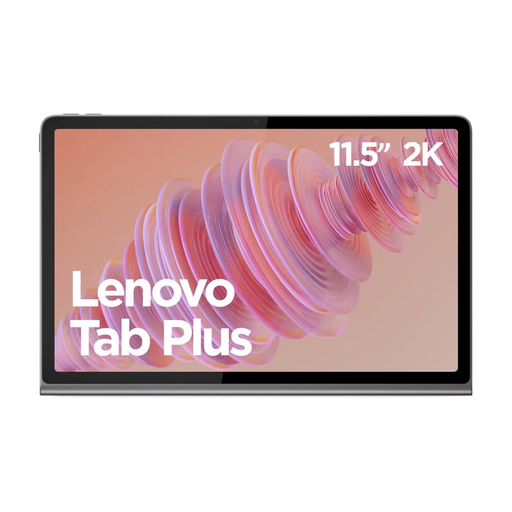
Lenovo Tab Plus 128GB Grey
Consider the Tab Plus if reading and browser research are your main tasks and you want to check its position in a fixed table setup.
Lenovo lists an 11.5-inch, 2000 × 1200 display for Tab Plus. The Joybuy listing says this 128GB product is supplied without a charging adaptor; check pen options separately if handwriting matters.
View on Joybuy
 No image available
DOOGEE U11 PRO, 11-inch, 256GB, Black
This model is worth considering if keeping local research files matters alongside tablet-based browsing.
Its product name lists an 11-inch display and 256GB storage, with TF-card expansion up to 2TB. Assess the screen against the detail in the records you use, and check pen and table-positioning options if needed.
View on Joybuy
 No image available
TABWEE T80, 10-inch, 128GB, keyboard bundle
The keyboard bundle may appeal if typing names and research notes is more important to you than having a larger screen.
The product name lists Android 16 and TF-card expansion up to 2TB. Check whether the 10-inch workspace suits detailed record images and confirm the exact bundle contents before buying.
Purchase link unavailable
Frequently asked questions
Can I use Ancestry on an iPad or Android tablet?
Yes, Ancestry offers an app through the Apple App Store and Google Play. Ancestry states that it requires iOS 15.0 or later or Android 7.0 or later; check the exact tablet and the tasks you intend to perform before buying.
Can I use FamilySearch or Findmypast to work on a tree from a tablet?
Yes, both describe mobile family-tree tasks. FamilySearch says its apps can build a tree, search records and capture memories; Findmypast describes adding discoveries to a tree and says that viewing transcripts and original images in its app requires a subscription.
Do I need a 13-inch tablet to read family-history records?
No: a larger screen is useful when you want more room for detailed images and notes at a fixed table, but a smaller tablet may be easier to hold. For one concrete comparison, Apple lists its 13-inch iPad Air Wi-Fi model at 616 g and its 11-inch Wi-Fi model at 464 g.
Can I research family history without an internet connection?
Do not rely on full offline access without checking your particular app and saved content. Ancestry’s troubleshooting guidance describes connection-related app messages and notes that trees must be downloaded again after reinstalling its app.
Will a charging adaptor come with the tablet?
Check the exact product listing rather than assuming one is included. The Joybuy listing for the Lenovo Tab Plus 128GB says it is supplied without a charging adaptor; that detail should not be applied to other tablets or variants.


