For checking a ferry operator’s live-status page from a hotel room with working Wi-Fi, a tablet with a readable screen and a suitable browser may be all you need. Consider a cellular-capable variant if you also need updates away from the hotel, and check that any operator app you rely on is available for the tablet before buying.
Who is this for?
Hotel Wi-Fi timetable checkers
If you mainly check departures, arrivals and booking details from your room, focus on a screen you can read comfortably and access to the operator’s live pages. Wightlink Ferries provides live service status and timetables that reflect updates.
Travellers checking updates beyond the room
If you want to check for changes on the way to the terminal, decide whether you will use a phone hotspot or need a tablet with its own mobile-data connection. Apple distinguishes its Wi-Fi iPad models from Wi-Fi + Cellular variants; choosing the latter also requires mobile-data service.
Travellers who rely on an operator app
If an app or notification channel is part of your travel plans, confirm that it works on the tablet you intend to buy. Wightlink Ferries describes app and WhatsApp updates where applicable, while Amazon says Google Play is not supported on Fire tablets.
What matters when choosing a tablet?
Start with where you will check for updates: hotel Wi-Fi may cover a room-based check, but checking again on the journey calls for a separate connection plan. Then choose a screen and software that work for the information you actually use.
| Concern | What to check | Who this matters to |
|---|
| Live information |
Confirm that the tablet can connect to the hotel network and open your ferry operator’s live-status page in its browser. |
I need to see changes before leaving the hotel, rather than rely on a saved timetable; around 36% of consumers put access to live information first. |
| Screen readability |
Compare the exact model’s screen size and display specifications, including glare treatment where stated. |
If I am reading route names and departure times alongside my booking, I want enough display space to follow them comfortably. Readability comes first for around 29% of consumers. |
| Fit for a basic task |
Check browser and app suitability before choosing extra storage, multitasking features or accessories you may not use. |
I mainly want to open a live page, so additional tablet features are less important to me; around 21% of consumers prioritise keeping the choice focused on that task. |
| Use beyond the hotel |
Check the exact variant for cellular capability and its weight; otherwise, plan how you will connect outside the room. |
When I leave for the terminal, I still want a way to check updates without hotel Wi-Fi. Around 14% of consumers put that flexibility first. |
What should you avoid?
-
Treating a saved timetable as a final departure time
Ferry information can change. Wightlink Ferries says its live timetable reflects updates and that delay information is guidance.
Check the live status for your route before leaving the hotel, and follow the check-in instructions on your booking rather than delaying arrival because of an online estimate.
-
Assuming every tablet can connect away from Wi-Fi
A Wi-Fi model needs another internet source outside the hotel. Apple, for example, specifies 5G/LTE for Wi-Fi + Cellular iPad variants, not its Wi-Fi-only variants.
Decide whether a phone hotspot meets your needs or whether you want a cellular-capable tablet with suitable mobile-data service.
-
Assuming a Fire tablet has every Android app
Amazon says Google Play is not supported on Fire tablets, so the app you intend to use may require a different route.
Check the Amazon Appstore for the exact app you need, or confirm that the operator’s live website works in the tablet’s browser.
-
Assuming a charging adaptor is in the box
Amazon’s cited Fire HD 10 listing says a power adaptor is not included.
Check the contents of the exact bundle and bring a compatible charger and cable if you will need to charge the tablet overnight.
Brands to consider for this task
Lenovo
The Tab M11 is a Wi-Fi Android option to consider for reading ferry pages in a hotel room.
- Lenovo UK specifies an 11-inch, 1920 × 1200 anti-glare display, 4GB memory and 128GB storage for the cited Tab M11 configuration.
- The cited configuration relies on Wi-Fi or another internet source rather than its own mobile-data connection.
Samsung
The Galaxy Tab A9+ is an 11-inch Android option for readers who may keep a timetable alongside another app.
- Samsung describes support for up to three apps on screen, subject to app support; memory depends on the configuration.
- The cited Galaxy Tab A9+ configuration is Wi-Fi-only, and specifications should be checked for the exact regional variant.
Apple
Apple’s iPad 11-inch (A16) range offers a choice between Wi-Fi and Wi-Fi + Cellular variants for different connection needs.
- Apple specifies Wi-Fi 6 across iPad 11-inch (A16) models and 5G/LTE capability on Wi-Fi + Cellular variants.
- Mobile data requires the cellular variant and suitable service; it is not a feature of every iPad listing.
Amazon Fire
Fire HD 10 is worth considering for browser-led checks if the operator’s website meets your needs on the device.
- Amazon specifies a 10.1-inch 1080p display for the cited Fire HD 10 release.
- Amazon says Google Play is not supported on Fire tablets, and the cited bundle does not include a power adaptor.
Tablets on Joybuy for hotel-room checks
These Wi-Fi tablet listings have screens of around 11 inches for viewing ferry information from a hotel room. Check that your operator’s website or required app works on the exact device; do not assume that Wi-Fi or SIM-related wording means the tablet has mobile-data service.
 No image available
DOOGEE Tab E3 11-inch Android 15 tablet, 256GB, Black
Consider this for viewing timetable pages on hotel Wi-Fi, provided your operator’s website works in its browser.
The title specifies an 11-inch FHD+ 90Hz display and dual SIM slots. Confirm whether this exact variant supports the mobile-data connection you need before relying on it away from Wi-Fi.
View on Joybuy
 No image available
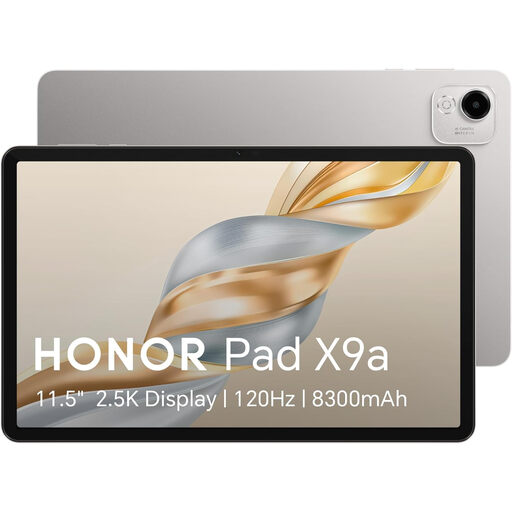
HONOR Pad X9a 11.45-inch Wi-Fi tablet, 128GB, Grey
This Wi-Fi listing is relevant if you want a larger screen for room-based timetable checks and can connect through the hotel network.
Check that your operator’s website or required app works on the device. Plan another internet source if you need updates beyond the hotel.
View on Joybuy
 No image available
DOOGEE U11 PRO 11-inch tablet, 256GB, Black
Its stated 11-inch size and Wi-Fi make it a candidate for checking a live timetable from the hotel, once browser suitability is confirmed.
The title also specifies a 90Hz IPS screen. Confirm the precise display resolution and processor for this variant before using either specification to compare tablets.
View on Joybuy
 No image available
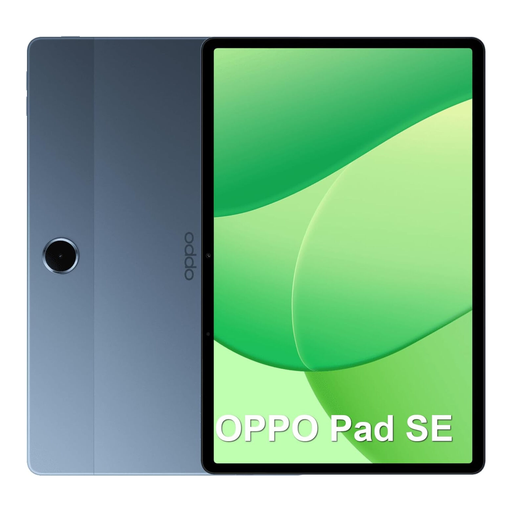
OPPO Pad SE OPD2419 EUN Wi-Fi tablet, 4GB/128GB, Twilight Blue
This Wi-Fi tablet is a room-based option if its browser or a suitable app can open your ferry operator’s live information.
Check the software you need on the exact model before purchase, and arrange another connection if you plan to check updates away from hotel Wi-Fi.
View on Joybuy
 No image available
Apple iPad Air 11-inch (2026, M4) Wi-Fi, 128GB, Starlight
Consider this iPad Air if you want an 11-inch Wi-Fi iPad for checking live ferry pages from the hotel, subject to confirming that your operator’s website or app works for you.
This listing is for a Wi-Fi model, not the separate iPad 11-inch (A16) cellular variant discussed above. Arrange another internet source for checks away from Wi-Fi.
View on Joybuy
Common questions
Is a Wi-Fi-only tablet enough in a hotel room?
Yes, if the hotel connection works and you can open your ferry operator’s live page or supported app. If you also need updates away from the hotel, plan to use a phone hotspot or choose a cellular-capable tablet with suitable service; a Wi-Fi model does not provide its own mobile-data connection.
Can I rely on a downloaded ferry timetable?
Check the operator’s live timetable or status page close to travel time instead of relying only on a saved copy. Wightlink Ferries says its real-time timetable reflects updates, but delay information remains guidance; follow the check-in instructions on your booking.
Will a ferry operator’s Android app work on a Fire tablet?
Check the exact app in the Amazon Appstore before choosing a Fire tablet, or confirm that the operator’s website works in its browser. Amazon says Google Play is not supported on Fire tablets, so Android app availability cannot be assumed.


