Choose a cellular tablet if checking changing ferry departures without a phone hotspot matters most; choose a Wi-Fi tablet if you are content to use your phone’s connection or available Wi-Fi. Neither choice guarantees a live update on a train: Ofcom found poor mobile performance in 58% to 83% of train tests in June 2026, depending on the network. Also consider how easily you can read, carry and charge the tablet during the journey.
Who is each option for?
Travellers who depend on live updates
If a delayed or moved ferry could change your onward plans, a cellular tablet lets you attempt an update without setting up a phone hotspot. Keep booking details available offline too: Ofcom’s June 2026 train tests found that mobile performance varied by network and was often poor.
Travellers already using a phone hotspot
A Wi-Fi tablet can make sense when you carry a phone with a suitable data plan and are willing to use it for the tablet’s connection. Live updates will still depend on the phone’s signal and an available hotspot.
Travellers packing light
If the tablet is mainly for departure pages, confirmations and maps, consider whether its screen is comfortable to read without making the device awkward to hold, stow and protect between connections.
What matters when choosing?
Decide whether the tablet needs its own mobile connection before weighing screen size and carrying comfort. Direct mobile data removes the hotspot step, but it does not remove gaps in rail coverage.
Cellular tablet
Consider it when: You need to attempt live checks without relying on your phone as a hotspot.
Trade-off: You need a compatible mobile-data arrangement, and weak signal can still interrupt updates.
Wi-Fi tablet
Consider it when: Your phone hotspot or another Wi-Fi connection is an acceptable way to get online.
Trade-off: Away from fixed Wi-Fi, the tablet depends on that other connection source.
| Concern |
What to check |
Who this matters to |
| Independent access |
Confirm that the exact variant has cellular capability and supports your intended network and data arrangement. |
If a ferry update may change my connection, I want to check it without pairing the tablet with my phone. Around 36% of consumers place that independence first. |
| Connection costs |
Compare Wi-Fi and cellular variants and check whether using the tablet would require a separate data plan. |
I already use my phone as a hotspot and would rather not arrange another tablet connection; for around 22% of consumers, that is the primary consideration. |
| Reading and charging |
Check the exact display configuration and charging requirements; battery capacity alone does not establish journey runtime. |
On a long trip, I need to read departure pages and keep the device usable until I arrive. That takes priority for around 21% of consumers. |
| Carrying comfort |
Compare exact-model dimensions and weight, and check case compatibility. |
With luggage and train changes to manage, I need a tablet I can hold and stow comfortably; around 21% of consumers put handling first. |
Buying pitfalls
-
Assuming 5G or train Wi-Fi means continuous updates
Ofcom’s June 2026 train tests found poor mobile performance in 58% to 83% of tests, depending on the network; on-board Wi-Fi performed well in only 1% of tests. A connection type alone cannot establish what will work on your route.
Check coverage along journeys you regularly make, try your existing phone connection where practical, and save essential booking details before boarding.
-
Confusing a Wi-Fi variant with a cellular variant
Similar tablet names can describe different connection options. Apple distinguishes its Wi-Fi + Cellular iPads by their ability to connect directly to mobile networks.
If the tablet must get online without your phone, confirm the exact variant and its mobile-data compatibility before choosing it.
-
Treating battery capacity as a journey-length promise
A stated battery capacity does not tell you how long repeated online checks will last with your screen settings and connection conditions.
Check the exact model’s charging arrangement and consider a compatible charger or power bank where practical.
Brands to consider
Apple
Relevant if you want an iPad that can connect without a phone hotspot.
- Apple says its Wi-Fi + Cellular iPads can connect directly to mobile networks when Wi-Fi is unavailable.
- Check the exact iPad variant and data-plan compatibility; cellular capability does not establish reception on your train route.
Samsung
Relevant if you prefer Android and are considering a tablet with its own mobile connection.
- Samsung identifies a Galaxy Tab A9+ 5G model with cellular connectivity.
- Confirm the connection type and configuration of the particular model you are considering; a model-family name does not establish rail coverage.
Lenovo
Relevant to travellers considering a Wi-Fi tablet for departure pages, maps and browsing.
- Lenovo lists a Tab M11 configuration with an 11-inch, 1920 × 1200 anti-glare display and Wi-Fi connectivity.
- That configuration belongs to the Wi-Fi or hotspot route; check a different variant separately if direct mobile data is essential.
Joybuy tablets for these travel needs
These tablets offer different ways to check travel information: several suit an available Wi-Fi connection or phone hotspot, one has an explicitly named cellular variant, and a compact iPad is worth assessing for carrying comfort. Check the exact connection option before relying on any tablet for live updates.
 No image available
Samsung Galaxy Tab A11+ 11-inch Wi-Fi, 128GB, Grey
Consider this for departure pages when you are content to connect through available Wi-Fi or a phone hotspot. It will need that connection source for online updates during a journey.
Joybuy
 No image available
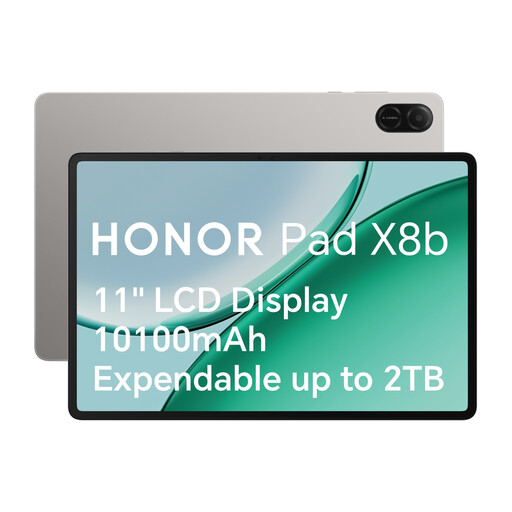
HONOR Pad X8b 128GB, Space Grey
This is an option for checking travel pages through a phone hotspot or available Wi-Fi. Confirm the exact connection variant if you need the tablet to use mobile data independently.
Joybuy
 No image available
Apple iPad Mini 7 (A17 Pro), 512GB, Space Grey
Consider this if carrying a smaller tablet between connections matters to you. Confirm whether this exact variant has cellular capability before depending on it for updates without a phone hotspot.
Joybuy
 No image available
Apple iPad Pro 11-inch (M5) Wi-Fi, 1TB, Nano-Texture Glass, Silver
Consider this Wi-Fi variant if you plan to use a hotspot and want to assess the Nano-Texture Glass option for reading travel pages. Check its dimensions and weight if carrying comfort is important.
Joybuy
No image available
Apple iPad Pro 13-inch (M5) Wi-Fi + Cellular, 1TB, Standard Glass, Silver
The cellular variant suits travellers who want to attempt live checks without pairing a phone hotspot. Confirm your intended data-plan compatibility and whether the larger tablet is comfortable to carry; mobile reception on trains can still fail.
Joybuy
Common questions
Will a 5G tablet let me check ferry departures throughout a train journey?
No connection can be assumed to work throughout a train journey. A cellular tablet can attempt a direct mobile-data connection, but Ofcom found poor mobile performance in 58% to 83% of train tests in June 2026, depending on the network. Check coverage for your usual route and keep essential booking details available if a live page will not load.
Can I use a Wi-Fi-only tablet instead?
Yes, if you can connect it to a phone hotspot or another usable Wi-Fi network. It suits travellers comfortable relying on that connection, particularly when they already carry a phone with a suitable data plan. Allow for stretches where the phone or train Wi-Fi cannot refresh a departure page.


