Readers who annotate sources
If you compare criticism with scans, PDFs or your own notes, start with the way you obtain those texts. A pen is useful only if it works with the files and reading apps you intend to use.


Choose a conventional tablet if you need to move between film-criticism websites, colour images, PDFs and annotation apps. A reading-focused e-ink device makes more sense when your texts are mainly compatible documents and you value a quieter reading workflow over broad app and browser access; check your actual library sources before choosing either route.
If you compare criticism with scans, PDFs or your own notes, start with the way you obtain those texts. A pen is useful only if it works with the files and reading apps you intend to use.
If you read for extended periods, balance page size against the weight you will carry or hold. Check the display in lighting similar to your reading space, and keep sounds and notifications off in quiet areas.
If your criticism arrives as files you can load onto a device, a dedicated reader may suit a simpler workflow. Check protected files and library-service access before giving up a tablet’s browser and apps.
Start with a representative article or PDF and how you access it. That determines whether a general-purpose tablet or a document-focused reader is practical; screen size and writing accessories come next.
| Concern | What to check | Who this matters to |
|---|---|---|
| Annotation and source access | Try your usual websites and files; check whether the chosen pen works in your annotation app and whether it is included. | If I follow citations between articles and PDFs, I want to mark passages without losing my place in the research. Around 44% of consumers put annotation and access to multiple sources first. |
| Reading comfort and portability | Compare the exact model’s weight and screen size, then consider whether you read hand-held or at a table. | For a long library session, I need a screen I can read without making the device awkward to hold or carry. Around 33% of consumers prioritise that balance. |
| Focused document reading | Test a representative PDF or e-book, including its protection and transfer method, before choosing an e-reader. | If my criticism is already available as transferable documents, I would rather keep reading separate from other tablet tasks. Around 23% of consumers make that simpler workflow their primary concern. |
PDF support does not guarantee access to a journal website, a library loan or a protected file. Rakuten Kobo distinguishes ordinary file support from the extra steps needed for some DRM-protected books.
Before buying, try an article and a document from the services you actually use. Work out whether each needs a browser, an app, a file transfer or Adobe Digital Editions.
A larger display gives a page more room, but it changes hand-held reading. Apple lists its 13-inch iPad Air Wi-Fi model at 616 g and its 11-inch model at 464 g; Samsung UK lists the Galaxy Tab S10 FE+ Wi-Fi at 664 g and the smaller FE at 497 g.
If you usually read at a table, consider how a stand would fit. If you carry the device around the library or hold it while reading, compare the exact configurations’ weights.
A writing pen, case, stand or charging accessory can affect whether your chosen setup is ready for annotation and extended reading.
Check the contents of the exact configuration, and choose additional accessories only for tasks you expect to do.
Samsung UK says the Galaxy Tab S10 FE and FE+ do not include a travel adapter, so check your charging setup if considering either model.
Speaker capability is of little use during silent study. The University of Leicester Library asks visitors to set mobile devices to silent; rules at your library may differ.
Silence notifications before you settle in, and check local rules before using audio or taking a call.
These product lines illustrate different reading workflows, not a reason to choose a brand before checking your sources and files.
The iPad Air is a conventional tablet option for criticism accessed through a browser, apps and colour documents.
The Galaxy Tab S10 FE offers a conventional Android-tablet route for readers who plan to annotate and keep documents locally.
The Lenovo Tab Plus is an 11.5-inch Android option if viewing articles and PDFs is the main task.
Kindle Scribe is a reading-and-writing option when criticism can be brought onto the device as supported documents.
Kobo e-readers are relevant if you primarily read EPUB or PDF files that you are permitted to transfer.
These choices span a reading-focused e-ink notebook and conventional tablets of several screen sizes. Compare each with the way you obtain film criticism rather than assuming that a screen or pen specification guarantees access to your library sources.
 No image available
Consider this reading-focused device if you can obtain your criticism as compatible documents and want to keep notes alongside them.
The product name identifies a 10.65-inch E Ink display and a protective-case offer. Check the case contents, file handling and your library’s sign-in method before relying on it for your usual reading.
The listing states that there is no reading light, which matters if your preferred seat is dimly lit.
 No image available
This conventional tablet suits readers who want to move between criticism websites, documents and tablet apps.
It is the 11-inch M4 Wi-Fi model with 128 GB of storage. Apple lists an anti-reflective display and a 464 g Wi-Fi weight for the 11-inch iPad Air.
If annotation matters, check the compatible Apple Pencil for this configuration; the pen is sold separately. Test access to the library services you intend to use.
 No image available
Consider this larger tablet if you mainly read PDFs at a table and want a pen supplied with the device.
The product name specifies a 12.7-inch 2K display, 256 GB of storage, Android 15 and an included stylus.
Check the device’s weight if you plan to hold it while reading, and try the stylus in the particular document apps you need.
 No image available
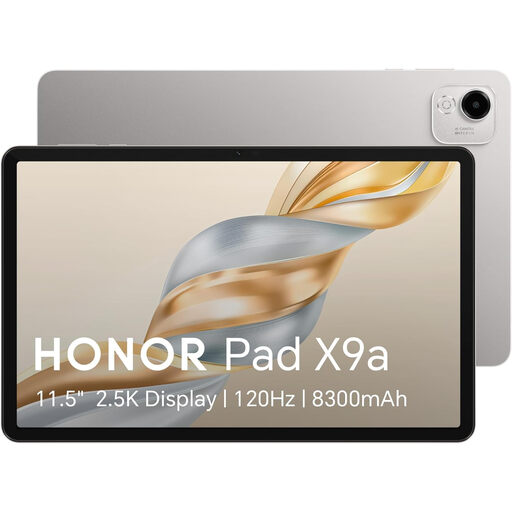
This Wi-Fi tablet is an option for reading articles and documents where you can use a suitable connection or prepare files in advance.
The product name specifies an 11.45-inch screen and 128 GB of storage.
Check the Wi-Fi service at your library, and confirm weight and stylus compatibility if hand-held reading or annotation is important to you.
 No image available
Consider this tablet if mobile-data capability matters to your reading setup as well as access to library Wi-Fi.
The product name identifies the OPD2420 EUN variant with 6 GB of memory, 128 GB of storage and LTE.
Check its weight for extended hand-held reading, and confirm that your criticism sources and preferred annotation method work on the device.
A Wi-Fi tablet may be enough if your library’s connection works for the sources you need, or if you can download permitted texts in advance. Islington Council says its library Wi-Fi is available to customers with Wi-Fi-enabled devices, but notes that filtering can block legitimate material and availability is not guaranteed; check the library you plan to visit.
Set your device to silent in quiet areas, and use headphones only where your library permits them. The University of Leicester Library asks visitors to silence mobile devices and restricts calls in its silent zones; follow the rules of your own library.
A compatible PDF may open, but test the exact file and the way you obtain it. Rakuten Kobo lists PDF support and describes loading non-protected files; some DRM-protected books need Adobe Digital Editions, while access through a library website or app is a separate check.