Choose an approximately 11-inch tablet if you want to read downloaded fantasy novels and use the same device for other apps or travel entertainment. Prioritise access to your books offline, a screen you can read comfortably and a way to support the tablet during long sessions. If the trip is mainly for novels, a dedicated e-reader is another route: Amazon describes the Kindle Paperwhite as having a glare-free 7-inch display and battery life lasting weeks, but it does not offer the same range of tablet uses.
Who is this for?
Offline library travellers
You want the next books in a fantasy series ready before take-off, without relying on inflight connectivity. Google Play Books supports downloading books for offline reading; check that your own reading service offers the access you need.
Long-session comfort readers
You expect to read for extended stretches and need to consider screen readability, how much the tablet weighs in hand and whether a case can support it on a tray table.
One-device entertainment travellers
You want novels, downloaded video and other travel apps on one device. Your choice depends on access to your preferred reading apps and enough storage for everything you plan to take offline.
What matters when choosing?
Decide whether you need a general-purpose tablet or mainly a device for novels. Then check offline access and reading comfort before comparing configurations.
Approximately 11-inch tablet
Choose it when: you want a larger page view and the same device for reading apps, downloaded video and other tasks.
Allow for: holding or supporting the device during a long session, and planning power use rather than treating a web or video battery rating as reading time.
Dedicated e-reader
Choose it when: the flight is mainly for novels and a reading-focused display matters more than general apps. Amazon describes the Kindle Paperwhite as having a glare-free 7-inch display.
Allow for: a smaller screen and fewer general tablet functions, particularly if you also want video or colour content.
| Concern |
What to check |
Who this matters to |
| Offline reading |
Check your ebook service on the chosen device; download and open the books you intend to read while offline. |
I want the next books in my series ready even without inflight Wi-Fi. Around 36% of consumers put offline access first. |
| Reading comfort |
Compare the exact model’s weight and display treatment, and consider how you will support it during a long session. |
Holding a tablet throughout the flight may tire my hands, especially with a case attached. For around 29% of consumers, comfortable long-session reading comes first. |
| Books and other uses |
Check access to your existing reading apps and leave room for the other files you plan to download. |
I want novels and other travel media on the same device without changing how I access my books. That combined use is the main concern for around 21% of consumers. |
| Reading-focused configuration |
Compare the exact memory and storage configuration, and check which accessories come with it. |
If I will mostly read novels, I would rather choose a configuration that fits that use than focus on extras I may not need. Around 14% of consumers make that their primary concern. |
Mistakes to avoid
-
Counting on inflight Wi-Fi for your books
A book you have not downloaded may be inaccessible when connectivity is restricted or unavailable.
Download the next books in your series before departure and open each one while your device is offline.
-
Choosing a large screen without a holding plan
An approximately 11-inch display gives you a larger page view, but holding a tablet through a long reading session may become tiring.
Compare the weight of the exact model and consider a case that can support it on a tray table.
A suitable case, stand or hand strap may need to be obtained separately.
-
Reading a battery rating as a flight-long promise
Apple’s stated rating of up to 10 hours for its cited 11-inch iPad applies to Wi-Fi web browsing or video playback, not continuous use of your particular reading app.
Charge before travel and check your airline’s rules before planning to use a power bank or onboard charging.
-
Assuming similarly named tablets are the same variant
Screen size alone does not identify a model’s storage, connectivity version or included accessories.
Check the full model and configuration against the listing before choosing a tablet for your reading library.
Tablet brands to consider
These examples show different tablet configurations for the trip; check the specification of the particular model you are considering.
Apple
The 11-inch iPad (A16) is a general-purpose route for reading alongside other iPad apps and travel entertainment.
- Apple UK lists a 2360 × 1640 display, 128GB starting storage and a 477g weight for the Wi-Fi model.
- Apple’s up-to-10-hour figure is for Wi-Fi web browsing or video playback. Compare display treatment on the exact iPad model if reflections concern you.
Samsung
The Galaxy Tab S10 FE is an Android route for reading alongside other apps and media.
- Samsung UK specifies a 10.9-inch display and microSD support up to 2TB for the Tab S10 FE.
- Samsung’s stated brightness of up to 800 nits applies in High Brightness Mode; that specification alone cannot tell you how comfortable you will find the screen.
Lenovo
The Tab M11 is an 11-inch Android option to examine when novels and other relatively light tasks are the main uses.
- Lenovo UK lists an 11-inch 1920 × 1200 IPS anti-glare display for the cited Tab M11 configuration.
- Check whether the cited 4GB RAM and 128GB storage configuration suits the other apps and downloads you plan to use.
Joybuy product choices
These products include an E-Ink note-taking tablet and general-purpose tablets with screens around 11 inches. For each one, check how you will access your books offline and how you will read comfortably during the flight.
 No image available
iFLYTEK AINOTE 2 10.65-inch E-Ink tablet with protective case
Consider this reading-focused note-taking tablet if you plan to prepare files before travelling. Its title specifies a 10.65-inch E-Ink screen and a protective case; check that your books are in a usable format.
This model is listed without a reading light, so consider the cabin lighting you expect to use. Check its continuous-reading battery performance for your journey.
View on Joybuy
 No image available
DOOGEE U11 PRO 11-inch Android tablet, 256GB, Black
Consider this general-purpose tablet if you want space for books and other downloaded media. Its title lists an 11-inch IPS screen, 256GB storage and expansion up to 2TB; check whether a microSD card is supplied separately.
Check your reading app’s offline function and the screen’s suitability for your usual reading light. A stated video-playback duration would not establish continuous-reading time.
View on Joybuy
 No image available
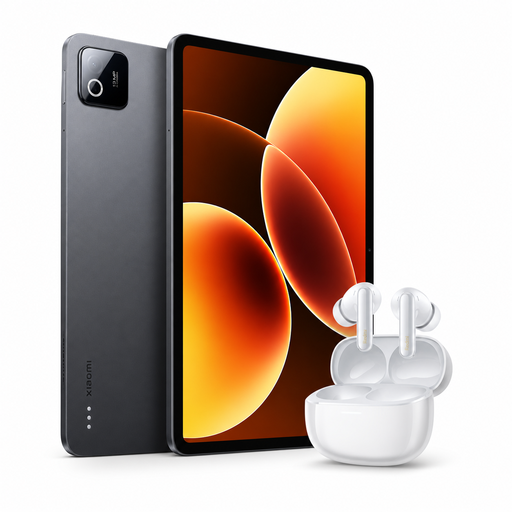
Xiaomi Pad 8 Wi-Fi 8GB/128GB Grey with Redmi Buds 6 Pro Glacier White
This tablet-and-earbuds bundle may suit someone who wants novels and other travel media on one device. The listing identifies an 11.2-inch tablet with 128GB storage.
Check the exact battery specification before choosing it: the product information gives conflicting capacities. Also confirm access to your preferred offline reading app.
View on Joybuy
 No image available
DOOGEE U11 11-inch tablet, 16GB+128GB, Blue
Consider this general-purpose tablet if you want an approximately 11-inch page view and room for downloaded files. Its title lists 128GB storage and expansion up to 2TB; check whether a microSD card is included.
Confirm the processor before purchase because the product information gives conflicting models. Check offline access in your reading app and plan for a comfortable way to support the screen.
View on Joybuy
 No image available
Apple 11-inch iPad Air (2026, M4) Wi-Fi 128GB, Starlight
This iPad Air may suit someone who wants novels alongside other tablet apps. The listed variant has an 11-inch screen and 128GB storage.
Check its exact weight and display treatment for long reading sessions, and confirm offline downloads in your preferred reading app. Do not apply the battery rating of a different iPad model to this one.
View on Joybuy
Common questions
Do I need a cellular tablet to read on a long flight?
No, not if your books are downloaded and accessible offline before departure. Google Play Books supports offline book downloads, but check the process in the app you use and open your chosen titles without a connection before you travel.
Should I take my tablet in cabin baggage?
The UK Civil Aviation Authority says tablets should normally be taken in the cabin. Check your airline’s baggage and in-flight device-use rules before departure.
Can I use a power bank to charge my tablet during the flight?
Check your airline’s rules before relying on a power bank for tablet charging. The UK Civil Aviation Authority says power banks should be kept in the cabin and must not themselves be recharged onboard; rules on using one to charge a device also need checking with your airline.
Would an e-reader suit a flight spent mainly reading novels?
An e-reader is worth considering if reading novels matters more to you than video and general apps. Amazon describes the Kindle Paperwhite as having a glare-free 7-inch display and battery life lasting weeks; choose a tablet instead if you need its broader app and media functions on the same device.


