Cottage-based route planners
You want room to compare walks, access points and other plans before setting out, without expecting the tablet to replace your phone on the towpath. Ordnance Survey offers route-planning tools on the web and in its app.


An approximately 11-inch Wi-Fi tablet is a sensible choice if you will mainly compare canal-walk routes and trip details at the holiday cottage. Choose a cellular-capable variant if you need the tablet to connect to mobile data away from cottage Wi-Fi; before relying on any tablet during a walk, check its location features, your map app’s offline workflow and your charging arrangements.
You want room to compare walks, access points and other plans before setting out, without expecting the tablet to replace your phone on the towpath. Ordnance Survey offers route-planning tools on the web and in its app.
You expect to check online information away from cottage Wi-Fi and need to decide whether a tablet with its own mobile-data connection suits that use.
You want a tablet for a few sessions of map reading, browsing and notes, and would rather choose its features around those tasks than around heavier workloads.
Decide where you will use the tablet before choosing its connectivity. Then compare the screen and exact configuration against the maps, route details and notes you want to view.
| Concern | What to check | Who this matters to |
|---|---|---|
| Connection away from the cottage | Check whether the exact variant has cellular connectivity and whether you have a suitable data service. Confirm how your map app works without cottage Wi-Fi. | If I need to change a route while away from Wi-Fi, I want the tablet to get online without depending on another device. Around 40% of consumers put that direct connection first. |
| Map-reading workspace | Compare screen size and the exact model’s display details; check whether your planning apps support the layout you want to use. | When I compare a canal route with access information at the cottage, I want enough screen space to read both comfortably. For around 30% of consumers, that planning workspace is the main concern. |
| Features for occasional use | Start with your map and browsing needs, then check the exact storage configuration and included accessories. | If I will plan walks only occasionally, I want a configuration that covers those sessions without choosing extras I will not use. That is the primary need for around 30% of consumers. |
Screen size does not tell you whether a tablet has its own mobile-data connection. Apple, for example, distinguishes the Wi-Fi and Wi-Fi + Cellular configurations of its 11-inch iPad (A16).
Choose the connectivity variant around where you will use it, and check the exact tablet and map app before relying on online or offline maps away from the cottage.
Canal & River Trust says towpath surfaces vary with the weather and time of year. A route viewed at the cottage cannot establish the conditions you will encounter.
Check the planned route and current conditions, and take footwear and equipment appropriate to the walk.
Lenovo lists different Tab M11 bundles and optional accessories, while Samsung describes microSD expansion for the Galaxy Tab A9+ range. Neither detail tells you what accompanies a particular listing.
Check the full model number, connectivity type, storage and included charging equipment and accessories for the configuration you intend to buy.
Using expandable storage requires a compatible card; an optional pen, case or charger also needs to be obtained separately if it is not included.
These model ranges illustrate different ways to plan from a cottage; check the particular variant rather than treating a brand name as a specification.
The 11-inch iPad (A16) is an iPadOS planning option with separate Wi-Fi and Wi-Fi + Cellular configurations.
Galaxy Tab A9+ is an Android option for an 11-inch planning screen and, where useful, viewing apps side by side.
Tab M11 is an 11-inch Android option for maps, notes and web-based planning at the cottage.
These tablets offer different screen sizes and connectivity choices for cottage-based route planning. For use away from cottage Wi-Fi, check the exact model’s mobile-network compatibility, location features and preferred map app before choosing.
 No image available
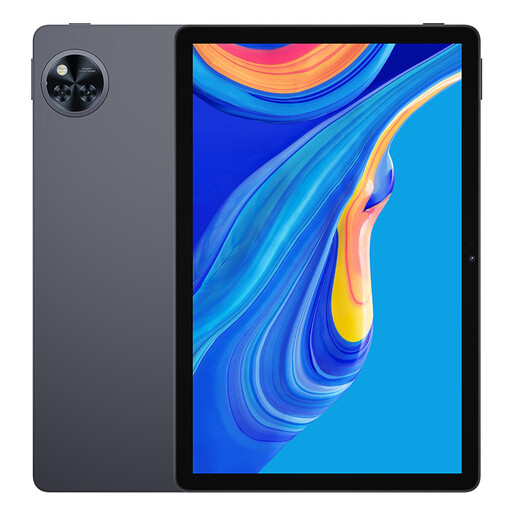
Consider this configuration if you want an 11-inch cottage planning screen and a tablet listed with its own 4G connection. The product name also specifies Android 16 and 5G Wi-Fi; 5G Wi-Fi is not the same as 5G mobile connectivity.
Check network compatibility, the map app’s location and offline functions, and the charging equipment you will need. Confirm the exact battery specification before planning use away from a charger.
 No image available
Consider the larger screen if map and trip-detail viewing at the cottage matters more to you than a compact tablet. The product name specifies a 13.4-inch, 120Hz display, dual SIM 4G and GPS.
Confirm the exact configuration and UK mobile-network compatibility, and check how your map app uses location and offline maps before taking it on a walk.
 No image available
The listed 11-inch screen and 5G Wi-Fi make this a configuration to consider for planning on the cottage network. Its product name also lists GPS, but that alone does not establish how your chosen map app will work offline.
If you need a direct mobile-data connection during the walk, confirm whether this exact variant has cellular capability; 5G Wi-Fi does not establish that it does.
 No image available
This Wi-Fi configuration suits route research and map viewing while connected at the cottage. Its product name identifies an 11-inch screen and 128GB storage.
It is an iPad Air M4, not the iPad (A16) described in the brand section. Check this model’s location features and your map app’s offline workflow if you intend to use it away from Wi-Fi.
 No image available
Consider the Mini if a smaller tablet is more appealing than an approximately 11-inch planning screen; accept less room for viewing map and trip information together. The product name specifies 512GB storage.
Confirm whether this exact configuration is Wi-Fi or cellular, along with its location features and your map app’s offline workflow, before using it away from the cottage.
No. A tablet can make planning at the cottage more comfortable, but it does not replace checking the route and conditions before setting out. Canal & River Trust notes that towpath surfaces vary with the weather and time of year.
Wi-Fi-only is sufficient if the tablet’s main job is planning while connected at the cottage. If you need online maps away from that network, compare a cellular variant with using another connection method, and check your map app’s offline and location requirements separately.
You can check it, but stay aware of other towpath users and your surroundings. Canal & River Trust’s Towpath Code says pedestrians have priority and calls for extra care when passing people, pets and wildlife.
Check what charging equipment accompanies the exact tablet and whether it is appropriate for your stay. The Office for Product Safety and Standards explains that the Electrical Equipment (Safety) Regulations 2016 set requirements for electrical equipment placed on the Great Britain market; a product title alone does not establish what is included in a particular bundle.