For repeated holiday-cost comparisons at a standing desk, choose the tablet and workstation together: a stable adjustable stand and separate keyboard matter when you need to read booking terms and enter figures for extended periods. A larger screen gives more room for a budget sheet alongside booking pages, while a smaller tablet is easier to carry; neither screen size removes the need to check your apps and desk setup.
Who this setup suits
Standing-desk holiday planners
If you repeatedly compare flights, accommodation, transport and budgets while standing, screen position and typing comfort matter alongside display size. The UK Health and Safety Executive advises placing a screen directly in front of you, around an arm’s length away, with its top at eye level.
Multi-tab cost comparers
If fare calendars, maps, a budget sheet and booking terms need to stay in view, consider a larger display or confirm that your preferred apps work well side by side. Apple and Lenovo list 13-inch and 12.1-inch options respectively.
Occasional planners who carry their tablet
If you research holidays in shorter sessions and also use the tablet away from your desk, carrying weight may matter more than keeping several windows visible at once. Apple lists its 11-inch iPad Air Wi-Fi model at 464g, compared with 616g for its 13-inch Wi-Fi model.
What to check before buying
Start with how you will position the screen and type, then decide how much viewing space you need and whether you will carry the whole setup.
| Concern | What to check | Who this matters to |
|---|
| Standing-desk setup |
Check that a stand holds the chosen tablet and case securely at a useful height, with space for a separate keyboard. The UK Health and Safety Executive advises keeping the screen directly in front of you, around an arm’s length away, with its top at eye level. |
If I spend extended periods entering dates and budget figures while standing, I need to raise the screen without raising my typing position. Roughly 33% of consumers put desk positioning and typing first. |
| Readable workspace |
Compare the exact variant’s display size and weight, and confirm that your browser and spreadsheet apps can show the pages you need side by side. |
When I compare a fare calendar with booking conditions and a budget sheet, I want enough room to read each one. For around 27% of consumers, visible workspace is the primary need. |
| Portability |
Check the selected tablet’s weight and connectivity variant, as well as whether you would carry its stand and keyboard. |
If I plan trips in short sessions and take my tablet away from the desk, I would rather carry less than keep several windows open. About 20% of consumers place portability first. |
| Complete setup |
Check the exact box contents and whether you need a stand, keyboard or charging adapter separately. Samsung’s UK sales information lists an S Pen and cable with the Galaxy Tab S10 FE but not a travel adapter. |
I want a usable desk setup without overlooking accessories I will need for typing and charging. That complete-setup concern comes first for roughly 20% of consumers. |
Buying pitfalls
-
Choosing a large tablet but leaving it flat on the desk
More display area does not raise the screen. For extended display use, the UK Health and Safety Executive advises positioning it directly in front of you, around an arm’s length away, with its top at eye level.
Check that an adjustable stand securely holds the tablet with its intended case, and leave room for a separate keyboard.
-
Assuming the box contains the whole desk setup
Samsung’s UK box list for the Galaxy Tab S10 FE includes an S Pen and data cable but not a travel adapter. A keyboard and suitable stand also need separate consideration.
Read the contents for the exact variant and check the accessories needed for your desk before choosing it.
-
Choosing on display size alone
A larger screen can leave more room for comparison but may be less convenient to carry. Apple lists its 13-inch iPad Air Wi-Fi model at 616g and its 11-inch Wi-Fi model at 464g.
Prioritise viewing space if you regularly compare several pages at the desk; consider carrying weight if planning is occasional or the tablet travels with you.
Brands to consider
Apple
The iPad Air range offers 11-inch and 13-inch routes for people choosing between carrying weight and screen space.
- Apple lists a 13-inch Liquid Retina option with 2732 × 2048 resolution and 600 nits brightness, alongside USB-C, Smart Connector and Apple Pencil support.
- Apple lists the 13-inch Wi-Fi model at 616g versus 464g for the 11-inch Wi-Fi model. Check keyboard and stand compatibility for the exact variant.
Samsung
The Galaxy Tab S10 FE is a 10.9-inch Android route for planning and annotation.
- Samsung lists S Pen support, a 90Hz display and microSD expansion up to 2TB for the Tab S10 FE.
- Samsung’s UK box list includes an S Pen and data cable but not a travel adapter. Check the keyboard and stand needed for your setup.
Lenovo
The Tab Plus Gen 2 offers a larger Android display for desk-led holiday comparisons.
- Lenovo lists a UK Tab Plus Gen 2 configuration with a 12.1-inch 2560 × 1600 display, 8GB memory and 256GB storage.
- Confirm that the exact keyboard, stand, browser and spreadsheet setup meets your needs before buying.
Tablets on Joybuy
These tablets offer larger-screen options for desk-led holiday-cost comparisons. Check each variant’s screen information and the stand and keyboard you would use with it.
 Image unavailable
Apple iPad Air 13-inch (2026, M4) Wi-Fi 256GB, Space Grey
Consider this variant for desk-based comparisons if you want an iPad Air with a larger display. The title identifies it as 13-inch, but its description says 14-inch: confirm the exact screen specification before buying.
Magic Keyboard support is stated, with the keyboard sold separately. Check stand fit and package contents for your setup.
View on Joybuy
 Image unavailable
Apple iPad Pro 13-inch (M5), Wi-Fi + Cellular, 1TB, Standard Glass, Silver
The stated 13-inch display suits a desk setup where you want more room for booking pages and a budget sheet. This is the 1TB Wi-Fi + Cellular variant with Standard Glass.
Magic Keyboard compatibility is stated, but the keyboard is a separate accessory. Confirm stand fit and the contents of the selected package.
View on Joybuy
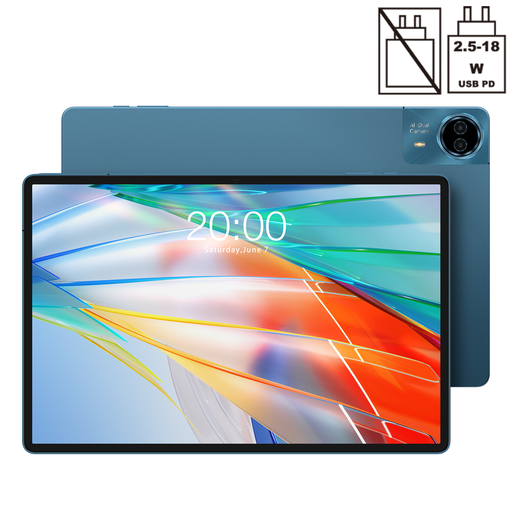 Image unavailable
TECLAST T70 14-inch, 2240 × 1400, 128GB, Android 15
This 14-inch option is worth considering if screen space takes priority over a compact tablet. Its stated display resolution is 2240 × 1400, with 8GB RAM plus 12GB virtual memory and 128GB storage.
Check its carrying weight and whether a suitable stand and separate keyboard work with the tablet before planning extended desk sessions.
View on Joybuy
 Image unavailable
TECLAST ArtPad Pro 2025 Edition, 12.7-inch 2K, 256GB
The stated 12.7-inch display gives this tablet a larger format for desk-led comparison. The title identifies 256GB storage, Android 15 and a 2K display; confirm the exact resolution and your preferred apps’ split-screen behaviour.
Check carrying weight, stand fit and separate-keyboard compatibility if you will use it for repeated standing sessions.
View on Joybuy
Common questions
Do I need a 13-inch tablet to compare holiday costs?
No: an 11-inch tablet can suit shorter sessions and frequent carrying, while a 12- to 13-inch screen is worth considering if you regularly keep a budget sheet, fares and booking terms in view together. Apple lists its 13-inch iPad Air Wi-Fi model at 616g, compared with 464g for the 11-inch Wi-Fi model.
Should I use a stand at a standing desk?
For prolonged or repeated comparisons, an adjustable stand helps you position a tablet without leaving it flat on the desk. The UK Health and Safety Executive advises placing a screen directly in front of you, around an arm’s length away, with its top at eye level; check that your stand holds the chosen tablet securely and leaves room for a separate keyboard.
What should I check besides the tablet itself?
Check the stand, keyboard and exact box contents needed for a usable standing-desk setup. Samsung’s UK sales information says the Galaxy Tab S10 FE box includes an S Pen and data cable but not a travel adapter; contents for another model or package should be checked separately.


