For reading maps, booking details and saved directions in a hotel room, start with a tablet whose screen is comfortable to read and whose apps meet your travel needs; Wi-Fi is usually enough if you prepare material for offline use. Choose a cellular-capable variant if live directions away from Wi-Fi matter, and check your exact apps before considering a Fire tablet, which does not support Google Play.
Who needs which features?
In-room map readers
If you mainly open route maps, hotel confirmations and screenshots at a desk or beside the bed, focus on a screen you can read comfortably rather than features intended for heavier work. Lenovo UK lists an 11-inch anti-glare display on its cited Tab M11 configuration.
Live-navigation travellers
If you also need route updates between the hotel, stations and attractions, consider how you will connect away from hotel Wi-Fi. Apple UK lists separate Wi-Fi and 5G-capable Wi-Fi + Cellular variants of the iPad (A16); the cellular capability does not apply to its Wi-Fi model.
Multi-app trip planners
If you want directions, reservations and messages visible together, check the tablet’s multitasking features as well as storage. Samsung UK says the Galaxy Tab A9+ can display up to three apps simultaneously and supports microSD expansion on applicable configurations.
What should you check before buying?
Decide where you will need fresh directions, then check screen readability and the apps you rely on. A larger display does not resolve a missing app or a lack of connection away from the hotel.
| Concern | What to check | Who this matters to |
|---|
| Readable maps indoors |
Compare screen size and resolution; check brightness and anti-glare specifications for the exact configuration. Consider whether you will hold the tablet or set it down. |
I want to inspect turns and booking details without repeatedly zooming in, particularly under room lighting. Around 46% of consumers put in-room readability first. |
| Access to current directions |
Choose between prepared offline material and live updates; confirm whether the exact variant is Wi-Fi-only or cellular-capable and whether your map app supports offline use. |
If routes change after I leave the hotel, I need a way to get updates without relying on guest Wi-Fi. For around 36% of consumers, that connection is the primary concern. |
| Apps and storage |
Check your mapping and booking apps in the device’s own app store, then confirm storage and any accessories you need. |
I need my travel apps to work and space to keep documents or maps on the device, without choosing features I will not use. App fit and storage come first for around 18% of consumers. |
Common buying mistakes
-
Assuming every Android app is available on a Fire tablet
Amazon UK states that Google Play is not supported on Fire tablets. That matters if a particular mapping, booking or messaging app is essential to your plans.
Check each required app in the Fire tablet’s app store before ordering. The cited Fire HD 10 listing also says a power adaptor is not included, so check what you would need to charge it.
-
Choosing cellular without deciding where you need updates
A cellular-capable tablet addresses a different need from reading saved directions in a hotel room. Apple UK lists Wi-Fi and Wi-Fi + Cellular as distinct iPad (A16) variants.
Work out whether live navigation away from Wi-Fi is essential before choosing a cellular model; otherwise, concentrate on the screen, apps and offline workflow.
Using the cellular connection also requires a suitable mobile-data arrangement.
-
Using guest Wi-Fi for every account task
The National Cyber Security Centre warns that attackers on the same public or insecure network may be able to intercept or modify data.
Use saved directions when practical, confirm the hotel network name with staff if uncertain and avoid unnecessary sensitive account activity on guest Wi-Fi.
-
Treating battery capacity as measured running time
A capacity in mAh and a manufacturer’s stated hours of use are different measures; neither, on its own, establishes how long competing tablets will run during your trip.
Compare the stated test conditions, charging arrangements and your expected screen-on use instead of ranking models solely by battery capacity.
Relevant brands to consider
Lenovo
The UK-listed Tab M11 configuration is worth examining if you expect to read saved maps indoors and do not require mobile data built into the tablet.
- Lenovo UK lists an 11-inch 1920 × 1200 IPS anti-glare display, 400-nit brightness and 128GB storage for the cited configuration.
- The cited configuration uses Wi-Fi; arrange another connection or save material in advance when you need directions away from Wi-Fi.
HONOR
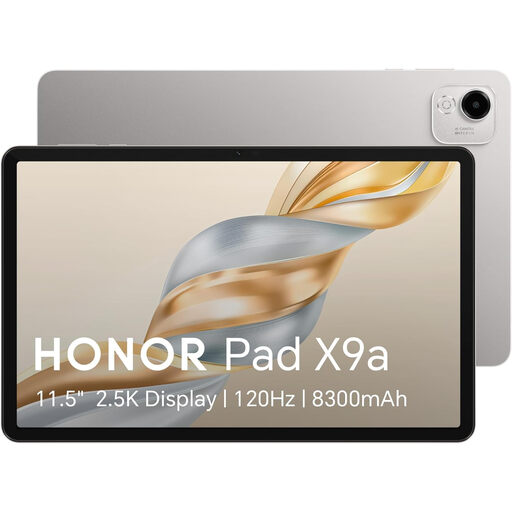
The Pad X9a is a Wi-Fi tablet to consider if you want an 11.45-inch screen for maps and other travel material.
- HONOR UK lists an 11.45-inch Pad X9a configuration with 6GB RAM, 128GB storage and an 8300mAh battery.
- The cited UK configuration is Wi-Fi-only, so it does not provide its own mobile-data connection for live updates.
Apple
The iPad (A16) offers an iPadOS option for map viewing, with a separate cellular-capable variant if you need mobile-data access.
- Apple UK lists an 11-inch 2360 × 1640 display and Wi-Fi 6, with 5G on Wi-Fi + Cellular models.
- Check the exact variant: a Wi-Fi iPad does not gain cellular capability from the availability of a different model.
Samsung
The Galaxy Tab A9+ is relevant if you plan to view directions alongside messages or notes.
- Samsung UK says the Galaxy Tab A9+ can show up to three apps on one screen and supports microSD expansion up to 1TB on applicable configurations.
- Check the exact model’s memory, storage and connectivity rather than assuming every Galaxy Tab A9+ configuration is identical.
Amazon Fire
Consider a Fire tablet for straightforward reading only after confirming that your essential travel apps work in its ecosystem.
- The cited Amazon UK Fire HD 10 listing specifies a 10.1-inch 1080p display and microSD expansion.
- Amazon UK says Google Play is not supported on Fire tablets and that the cited Fire HD 10 does not include a power adaptor.
Tablets for different travel needs
These Joybuy tablets cover Wi-Fi viewing of prepared directions and larger-screen or cellular-capable options for travellers with other needs. Compare the exact variant with the connection, apps and carrying size your trip requires.
 No image available
HONOR Pad X9a 11.45-inch Wi-Fi, 128GB, Grey
For reviewing maps and booking details in the room using Wi-Fi or material saved beforehand.
11.45-inch display; 128GB storage; Wi-Fi configuration. Check your required travel apps before buying.
View on Joybuy
 No image available
Apple iPad Pro 13-inch (M5), Wi-Fi + Cellular, 1TB, Standard Glass, Silver
Consider this listed cellular variant if you want live direction updates away from hotel Wi-Fi as well as a large screen for reviewing trip details.
13-inch display; 1TB storage; Wi-Fi + Cellular. Check its carrying size and the exact travel apps you need.
The supplied product address identifies a Wi-Fi variant, while this product title identifies Wi-Fi + Cellular; confirm the variant before purchasing.
Purchase link unavailable
 No image available
TECLAST ArtPad Pro 2025 Edition, 12.7-inch 2K, 256GB, dual SIM 4G, with stylus
For travellers who want a larger map view, saved material and a listed 4G option beyond hotel Wi-Fi.
12.7-inch 2K display; 256GB storage; dual SIM 4G LTE; stylus included. Check its carrying size, your required apps and supported 4G bands for your intended network.
View on Joybuy
No image available
Apple iPad Pro 11-inch (M5), Wi-Fi, 256GB, Standard Glass, Silver
For viewing routes and hotel information on an 11-inch Wi-Fi tablet, with directions saved before you lose your connection.
11-inch model; 256GB storage; Wi-Fi configuration. Check display characteristics, carrying weight and your required apps if they affect your choice.
View on Joybuy
 No image available
Teclast T65 2026, 13.4-inch 120Hz, 128GB, dual SIM 4G
For reviewing directions on a particularly large screen and considering a listed 4G connection away from the hotel.
13.4-inch 120Hz display; 128GB storage; dual SIM 4G; GPS. Check display resolution and brightness, carrying size, your required apps and supported 4G bands for your intended network.
View on Joybuy
Frequently asked questions
Is a Wi-Fi tablet enough for checking directions in my hotel room?
A Wi-Fi tablet can be enough if you can save booking details and suitable offline directions in advance and use the hotel connection for updates. If live directions away from Wi-Fi are essential, check a cellular-capable variant instead; Apple UK lists Wi-Fi and Wi-Fi + Cellular as separate iPad (A16) options.
Will my mapping app work on any tablet?
Do not assume it will: check the exact app in the tablet’s own app store before buying. Amazon UK says Google Play is not supported on Fire tablets, which makes this check especially important if your plans rely on a Google Play-distributed app.
Can I use hotel guest Wi-Fi to check travel directions?
You can use it for route checking, but treat guest Wi-Fi as a public or potentially insecure network. The National Cyber Security Centre warns that attackers on the same public or insecure network may intercept or modify data; confirm the genuine network name if uncertain and avoid unnecessary sensitive logins.
Should battery capacity decide which tablet I buy?
Not by itself for occasional in-room map reading. If you will also use the tablet throughout the day, examine the manufacturer’s usage conditions and your charging options; battery capacities in mAh are not directly comparable measurements of running time.


