For reading bills, statements and familiar budget sheets at a kitchen table, an around 11-inch Wi-Fi tablet is a practical starting point. If you enter figures regularly, check keyboard compatibility and Excel editing eligibility; consider a larger screen when seeing more columns matters more than a lighter tablet.
Who needs which setup?
Household-budget checkers
If you mainly read statements, bills and familiar budget sheets, with only occasional corrections, start by checking whether the screen is comfortable to read at the table. Routine account access also calls for an up-to-date device and protected sign-in.
Frequent spreadsheet editors
If you repeatedly enter transactions or adjust cells, look for a compatible keyboard and pointing option. Confirm that your intended Excel tasks are available with your Microsoft 365 plan and the tablet’s screen size.
Wide-sheet reviewers
If you compare broad spreadsheets or several documents, a larger display may reduce scrolling while the tablet rests on the table. Check whether its extra size and weight still suit the way you will handle it.
What matters when choosing?
Start with the documents you need to see, then check how often you edit them and how you will protect access to the accounts behind them.
| Concern |
What to check |
Who this matters to |
| Readable documents |
Compare screen size and weight using a typical statement or spreadsheet at your preferred viewing scale. |
If I mainly inspect bills and account sheets, I want to read figures without constant zooming; around 40% of consumers put document readability first. |
| Corrections and entry |
Check keyboard compatibility and whether your intended Excel edits are available for the app, plan and screen size. |
When I enter transactions regularly, precise input matters more than touch-only convenience; around 30% of consumers prioritise editing input. |
| Account access |
Check update support and set up a screen lock and two-step verification where available. |
For banking, billing email and stored financial files, I need to protect sign-in as well as the device; around 30% of consumers make secure account access their primary concern. |
What is easy to overlook?
-
Assuming a keyboard comes with the tablet
Regular figure entry can be awkward if the intended typing setup is not part of the package.
Check the exact package contents, keyboard compatibility and layout. If you need the tablet propped up, check for a suitable stand too.
-
Assuming tablet Excel works like desktop Excel
Microsoft says mobile editing features depend on the applicable plan and screen size, so viewing a workbook does not establish that every edit you need is available.
Check your intended Excel tasks against the current app and Microsoft 365 plan conditions for the exact tablet size.
-
Choosing cellular for fixed home use
If the tablet stays at the kitchen table, home Wi-Fi may already cover ordinary account review.
Choose cellular connectivity only if you need access away from Wi-Fi; otherwise check the Wi-Fi configuration first.
-
Relying on the new device alone for security
A screen lock cannot replace protection for banking, email and cloud accounts. The National Cyber Security Centre advises keeping software updated and using two-step verification to make account access harder if a password is stolen.
Enable updates and two-step verification where offered, particularly for the email account used to reset other passwords.
Brands to consider
Apple
Apple’s iPad range covers an 11-inch iPad (A16) for routine review and a 13-inch iPad Air for readers who want more worksheet area at the table.
- Apple lists a 2360 × 1640 display and Touch ID for the 11-inch iPad (A16).
- Apple keyboard accessories are separate; check the exact iPad model before choosing one. Microsoft 365 editing conditions still apply.
Samsung
The 10.9-inch Galaxy Tab S10 FE is an Android option for account review and annotating documents with the S Pen identified in Samsung’s package information.
- The S Pen gives readers another way to mark up statements and PDFs.
- Samsung’s S10 FE listing says a travel adaptor is not included; check any keyboard package separately and confirm Microsoft 365 editing eligibility.
Lenovo
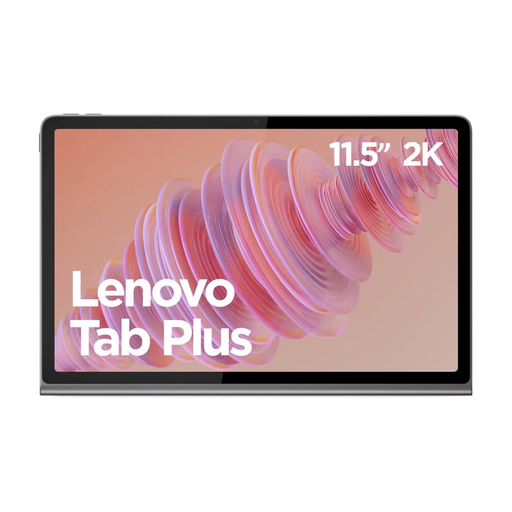
The Lenovo Tab Plus is an Android option for mainly table-based reading, with an 11.5-inch display and integrated kickstand.
- Lenovo specifies a 2000 × 1200 display and a 175-degree kickstand for the Tab Plus.
- Check the exact package for a charger and keyboard, and confirm that your spreadsheet tasks work in the intended app.
Joybuy tablet choices
These tablets offer different approaches to reviewing household accounts at a table: a built-in stand, smaller models described with keyboards, and Wi-Fi models for indoor use. Check the exact package and software conditions against your own editing tasks.
 No image available
Lenovo Tab Plus 128GB Grey
Consider this model if you want statements propped up on the table. Lenovo specifies an 11.5-inch, 2000 × 1200 display and an integrated 175-degree kickstand for the Tab Plus.
If you enter figures often, confirm the keyboard contents of this exact package. The listed charging adaptor is not included.
View on Joybuy
 No image available
TABWEE T20 10.1-inch 256GB tablet with keyboard, mouse and stylus
The described keyboard and mouse may suit occasional figure entry at the table, while the stylus offers another input option. Check a typical account sheet at your preferred viewing scale on the 10.1-inch display.
Confirm the installed Android version and update support for this exact model before using it for financial accounts.
View on Joybuy
 No image available
TABWEE T80 10-inch Android 16 128GB tablet with keyboard
The keyboard described with this compact tablet may help with occasional corrections. Try a representative account sheet at your preferred viewing scale on its 10-inch display.
Confirm the exact package if you need a stand, and check model-specific update support before using financial accounts.
View on Joybuy
 No image available
Apple 11-inch iPad Air (2026, M4) Wi-Fi 128GB – Starlight
This 11-inch Wi-Fi model suits readers who want an iPad Air for indoor account review, with the option of a compatible Magic Keyboard sold separately.
If regular Excel editing is the reason for choosing it, check the tasks you need against your Microsoft 365 plan and this model’s screen size.
View on Joybuy
 No image available
Samsung Tab A11+ SM-X230 6/128GB Silver
Consider this tablet for indoor account review if its display and Wi-Fi configuration suit the documents you use. The product name identifies the 6/128GB variant.
Check the package for a keyboard or stand if you need either, and confirm the Excel tasks you plan to perform before relying on it for regular edits.
View on Joybuy
Common questions
Do I need a 13-inch tablet for household accounts?
Not usually if you mainly read bills, statements and familiar budget sheets at a table. Consider a 13-inch display when seeing more spreadsheet columns at once matters more to you than a lighter device; Apple lists the 13-inch iPad Air Wi-Fi at 616g.
Will Excel editing work on any large tablet without a subscription?
Do not assume it will. Microsoft says mobile viewing and editing capabilities differ by plan and screen size, so check the current conditions for your intended app, workbook tasks and exact tablet before choosing it for regular editing.
Is Wi-Fi-only sufficient for a kitchen-table accounts tablet?
Wi-Fi-only is a sensible choice when you normally use the tablet at home with reliable Wi-Fi. Choose cellular connectivity if you also need to access accounts where Wi-Fi is unavailable.
How should I protect financial accounts on the tablet?
Keep the operating system and apps updated, use a screen lock and enable two-step verification for banking, email and cloud accounts where offered. The National Cyber Security Centre advises updates for security fixes and says two-step verification makes account access harder even when someone knows your password.


